
Your AI agent works perfectly—until it doesn't.
One day it categorizes leads flawlessly. The next day, it starts hallucinating data, forgetting instructions, or replying with "Here is the JSON you asked for" instead of just the JSON itself. In a chat interface like ChatGPT, this is a minor annoyance. In an automated workflow using Make or n8n, it breaks everything. (n8n, it breaks everything)
Reliability is the biggest hurdle in moving from "cool AI demo" to "production business tool."
The good news is that you don't always need a smarter model. You often just need a smarter prompt. Most "stupid" AI errors are actually communication errors. The model isn't broken; your instructions are just ambiguous to a machine that predicts one word at a time.
Here are three simple, high-impact prompt changes that will instantly make your AI agents more reliable, consistent, and production-ready.
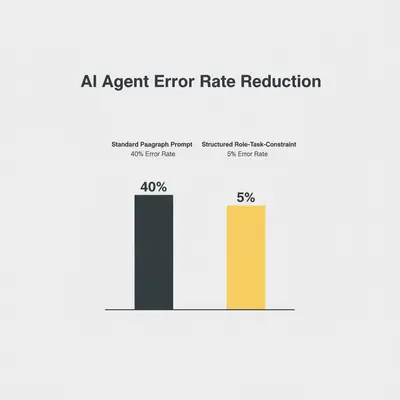
1. Switch to the "Role-Task-Constraint" Structure
Most beginners write prompts like they are sending a Slack message to a colleague. They mix context, instructions, and examples into one big block of text.
The Problem: Large Language Models (LLMs) struggle to prioritize instructions buried inside dense paragraphs. If you bury a critical constraint (e.g., "never use markdown") in the middle of a sentence about tone of voice, the model might miss it.
To fix this, stop writing paragraphs and start writing structured specs. Break your prompt into three distinct sections: Role, Task, and Constraints.
The Fix: Structured Delimiters
Use XML tags (like <instructions>) or Markdown headers (#) to clearly separate different parts of your prompt. This helps the model understand where the context ends and the rules begin.
❌ The "Slack Message" Prompt (Unreliable): "You are a helpful assistant. I'm going to give you an email and I want you to summarize it for me but don't make it too long and make sure you check if it's angry or happy. If it's angry tell me immediately. Oh and output it as a list."
✅ The Structured Prompt (Reliable):
# ROLE
You are a Customer Success AI Specialist. Your goal is to analyze incoming support emails for sentiment and urgency.

# TASK
1. Analyze the email provided in the input variable.
2. Determine the sentiment (Positive, Neutral, Negative).
3. Summarize the core issue in one sentence.

# CONSTRAINTS
- Do NOT use markdown formatting.
- Do NOT include introductory text like "Here is the analysis."
- If sentiment is "Negative", prefix the summary with "URGENT:".
Quick Win: Even simple models like GPT-4o mini or Claude 3 Haiku perform significantly better when you use this structure. You essentially "upgrade" the model's intelligence just by organizing your request.
2. Force a "Reasoning Step" Before the Final Answer
One of the most common causes of AI hallucinations is asking the model to jump straight to the answer.
If you ask an AI, "Is this lead qualified?" it has to guess "Yes" or "No" immediately. It doesn't have time to "think" about the criteria you gave it. Once it outputs the word "Yes," it is mathematically committed to justifying that "Yes," even if the evidence suggests otherwise.
The Fix: Chain of Thought (CoT)
Instruct the model to "think out loud" before it gives the final answer. You tell it to first review the criteria, match the data, and then decide.
❌ The Direct Prompt: "Look at this lead and tell me if it is qualified (Yes/No)."
✅ The Reasoning Prompt:
# INSTRUCTIONS
Analyze the lead data step-by-step:
1. First, extract the 'Company Size' and compare it to our minimum requirement (50+ employees).
2. Second, check the 'Job Title' against our target list (CEO, CTO, VP).
3. Finally, based ONLY on the evidence above, output the final qualification status.

# OUTPUT FORMAT
{
  "reasoning": "Company size is 20, which is below 50. Job title matches.",
  "qualified": false
}
By forcing the model to output the reasoning field first, you force it to process the logic before it commits to a decision. This single change can reduce logic errors by over 50%.
Pro Tip: In your automation tool (like n8n or Make), you can simply map the
qualifiedfield to your router and ignore thereasoningfield. The "reasoning" is there purely to help the AI get the answer right.
3. Enforce JSON Output with a Schema
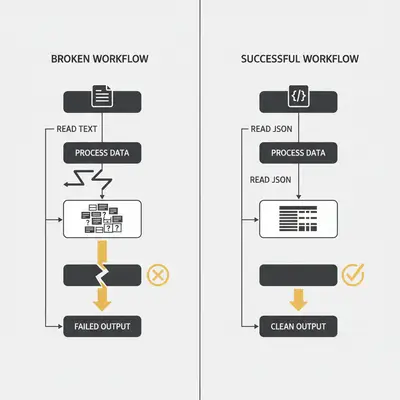
If you are building an automation workflow, text responses are your enemy.
Text varies. An AI might say "The sentiment is positive" one time and "Positive sentiment detected" the next. This breaks your If/Else logic because your filter is looking for the exact word "Positive".
The Fix: Provide a One-Shot Example
Don't just ask for JSON; give the model an exact template of what the JSON should look like. This is often called "One-Shot Prompting."
❌ The Vague Prompt: "Return the answer in JSON format."
✅ The Schema Prompt:
# OUTPUT FORMAT
You must strictly follow this JSON structure. Do not include markdown code blocks (```json). Return raw JSON only.

Example Output:
{
  "sentiment": "Positive",
  "urgency_score": 8,
  "category": "Billing"
}
When you provide a concrete example, the model doesn't have to guess the key names or value formats. It simply mimics the pattern you provided.
Key Insight: Many modern models (like GPT-4o) have a specific "JSON Mode" setting. Always enable this in your API settings or automation nodes to guarantee valid syntax. However, providing the schema in the prompt is still necessary to ensure the content of that JSON is correct.
Why These Changes Work
These three changes leverage the fundamental mechanics of how Large Language Models work:
- Structure reduces cognitive load and ambiguity.
- Reasoning forces the model to compute logic before predicting the conclusion.
- Schemas constrain the output space, making it machine-readable.
Implementing these fixes doesn't cost extra money—in fact, it often saves money by reducing the need for retries and manual fixes.
Reality Check: Even with perfect prompts, AI models are probabilistic. They will never be 100% perfect. Always build error handling into your workflows (like a "try/catch" in code) to manage the rare failures gracefully.
Applying This to Your Tech Stack
Whether you are using Make vs n8n or building custom scripts, the prompting logic remains the same.
If you are just getting started with AI automation, don't overcomplicate the tech stack. Focus on the prompt first. A great prompt in a simple tool beats a bad prompt in an expensive tool every time.
Recommended Next Steps
- Audit your current prompts. Are they big blocks of text? Break them into
# ROLE,# TASK, and# CONSTRAINTS. - Add a reasoning step. If your agent makes logic errors, ask it to "explain why" before giving the answer.
- Standardize outputs. Never accept plain text for data processing tasks. Always demand JSON.
Once your prompts are solid, you can start optimizing for cost and speed. For a deeper dive on optimization, check out our guide on calculating token costs to see how prompt length affects your bottom line.
Conclusion
Unreliable AI agents are rarely "hallucinating" for no reason. They are usually just confused. By restructuring your prompts, forcing reasoning, and locking down the output format, you turn a creative writing tool into a reliable data processing engine.
Start with these three changes today. You’ll be surprised how much smarter your existing AI models suddenly become.
Ready to build reliable agents? Check out our Prompt Engineering Checklist for a complete framework to ensure your automations run smoothly every time.
Related Resources
- Prompt Engineering Step-by-Step Checklist
- Understanding AI Hallucinations & How to Prevent Them
- System Prompt vs User Prompt: What's the Difference?
- Make vs n8n: Which Tool is Best for AI Agents?