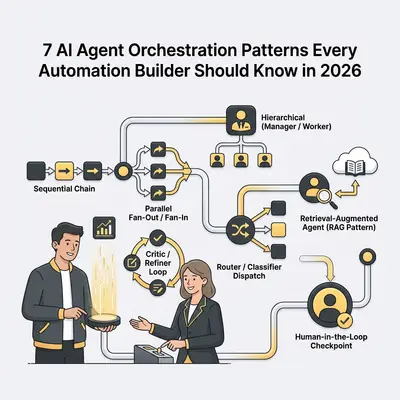
Most AI automation failures are not model failures. The model does what you ask. The problem is what you ask it, when you ask it, and how the results flow through your system. That is orchestration—and getting it right is the difference between a workflow that occasionally works and one that you can depend on.
By 2026, the pattern library for multi-agent systems has matured. There are recognizable, reusable structures that solve specific problems. This post names seven of them, explains when to use each, and shows how they map to real automation workflows.
Who this is for: Automation builders working with n8n, custom Python workflows, or low-code platforms who want to go beyond single-prompt automations without having to invent the architecture from scratch.
Why Orchestration Matters More Than the Model
A common mistake is blaming the LLM when a workflow underperforms. The real culprit is usually one of three things:
- Too much in one prompt. Asking one agent to research, analyze, write, and format simultaneously forces trade-offs and dilutes focus. Splitting into specialized steps produces better output at each stage.
- No error recovery. A single failed LLM call breaks the entire chain. Workflows without fallback logic are fragile by design.
- No validation. Passing unvalidated output from one step directly into the next propagates errors silently. A bad summary fed into a decision node produces a bad decision.
The patterns below address these failure modes directly.
The 7 Orchestration Patterns
1. Sequential Chain
What it is: The simplest orchestration pattern. Output from Step A becomes the input for Step B, which feeds Step C, and so on. Each agent has a single clearly defined job.
When to use it: When a task has natural stages—research, then summarize, then format, then send. When each step produces output that the next step meaningfully transforms. When you are starting out and want to build something debuggable before adding complexity.
Example workflow:
- Agent 1: Extract key facts from a raw sales call transcript
- Agent 2: Score the lead based on those facts using a defined rubric
- Agent 3: Draft a follow-up email appropriate to the score
Implementation in n8n: Three chained AI Agent nodes. Each node receives the output of the previous as its input context. Use structured JSON output at each step to make parsing reliable.
Failure modes to watch: Context loss. If Agent 2 receives only a summary instead of the full structured output from Agent 1, it loses information that may matter for the final result. Pass complete structured data between steps, not compressed summaries.
Pro Tip: At each chain boundary, validate that the output format matches what the next step expects before passing it forward. A simple Code node that checks for required fields catches most chain failures early.
2. Parallel Fan-Out / Fan-In
What it is: One orchestrator agent splits a task into parallel sub-tasks, dispatches them to multiple worker agents simultaneously, then aggregates the results.
When to use it: When a task has independent components that do not need each other's output—researching multiple competitors, processing multiple documents, analyzing multiple data streams at once. Parallelism cuts total processing time proportionally to the number of parallel branches.
Example workflow:
- Orchestrator: Splits a list of 10 competitor URLs into 10 independent analysis tasks
- 10 parallel agents: Each analyzes one competitor's positioning, pricing, and features
- Aggregator agent: Combines all 10 outputs into a comparative summary
Implementation in n8n: Use a Split In Batches node to create parallel execution paths, an AI Agent node in each path, then a Merge node to collect outputs before passing to the aggregation agent.
Failure modes to watch: One slow or failed branch blocks the aggregator. Build in per-branch timeout and fallback—if a branch fails, the aggregator receives a null result for that item and proceeds rather than hanging.
3. Hierarchical (Manager / Worker)
What it is: A high-level manager agent breaks down a complex goal into sub-tasks and assigns them to specialized worker agents. Workers report results back. The manager assembles the final output and decides if further iterations are needed.
When to use it: When the task is too complex or unpredictable to pre-define the exact steps. When the number and type of sub-tasks depend on the specific input. When you want the system to handle a broad goal and figure out the breakdown itself.
Example workflow:
- Manager agent: Receives the goal "Prepare a competitive analysis for our Q2 planning meeting"
- Manager dispatches: Research agent (market data), Competitor agent (specific competitors), Trend agent (recent news), Financial agent (public financials)
- Manager aggregates: Compiles and synthesizes all outputs into a structured briefing
Implementation in n8n: The manager agent uses tools that trigger sub-workflows. Each sub-workflow is a self-contained worker. The manager loops until it decides the task is complete.
Failure modes to watch: Manager hallucinating sub-tasks that do not match available tools. Always constrain the manager's tool list explicitly and validate that every dispatched sub-task maps to a real, configured worker.
For more on building multi-agent workflows in n8n, see Agentic AI in n8n: How to Build Multi-Agent Workflows for Complex Tasks.
4. Critic / Refiner Loop
What it is: A generator agent produces a first draft. A separate critic agent evaluates it against defined criteria. If the output fails the evaluation, it is passed back to the generator with feedback. The loop continues until the output passes or a maximum iteration count is reached.
When to use it: When output quality must meet a specific standard—writing that matches a style guide, code that passes a linter, data that fits a schema. When single-pass generation is insufficient and you want systematic quality improvement rather than manual review.
Example workflow:
- Generator: Drafts a product description for a new item
- Critic: Evaluates against brand guidelines, required keywords, and character limits. Returns a pass/fail with specific feedback
- If fail: Generator receives the draft and the critic's feedback, produces a revised draft
- Continues until pass or 3 iterations
Implementation in n8n: An AI Agent node (generator) → a Code or AI Agent node (critic with structured pass/fail output) → a conditional branch. If fail, route back to the generator with the combined previous draft and critic feedback as context. Set a max-iterations counter to prevent infinite loops.
Failure modes to watch: The critic providing vague feedback that the generator cannot act on ("this needs improvement" instead of "the third sentence exceeds 20 words and violates the brevity guideline"). Write critic prompts that produce specific, actionable, structured feedback.
5. Router / Classifier Dispatch
What it is: An initial classifier agent reads the incoming request and routes it to the appropriate specialized agent based on its category, complexity, or required expertise.
When to use it: When your automation handles multiple distinct input types that require different processing. When you want to use cheaper models for simple cases and more capable (expensive) models only for complex ones. When different input categories genuinely need different prompts and context.
Example workflow:
- Classifier: Reads an incoming support ticket and categorizes it as: billing question, technical bug, feature request, or other
- Routes billing → billing specialist agent (with payment history context)
- Routes technical → technical agent (with product documentation context)
- Routes feature → product feedback logger (no LLM needed)
Implementation in n8n: A lightweight AI Agent or Code node classifies the input and outputs a category string. A Switch node routes to the appropriate downstream workflow based on that string.
Failure modes to watch: The classifier choosing wrong categories for edge cases, sending tickets to the wrong specialist. Add an "uncertain" category that routes to human review for cases where classifier confidence is low.
For a deeper look at model selection for different task types, see How to Choose the Best AI Model for Your Use Case.
6. Retrieval-Augmented Agent (RAG Pattern)
What it is: Before the primary agent runs, a retrieval step fetches relevant context from a knowledge base—documents, past conversations, database records—and injects it into the agent's prompt. The agent then answers or acts with that retrieved context, rather than relying on its training data alone.
When to use it: When the agent needs to reason over proprietary or up-to-date information not in its training data. When answers depend on specific documents, customer history, or internal knowledge. When you need citations or grounded responses rather than generated guesses.
Example workflow:
- Incoming question: "What is our refund policy for enterprise customers?"
- Retrieval step: Semantic search over internal policy documents, returns top 3 relevant sections
- Agent: Answers the question using only the retrieved sections as context, cites which document each claim comes from
Implementation in n8n: Use a Vector Store node (Pinecone, Qdrant, or Supabase pgvector) to retrieve relevant chunks based on the incoming query. Inject the retrieved text into the AI Agent node's system prompt or user message before generation.
Failure modes to watch: Retrieving the wrong chunks due to poor embedding or a badly formulated retrieval query. Test retrieval quality independently—log what is retrieved for each query and verify relevance before connecting the full chain.
7. Human-in-the-Loop Checkpoint
What it is: At defined points in an otherwise automated workflow, the system pauses and routes output to a human for review, approval, or correction before continuing. The human's response (approved, rejected, edited) feeds back into the workflow to proceed.
When to use it: When automation handles high-stakes actions—sending communications, making purchases, updating customer records—where errors are costly. When regulatory or compliance requirements mandate human sign-off on AI-generated outputs. When you are in early deployment and want a safety net before trusting the system fully autonomously.
Example workflow:
- Agent generates a draft contract amendment based on a client request
- Workflow pauses and emails the draft to the legal team
- Legal team reviews, edits if needed, and clicks "Approve" or "Reject" in a review interface
- If approved, the workflow sends the amendment and logs the approval; if rejected, routes back to the agent with the human's feedback
Implementation in n8n: Use a Wait node after the generation step. Trigger the continuation via a webhook that the human activates through an approval interface (a simple form or email button works). Log all human decisions for audit trails.
Failure modes to watch: The human checkpoint becoming a bottleneck that defeats the purpose of automation. Define clear SLA expectations for review time, and build escalation paths for when reviewers are unavailable.
Combining Patterns
Real-world workflows rarely use just one pattern. A production-ready orchestration might combine:
- Router to classify incoming tasks by type
- Parallel Fan-Out to process multiple data sources simultaneously
- Critic / Refiner to ensure output quality before delivering results
- Human-in-the-Loop for the small percentage of cases that require human judgment
The key is starting with the simplest pattern that solves your problem and adding complexity only when the simpler approach demonstrably falls short.
Pattern Selection Guide
| Situation | Pattern |
|---|---|
| Task has clear sequential stages | Sequential Chain |
| Multiple independent sub-tasks | Parallel Fan-Out / Fan-In |
| Goal is complex and steps are unpredictable | Hierarchical Manager / Worker |
| Output must meet a quality standard | Critic / Refiner Loop |
| Multiple input types needing different handling | Router / Classifier Dispatch |
| Agent needs proprietary or current information | RAG Pattern |
| High-stakes actions requiring approval | Human-in-the-Loop Checkpoint |
The Foundation: Structured Handoffs
Regardless of which pattern you use, one principle holds across all of them: structured handoffs between agents prevent the majority of orchestration failures.
When Agent A passes plain prose to Agent B, Agent B must interpret that prose before it can act—and interpretation introduces errors. When Agent A passes structured JSON with explicit field names, Agent B receives unambiguous data.
Define a clear schema for every inter-agent handoff. Validate the schema at each boundary. This single practice eliminates more orchestration bugs than any other.
Ready to build production-grade multi-agent workflows for your business? Book a strategy session at evalics.com/contact to review your automation architecture and identify where orchestration patterns can improve reliability and scale.