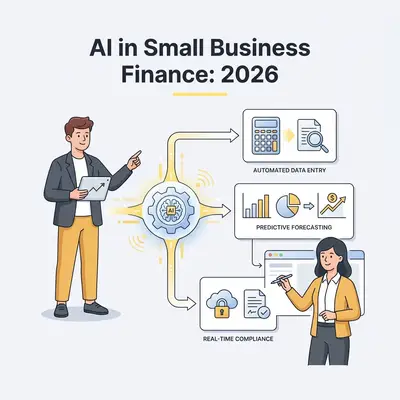
Most small business financial reporting follows the same pattern: the bookkeeper closes the books, the accountant produces the financial statements, the owner looks at the numbers and wonders what they mean, and the next month starts. AI is not replacing any part of this chain yet—but it is making each step faster, cheaper, and more insightful for businesses that use it deliberately.
This is not a post about AI replacing your accountant. It is about the seven specific places where AI is providing genuine value to small business finance in 2026: what the tools actually do, what they cost, and what the realistic benefit looks like.
Financial disclaimer: Nothing in this post constitutes financial, tax, or accounting advice. AI-generated financial analysis should be reviewed by qualified financial professionals before being used for significant business decisions.
The Real Problem AI Solves in Small Business Finance
Small businesses typically have one of two financial reporting problems:
-
Too little insight: The books are kept but nobody interprets them. The P&L exists but nobody reads it regularly. Cash flow surprises happen because nobody was looking.
-
Too much manual work: Generating even basic financial analysis requires hours of spreadsheet work. Monthly reporting is delayed. Financial questions that should be quick to answer require significant effort.
AI addresses both problems. It reduces the cost and time of producing financial information, and it makes that information interpretable in plain language for business owners who are not finance professionals.
The 7 Ways AI Is Changing Financial Reporting
1. Automated Transaction Categorization That Learns Your Business
Manual transaction categorization is tedious and error-prone. Modern AI-powered accounting tools (QuickBooks, Xero, Wave) use machine learning to categorize transactions based on vendor patterns, amount ranges, and your historical categorization choices—and they improve as they learn your specific patterns.
What this looks like in practice: When a new transaction from your cloud hosting vendor appears, the AI recognizes it based on merchant name and past categorization and correctly assigns it to "Software & Subscriptions" automatically. You review, confirm, and the system learns. After a month of operation, routine categorization becomes largely hands-off.
Where it still needs human review: New vendors the system has not seen before, transactions that could legitimately belong to multiple categories, mixed-purpose expenses (a meal that was partly business, partly personal), and large or unusual transactions.
Practical impact: A bookkeeper who previously spent 3-4 hours per month on transaction categorization for a typical small business can reduce that to 30-45 minutes of review and correction. This translates directly to lower bookkeeping costs or time the bookkeeper can spend on higher-value work.
2. Plain-Language Financial Summaries for Non-Finance Owners
The P&L exists. The numbers are there. But for most small business owners who are not finance professionals, turning those numbers into insight requires interpretation that they were never trained to do.
AI financial summary tools (built into QuickBooks, Xero, and some CFO-as-a-service platforms) now produce plain-language narratives alongside the numbers:
- "Revenue this month was $47,200, up 12% from last month, primarily driven by a $8,000 increase in consulting revenue. Your gross margin remained stable at 64%."
- "Operating expenses increased by $3,100 compared to last month, primarily due to a one-time equipment purchase of $2,800 in Tools & Equipment."
- "Your current cash position is $23,400. Based on upcoming invoices due ($12,000) and known expenses ($8,500 payroll next week), your projected cash balance in 14 days is approximately $26,900."
How to get this without a special tool: Copy your monthly P&L into Claude or GPT-4o with a prompt: "I am a small business owner, not a finance professional. Please explain what this financial statement tells me about my business performance this month, highlighting anything that warrants my attention." The output is often more useful than the raw numbers for non-finance owners.
Pro Tip: Build this into a monthly automation. Export your P&L to a Google Sheet, trigger an n8n workflow at month close, pass the numbers to Claude with an analysis prompt, and receive a plain-language financial narrative by email. This takes about 2 hours to set up and saves time every month.
3. Cash Flow Forecasting That Surfaces Problems Before They Happen
Cash flow surprises are the number one cause of small business stress. AI cash flow forecasting tools analyze your historical patterns, outstanding invoices, known upcoming expenses, and seasonal trends to project your cash position 30-90 days forward.
Tools that do this well: Float, Futrli, Spotlight Reporting (all integrate with QuickBooks and Xero). QuickBooks Cash Flow Planner offers a simpler built-in version. For custom forecasting, pulling QuickBooks/Xero data via API and running it through a structured AI analysis prompt in n8n produces surprisingly useful projections.
What AI cash flow forecasting does better than spreadsheets:
- Incorporates invoice aging data to estimate realistic collection timing, not just invoice due dates
- Applies historical seasonality patterns automatically
- Flags when projected cash dips below a threshold you define
- Scenarios: "What if we close the deal we are working on by end of month? What if the large invoice goes 30 days late?"
Realistic accuracy: AI cash flow forecasts are most accurate 14-30 days out and become increasingly uncertain at 60-90 days. Treat them as directional indicators, not precise predictions—but directional is often all you need to take action before a problem becomes a crisis.
4. Anomaly Detection and Expense Alerts
Fraud, billing errors, duplicate payments, and unusual expense patterns cost small businesses money that nobody notices because nobody is actively monitoring for anomalies. AI expense monitoring tools do this monitoring automatically.
What anomaly detection catches:
- A vendor billing you twice in the same month
- A subscription that auto-renewed at a higher tier than expected
- An employee expense report with amounts that differ significantly from their historical patterns
- A payment to a vendor you have not used before for an unusual amount
Tools: QuickBooks and Xero both have built-in anomaly detection features that flag transactions for review. Purpose-built expense management tools like Ramp, Brex, and Spendesk add AI anomaly detection to corporate card spending.
Manual alternative: For businesses without dedicated expense monitoring tools, a simple monthly review prompt to Claude with a transaction export can surface anomalies: "Review these transactions from the past month and flag any that appear unusual based on amount, vendor, or category compared to the overall pattern."
Practical value: One caught billing error or duplicate payment can easily cover a year of subscription costs for an AI expense monitoring tool.
5. Automated Invoice Matching and Accounts Payable Processing
Matching purchase orders to invoices to payments is a routine but time-consuming accounts payable task. AI-powered AP automation tools (BILL, Tipalti, Airbase) handle this automatically:
- Invoice arrives by email or upload
- AI extracts key fields: vendor, amount, invoice date, due date, line items
- AI matches the invoice to an existing purchase order or vendor record
- Workflow routes for approval based on amount thresholds
- Payment is scheduled automatically on approval
For small businesses: BILL (formerly Bill.com) is the most widely adopted small business AP automation tool. Its AI extracts invoice data, routes for approval, and manages payment scheduling. The time saving for businesses that process 20+ vendor invoices per month is significant.
What AI AP automation does not handle well: Complex invoices with unusual line item structures, invoices that require multi-party approval workflows, or invoices where the amount or items are disputed. These still require human handling.
6. Financial Performance Q&A Against Your Own Data
One of the most practical AI finance applications in 2026 is connecting your financial data to an AI that can answer ad-hoc questions in plain language—without you having to build a report or pivot table every time you want to understand something.
How to set this up:
- Export your chart of accounts, P&L, and transaction data monthly to a Google Sheet or database
- Connect to Claude or GPT-4o via API (n8n makes this straightforward)
- Ask questions in plain language: "What was my most profitable service line last quarter?" / "Which of my clients accounts for the most revenue over the past 12 months?" / "How has my gross margin changed over the past 6 months?"
This approach turns your financial data into a queryable intelligence source rather than a static report.
The practical step today: You do not need a custom integration to start. Export your financial data to a CSV, paste the relevant data into Claude with a specific question, and get an immediate answer. This is manual, but it demonstrates the value before you invest in automation.
7. Tax Preparation Assistance (With Important Caveats)
AI is increasingly useful for tax preparation groundwork—organizing documents, categorizing expenses for tax purposes, identifying potential deductions, and flagging areas that need professional attention. It is not replacing tax professionals, but it is reducing the unorganized, messy state in which most small business owners arrive at their accountant's virtual door.
What AI helps with:
- Reviewing the year's transactions and ensuring they are correctly categorized for tax purposes
- Identifying expense categories that might include tax-deductible items worth reviewing with your accountant
- Drafting a summary of unusual events during the year (one-time large expenses, new asset purchases, changes in revenue mix) to share with your accountant
- Reviewing your prior year return to understand what your accountant focused on and preparing similar documentation
What AI cannot do: File your taxes, make judgment calls on gray-area deductions, assess your specific tax situation under current law, or serve as professional tax advice.
The accountant efficiency play: Arrive at your tax appointment with AI-organized, clearly categorized data and a written summary of the year's notable events. Most accountants bill by the hour. Coming prepared reduces billable time meaningfully.
Building an AI-Assisted Financial Reporting Stack
For small businesses that want to implement AI financial reporting systematically, a practical stack looks like:
| Layer | Tool | Purpose |
|---|---|---|
| Accounting | QuickBooks or Xero | Source of truth, AI categorization |
| Cash flow | Float or Futrli | 30-90 day cash projections |
| AP automation | BILL | Invoice processing and payment |
| Monthly narrative | n8n + Claude | Plain-language P&L summaries |
| Anomaly detection | Ramp/Brex (if applicable) | Expense monitoring |
| Ad-hoc analysis | Claude (direct) | One-off financial questions |
Not every business needs all of these. Start with the layer that solves your most acute problem. For most small businesses, that is either cash flow visibility (Float is the fastest win) or time spent on bookkeeping (AI categorization in QuickBooks or Xero).
Want to automate your monthly financial reporting and connect it to your business dashboards? Book a call at evalics.com/contact to design a financial automation stack that fits your accounting setup and reporting needs.