"AI is coming for our jobs."
You hear it in the breakroom. You see it in LinkedIn headlines. Your team whispers it when you mention "efficiency."
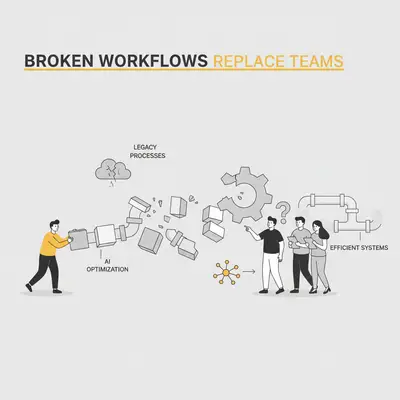
But the real threat to job security isn’t a sophisticated language model or an autonomous agent. It’s the messy, undefined, and broken workflows that teams struggle with every day.
AI is a force multiplier. If you apply it to a refined process, you get exponential efficiency. If you apply it to a broken process, you get automated chaos.
The businesses that will struggle in 2025 aren’t the ones refusing to fire people—they’re the ones refusing to fix how they work. Here is why your workflows, not your headcount, are the problem, and how fixing them actually secures your team's future.
The Amplifier Effect
Bill Gates famously said that automation applied to an efficient operation will magnify the efficiency, while automation applied to an inefficient operation will magnify the inefficiency.
This is the "Amplifier Effect."
Imagine a sales team that doesn't track leads properly. Sometimes they use a spreadsheet, sometimes a notebook, and sometimes they just "remember" to call back.
If you add an AI agent to this mix, what happens?
- The AI can't find the data because it’s not centralized.
- The AI hallucinates context because the history is missing.
- The AI sends generic emails to the wrong people at the wrong time.
The result isn't a leaner team; it's a team that now spends more time cleaning up the mess the AI made.
Key Insight: AI doesn't fix broken logic. It executes it faster. If your logic is flawed, AI will scale your mistakes to thousands of customers in minutes.
The True Cost of "Tribal Knowledge"
Most broken workflows survive on "tribal knowledge." This is the information that lives only in your employees' heads.
- "Oh, for that client, we always CC Sharon."
- "If the invoice is over $500, I usually double-check with Mark."
- "The data says X, but we know it actually means Y."
AI cannot access tribal knowledge. It only knows what is documented, structured, and explicit.
When business owners say, "AI can't do what my team does," they are often right—but not because the task is too complex. It's because the process for doing that task has never been written down.
Your team feels threatened because they are currently the "glue" holding these broken processes together. If you fix the process, they stop being glue and start being architects.
Signs Your Workflows Are Broken (Not Just "Manual")
Before you look for an AI tool, look for these red flags in your daily operations.
1. The "Just in Case" CC
If every email needs three managers CC'd "just in case," your decision-making hierarchy is unclear. AI agents need clear escalation paths. If a human doesn't know who owns a decision, an AI definitely won't.
2. The Data Re-Entry Loop
If your team takes data from an email, types it into a spreadsheet, and then types it again into a CRM, that is a broken workflow. It is not just manual work; it is an error-prone gap where data integrity dies.
3. The "Exception" Rule
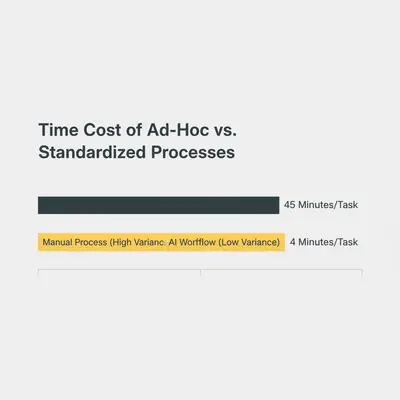
If 80% of your tasks are treated as "special exceptions" that require a unique manual approach, you don't have a process. You have a series of improvisations. Automation requires standardization.
Moving from "Doers" to "Reviewers"
The fear of replacement comes from a misunderstanding of value.
For the last twenty years, we paid people to be "doers."
- Write the email.
- Enter the data.
- Schedule the meeting.
In an AI-enabled business, the value shifts. We now need "reviewers" and "editors."
An AI can draft 50 sales emails in seconds. It cannot judge which one perfectly captures the nuanced tone needed for a specific hesitant client.
An AI can categorize 1,000 expense transactions. It cannot understand the context of why a specific vendor relationship is strategic despite higher costs.
The New Org Chart
Your team isn't going away. Their roles are elevating.
| Old Role | New AI-Enabled Role |
|---|---|
| Data Entry Clerk | Data Integrity Analyst (Managing the flow, fixing errors) |
| Content Writer | Content Strategist & Editor (Prompting AI, refining output) |
| Customer Support Agent | Customer Success Architect (Designing chatbot flows, handling complex escalations) |
| Scheduler | Operations Manager (Optimizing calendar logic and resource allocation) |
Reality Check: This transition isn't automatic. You must actively upskill your team. If you drop AI tools on them without training, they will view the tools as enemies rather than assistants.
How to Fix Your Workflows Before Automating
If you want to protect your team and grow your business, stop buying tools and start mapping steps.
Step 1: The "Post-It" Audit
Get your team in a room. Pick one core process (e.g., "New Client Onboarding"). Write every single step on a Post-It note.
- "Receive email."
- "Save contract to Drive."
- "Email finance."
- "Wait for reply."
Stick them on a wall. You will likely see a mess of loops, waiting periods, and redundant steps. This is what you are fixing.
Step 2: Kill the "Zombie" Steps
Look for steps that exist only because "we've always done it that way."
- Why do we print this form?
- Why does three people need to approve a $50 expense?
- Why are we manually copying data that is already in the email?
Eliminate these steps before you automate. Automating a zombie step just means you're wasting computing power instead of human power.
Step 3: Standardize the Input
AI needs clean ingredients. If your leads come in via phone, text, email, and WhatsApp, and land in four different places, AI will fail. Force a standardized input. Create a form. Use a central inbox. Ensure data enters your business in a structured way.
Step 4: Define the "Human Loop"
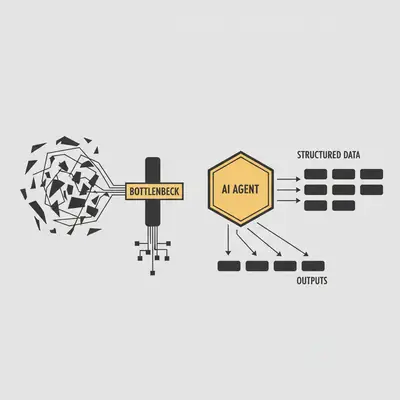
Decide exactly where a human needs to touch the process.
- Start: Human defines the strategy.
- Middle: AI executes the bulk work (drafting, sorting, calculating).
- End: Human reviews and approves the final output.
This definition gives your team security. They know exactly where they fit in the new machine.
Why This Protects Your Team
When you fix broken workflows, you remove the drudgery that leads to burnout.
High turnover often happens because smart people are tired of doing stupid tasks. They are tired of copy-pasting, chasing approvals, and fixing preventable errors.
By fixing the workflow and using AI to handle the robotic parts, you give your team the bandwidth to do the work they were actually hired for: thinking, creating, and connecting.
Pro Tip: Involve your team in the automation process. Ask them, "What is the most annoying, repetitive part of your day?" Automate that first. You instantly turn them from skeptics into champions.
Conclusion
The businesses that replace their teams with AI will likely fail. They will lose the context, creativity, and judgment that only humans possess.
The businesses that win will be the ones that fix their broken workflows, empowering their teams to wield AI like a superpower.
Don't let inefficiency hide behind the excuse of "being human." Respect your team's time enough to build processes that work.
Key Takeaways:
- AI amplifies your current state. If your workflows are broken, AI will just accelerate the mess.
- Tribal knowledge is a bottleneck. Document your processes so AI—and new hires—can actually function.
- Shift from "Doer" to "Reviewer." Your team's value lies in judgment and strategy, not repetitive execution.
Related Resources
- 7 Common AI Automation Mistakes Beginners Make
- AI Won't Replace You, But Someone Using AI Will
- Complete Guide to Business Process Automation
- Upskill Your Teams for AI Adoption
Official Sources
- IBM Global AI Adoption Index 2024 - Research on how businesses are adopting AI and the barriers to implementation.
- Harvard Business Review: How to Prepare Your Workforce for AI - Strategic advice on upskilling teams rather than replacing them.
- McKinsey & Company: The State of AI in 2024 - Data on the impact of AI on business processes and workforce productivity.
By Kevin Michael Schindler, AI Automation Expert at Evalics