
I saw a small software release announcement the other day that perfectly captures one of the biggest mistakes I see companies making with AI. Simon Willison released a plugin for his data tool, Datasette, called datasette-llm. In plain English, it’s a tool that helps other tools use Large Language Models.
The key feature? It lets you assign different AI models to different tasks. For example, you can configure it to use a small, fast model for simple data enrichment but a big, powerful model for helping you write complex SQL queries.
This might sound like a minor technical detail, but it’s a massive strategic insight. So many businesses I talk to are stuck on finding the "one best AI model." They run a few tests, pick a winner like GPT-4o or Claude 3 Opus, and then try to force it to do everything. This is a recipe for wasted money, slow applications, and mediocre results.
Why Is a "Single Best AI Model" a Terrible Strategy?
It’s a terrible strategy because no single model is the best at everything. Forcing one model to handle every task means you’re overpaying for simple jobs, getting slow responses when you need speed, and using the wrong tool for specialized work. It’s like hiring a brain surgeon to put on a band-aid.
The "one model" approach creates three distinct problems I see with clients all the time. First is cost. A powerful model like Claude 3 Opus can be 15 times more expensive than a nimble one like Haiku for the same task. I’ve seen clients cut their monthly API bills by over 70% simply by routing simple classification and extraction tasks to a cheaper, faster model.
Second is speed. The most powerful models are also the slowest. If you’re building a real-time customer service chatbot, a 5-second delay for an answer is an eternity. A smaller model can often provide a perfectly good answer in under a second, which makes all the difference in user experience.
Finally, it’s about picking the right tool for the job. A model fine-tuned for code generation will always outperform a generalist model at writing software. A model that excels at creative marketing copy might completely hallucinate when asked to extract structured data from an invoice. The "best" model is always task-dependent.
Reality Check: Your team isn't looking for the "best" AI model. They're looking for the right tool for the job. Forcing them to use one expensive, slow model for everything is a recipe for frustration and shadow IT.
How Do You Build a Multi-Model AI Strategy?
Building a multi-model strategy isn't about creating complexity for its own sake. It's about being intentional. It boils down to a simple, four-step process that moves you from a vague idea of "using AI" to a smart, efficient system.
1. Catalog Your AI Use Cases First, get specific. Don't just say you want to "use AI for marketing." List the actual business tasks. Are you generating social media posts? Summarizing customer feedback? Classifying inbound leads by intent? Write down every single task you want an AI to touch.
2. Define the Requirements for Each Task Next, grade each task against a few key criteria. You don't need a complex spreadsheet, just a basic understanding of the trade-offs.
- Cost: Is this a high-volume task where pennies-per-request matter?
- Speed: Does this need to happen in real-time for a user, or can it run in the background?
- Accuracy: How critical is it that the output is perfect? Is it for internal brainstorming or a legal document?
- Reasoning: Does the task require simple pattern matching or complex, multi-step logic?
3. Map Models to Tasks Now you can play matchmaker. Based on your requirements, assign a model category to each task.
- Task: Classify 10,000 support tickets per day. (High volume, low cost, high speed). -> Model: A fast, cheap model like Claude 3 Haiku or Gemini Flash.
- Task: Draft a detailed technical proposal. (Low volume, high reasoning, accuracy is key). -> Model: A powerful model like GPT-4o or Claude 3 Opus.
- Task: Extract line items from a PDF invoice. (Specialized task). -> Model: A model with strong vision and structured data capabilities.
4. Implement a Routing Layer
This is the technical glue that holds it all together. You need a simple "traffic cop" in your system that directs requests to the right model. When a task comes in, the router looks at its purpose and sends it to the correct API. This can be a simple function in your code, a visual workflow in a tool like n8n, or a dedicated service. The point is to have one central place that makes the decision.
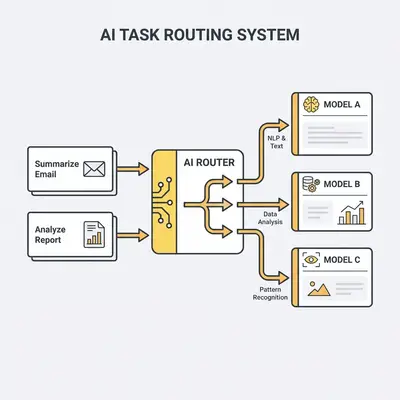
Pro Tip: Start with just two models: one powerful, expensive "heavy-lifter" (like GPT-4o) and one cheap, fast "workhorse" (like Claude 3 Haiku). Route 80% of your simple, high-volume tasks to the workhorse. This simple split can have a massive impact on your costs and performance from day one.
What Tools Can Help Manage Multiple Models?
The good news is you don't have to build this routing logic from scratch. The ecosystem has matured, and several tools make a multi-model approach easy to manage.
Workflow automation platforms like n8n are my go-to for this. You can visually build a workflow where a "Router" node or an "If" node checks the type of input and sends it down a different path to a different LLM node. It makes the logic clear and easy to modify without touching a line of code.
For developers, open-source libraries like LiteLLM are a game-changer. It provides a single, unified way to call over 100 different LLMs from providers like OpenAI, Anthropic, Google, and Cohere. You write your code once against the LiteLLM format, and it handles the translation and authentication for each specific model provider. This makes swapping models as simple as changing a single line of text.
And that brings us back to the datasette-llm plugin. It’s a perfect, real-world example of this principle being built directly into applications. The future of software isn't about being a "GPT-4 app"; it's about being an intelligent app that uses the right model for the right purpose, seamlessly, behind the scenes.
Key Insight: The goal isn't to manage a dozen different APIs. The goal is to build a system where the task dictates the tool, not the other way around. Smart routing and abstraction layers make this manageable, even for a small team.
What's the Payoff? A Real-World Example
I worked with a mid-sized e-commerce company that had gone all-in on GPT-4. They were using it for everything: their customer service chatbot, summarizing product reviews for sentiment analysis, and generating new product descriptions. Their monthly OpenAI bill was creeping past $5,000, and customers complained that the chatbot felt sluggish.
We implemented a simple multi-model strategy.
- Chatbot: We switched the chatbot from GPT-4 to the much faster and cheaper Claude 3 Haiku. It didn't need to write a novel; it just needed to answer common questions quickly.
- Review Summaries: This was a batch process they ran overnight. We moved it to a specialized open-source model fine-tuned on their product catalog. It was slower, but the cost was negligible, and its accuracy on their specific jargon was higher.
- Product Descriptions: We kept this task on a powerful model (GPT-4o) because it required creativity and high-quality writing. Since they only added a few dozen new products a month, this was a low-volume, high-value task where the cost was justified.
The results were immediate. Their monthly AI bill dropped from over $5,000 to around $1,200—a 76% reduction. The chatbot's average response time went from four seconds to less than one, and customer satisfaction scores for support ticked up. They were spending less money to get a better result, all because they stopped looking for a single silver bullet.