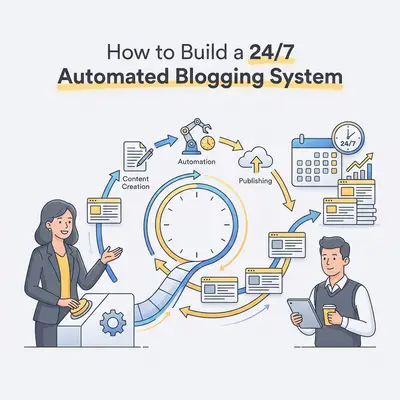
A 24/7 automated blogging system is a server-side architecture that captures raw input from a messaging app and processes it into finished content without human intervention. By hosting your automation scripts on a Virtual Private Server (VPS), you ensure your business workflows run continuously, independent of your local computer’s power state or internet connection.
Automating a content workflow takes the manual drafting and formatting off your desk and, more importantly, keeps your publishing schedule consistent when you get busy. Automating these tasks allows you to focus on strategy rather than repetitive data entry.
![_ [GRAPH] Column chart. Manual Workflow - 10 Hours/Week. Automated Workflow - 1 Hour/Week. Chart title: Weekly Time Spent on Content Creation at top. Alt text: Column chart showing a 90% reduction in time spent on content creation after implementing automation](/blogs/automate_blogging_telegram/-graph-column-chart-manual-workflow-10-hoursweek-a-400w.webp)
Why Should Small Business Owners Automate Their Content Workflow?
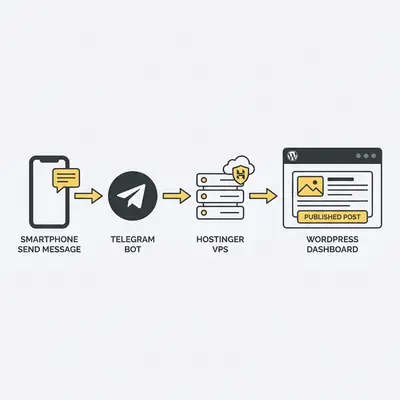
Automating your content workflow allows you to capture ideas instantly via Telegram and transform them into published blog posts without manual intervention. By leveraging a VPS, you ensure your automation scripts run 24/7, eliminating the need for a local computer to stay powered on. This provides a stable, scalable environment for your business growth.
Key Insight: Automation is not about replacing your voice; it is about removing the friction between having a great idea and getting that idea in front of your customers.
What Is a VPS and Why Is It Ideal for Automation?
A Virtual Private Server (VPS) is a dedicated slice of a physical server that provides you with full control over your own operating system and resources. For small businesses, a VPS like Hostinger is ideal because it offers the reliability, uptime, and processing power required to run background automation scripts continuously without the limitations of shared hosting.
Unlike shared hosting, where your scripts might be throttled by other users, a VPS gives you a private environment. This stability is critical for bots that need to listen for incoming messages 24/7. If your script crashes or the server reboots, you can configure it to restart automatically, ensuring your "digital assistant" never sleeps.
How Do You Set Up Your Hostinger VPS for Automation?
Setting up your VPS involves provisioning a Linux-based server, securing it with SSH keys, and installing the necessary runtime environments like Python or Node.js. This foundation acts as the "brain" of your operation, ensuring that your automation scripts have a permanent home to execute tasks whenever a trigger is received.
- Purchase a VPS plan from Hostinger and select your preferred Linux distribution, such as Ubuntu 22.04.
- Access your server via SSH using a terminal or an application like PuTTY.
- Update your server packages using the command
sudo apt update && sudo apt upgrade. - Install the necessary programming language runtime, such as
sudo apt install python3 python3-pip. - Configure a firewall (UFW) to secure your server ports by allowing only SSH and necessary web traffic.
- Set up a virtual environment to manage your automation script dependencies cleanly.
How Do You Connect Your Telegram Bot to Your VPS?
Connecting a Telegram bot to your VPS involves using the Telegram Bot API to create a polling script that listens for your voice notes or text messages. Once the bot is running on your VPS, it acts as a personal assistant that captures your raw ideas and sends them directly to your automation pipeline for processing.
Pro Tip: Use the 'python-telegram-bot' library to easily handle incoming messages and trigger your automation scripts. This library is well-documented and handles the complexities of the Telegram API for you.
How Does the Automation Script Transform Ideas Into Blog Posts?
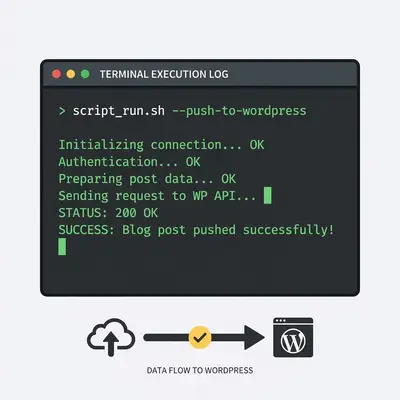
The automation script processes your Telegram input by sending the text or transcribed audio to an AI model, such as OpenAI’s GPT-4, to generate a structured, SEO-optimized blog post. Once the content is generated, the script uses the WordPress REST API to automatically draft or publish the post to your website.
This process removes the "blank page" syndrome. You simply record a voice note while driving or walking, and by the time you reach your desk, a high-quality draft is waiting in your WordPress dashboard. You only need to perform a final review and hit "Publish."
What Are the Common Pitfalls When Running Automation on a VPS?
Common pitfalls include failing to handle script errors, neglecting server security, and running out of system resources due to unoptimized code. To avoid these, always implement robust error logging, keep your server software updated, and monitor your VPS resource usage to ensure your automation remains stable and secure.
Warning: Never hardcode your API keys directly into your scripts. Use environment variables (.env files) to keep your credentials secure and prevent them from being exposed if your code is ever shared or backed up.
How to Maintain Your System for Long-Term Growth
Once your system is live, maintenance is minimal but necessary. Use a process manager like PM2 to keep your scripts running in the background. PM2 will automatically restart your bot if it encounters an error, ensuring your 24/7 uptime goal is met.
Periodically check your server logs to identify any failed API calls or content generation errors. If you find that your content needs are growing, you can easily upgrade your Hostinger VPS resources with a few clicks. This modular approach allows you to start small and scale your automation as your business revenue increases.