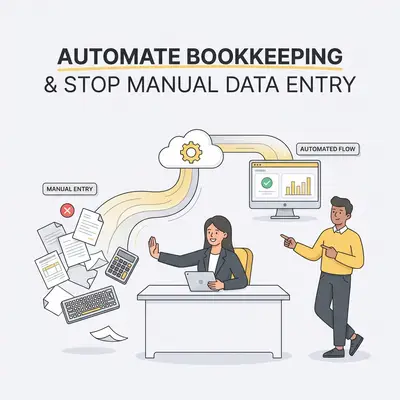
Automated bookkeeping is the process of using software to capture, categorize, and reconcile financial transactions without manual data entry. By replacing manual spreadsheets with integrated AI tools, small businesses can reduce administrative overhead by up to 80% while maintaining perfect audit trails. This shift transforms your accounting from a reactive chore into a proactive growth engine.
Why Is Manual Data Entry Killing Your Small Business Growth?
Manual data entry is a silent profit killer that consumes hours of productive time and introduces human error into your financial records. By automating these repetitive tasks, you reclaim your schedule, ensure tax compliance, and gain real-time visibility into your cash flow.
![_ [GRAPH] Column chart. Manual Entry - 12 Hours/Week. Automated Workflow - 2 Hours/Week. Chart title: Weekly Time Spent on Bookkeeping at top. Alt text: Column chart showing a reduction from 12 hours to 2 hours per week after implementing automated bookkeeping workflows](/blogs/automate_bookkeeping_data/-graph-column-chart-manual-entry-12-hoursweek-auto-400w.webp)
Key Insight: Every hour spent typing numbers into a spreadsheet is an hour you aren't spending on client acquisition or product development. Automation isn't just about saving time; it is about shifting your focus to high-value activities.
What Are the Top 5 Ways to Automate Your Bookkeeping?
Automating your bookkeeping involves integrating smart software to handle data capture, categorization, and reconciliation without manual intervention. These five methods represent the most effective ways to eliminate manual entry, ranked by their impact on your daily operations and overall financial accuracy.
- Automated Receipt Scanning: Use OCR-enabled apps like Dext or Hubdoc to snap photos of receipts. These tools extract vendor, date, and total data automatically, pushing the information directly into your accounting software.
- Bank Feed Integration: Connect your business bank accounts and credit cards to your accounting platform. This pulls transactions in real-time, eliminating the need for manual ledger updates and ensuring your books always reflect your current bank balance.
- Recurring Invoice Automation: Set up automated billing cycles for repeat clients. This ensures invoices are sent on time and payments are tracked without manual drafting, so nothing sits unbilled because you were busy.
- AI-Powered Categorization: Utilize machine learning tools that "learn" your spending habits. These tools automatically assign transactions to the correct tax categories based on historical data, reducing the need for manual review.
- Automated Payment Reconciliation: Sync your payment gateway, such as Stripe or PayPal, with your books. This automatically matches incoming deposits to outstanding invoices, ensuring your accounts receivable are always accurate.
Pro Tip: Start by connecting your primary business bank account to your accounting software. This single step provides the highest immediate return on investment for most small business owners.
How Do These Automation Methods Compare?
Choosing the right automation strategy depends on your transaction volume and current accounting stack. The table below highlights the pros and cons of each method to help you prioritize your implementation.
| Method | Primary Benefit | Potential Drawback |
|---|---|---|
| Receipt Scanning | Eliminates paper clutter | Requires consistent habit |
| Bank Feeds | Real-time accuracy | Requires initial setup |
| Recurring Invoices | Guaranteed cash flow | Less flexibility for custom work |
| AI Categorization | Saves hours of sorting | Needs occasional review |
| Payment Sync | Perfect reconciliation | Requires API integration |
Reality Check: Automation is not a "set it and forget it" solution. You still need to perform a monthly review to ensure the AI has categorized unusual or one-off expenses correctly.
How Does AI-Driven Bookkeeping Reduce Human Error?
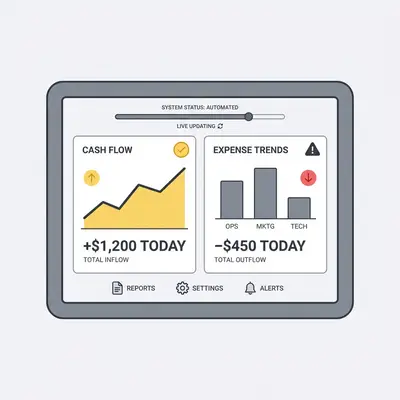
AI-driven bookkeeping reduces human error by removing the manual "human-in-the-loop" element from repetitive data entry tasks. Unlike humans, AI software does not suffer from fatigue or distraction. It ensures that every decimal point is placed correctly and every transaction is categorized according to your predefined rules, resulting in audit-ready books every month.
What Should You Look for in an Automation Tool?
When selecting an automation tool, prioritize software that offers seamless integration with your existing accounting platform, such as QuickBooks or Xero. Look for robust security features, user-friendly mobile interfaces for on-the-go data capture, and scalable pricing models that grow alongside your business transaction volume. If you are currently struggling with manual workflows, check out our guide on streamlining business operations for more foundational tips.
How Can You Get Started With Automation Today?
Getting started with automation is a phased process that begins with auditing your current manual workflows. Identify the most time-consuming tasks—usually receipt management and bank reconciliation—and implement one tool at a time. This ensures your team is comfortable with the new digital workflow before moving to full-scale automation.
Quick Win: Pick one recurring task you hate doing, such as chasing late payments, and set up an automated reminder system today. You will save time immediately and improve your cash flow.