Automate Client Onboarding: 5 Ways to Save Time with n8n
Manual onboarding drains your billable hours and hurts client experience. Use n8n to automate document signing and account setup to reclaim your time today.
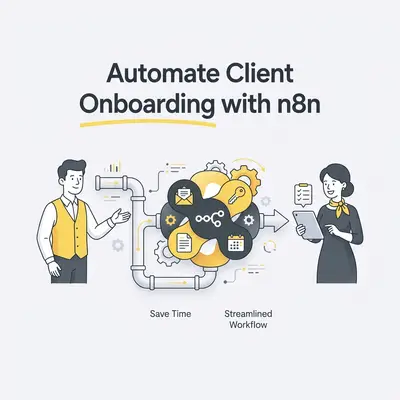
Manual client onboarding is a silent profit killer that consumes hours of billable time, introduces human error, and creates a disjointed first impression. Automating this process means using software to trigger tasks like document signing and account setup without manual intervention. By replacing manual data entry with n8n workflows, you reclaim your schedule and ensure every client receives a consistent, professional experience from day one.
Why is manual client onboarding killing your small business growth?
Manual onboarding forces you to act as a human bridge between your tools. You copy data from a CRM to a contract, then move that contract to a folder, then email the client. This process is prone to typos and delays. When you rely on manual steps, your growth is capped by how many hours you can personally work. Automation removes these bottlenecks, allowing your business to scale without adding headcount.
Key Insight: If your onboarding process takes more than 30 minutes of manual work per client, you are losing money on every new project you sign.
How can you automate client onboarding with n8n?
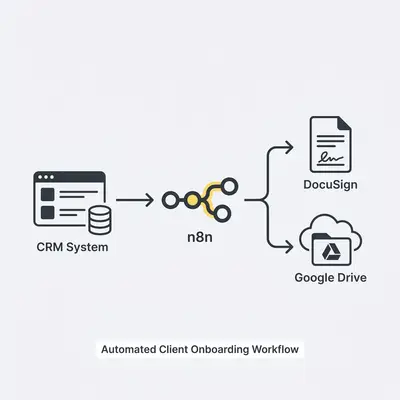
Automating your onboarding with n8n allows you to connect your CRM, email, and document tools into a single, seamless workflow. By triggering actions based on specific events—like a signed contract or a payment—you eliminate manual data entry. This ensures your team is always prepared for a new project the moment a client says "yes."
1. Automated Contract Distribution
You can trigger a contract to be sent via DocuSign or PandaDoc the moment a deal moves to "Closed Won" in your CRM. This eliminates manual email attachments and ensures legal compliance by using standardized templates. You save time and ensure the client receives the document while their intent is highest.
2. Instant CRM Data Syncing
Manual data entry is the primary cause of CRM errors. With n8n, you can map fields from your intake form directly into your CRM. This keeps client records updated in real-time across your entire tech stack. The main requirement is consistent field mapping, but once set, it eliminates duplicate entries forever.
3. Triggered Welcome Email Sequences
Personalized communication builds trust. You can set up n8n to send a series of welcome emails based on the client’s industry or service package. This provides immediate value without manual intervention. The key is writing high-quality copy that feels personal, even though it is delivered automatically.
4. Automated Project Folder Creation
Searching for files wastes time. You can configure n8n to create a new folder structure in Google Drive or Dropbox for every new client. This keeps files organized and accessible. This requires API access to your cloud storage, but it creates a professional, organized environment for every project.
5. Scheduled Kick-off Meeting Invitations
Stop the back-and-forth email chains to find a meeting time. By integrating n8n with tools like Calendly, you can automatically send a booking link once the contract is signed. This improves conversion rates by removing friction and ensures the client feels prioritized immediately after signing.
Pro Tip: Always include a "buffer" step in your n8n workflow to check if a client already exists in your system to prevent duplicate records.
How does n8n compare to other automation tools for SMBs?
Choosing the right platform depends on your technical comfort and budget. While some tools are easier to start with, n8n offers superior flexibility and cost-efficiency. It avoids the "per-task" pricing traps that make other platforms expensive as you scale.
Feature
n8n
Zapier
Make
Pricing Model
Self-hosted/Fixed
Per-task
Per-operation
Ease of Use
Moderate
High
Moderate
Customization
High (Code-friendly)
Low
Moderate
Data Privacy
High (Self-hostable)
Low
Low
How can you get started with your first n8n workflow?
Getting started involves identifying your most repetitive manual task and building a simple trigger-action loop. Start small, such as automating a single email notification, to build confidence. As you learn the logic, you can layer in more complex steps to handle your entire onboarding lifecycle.
Identify the "Trigger" (e.g., a new row in a Google Sheet).
Connect your primary application via API or Webhook.
Map the data fields to ensure information flows correctly.
Add a "Filter" node to handle conditional logic.
Test the workflow in "Execution" mode to verify results.
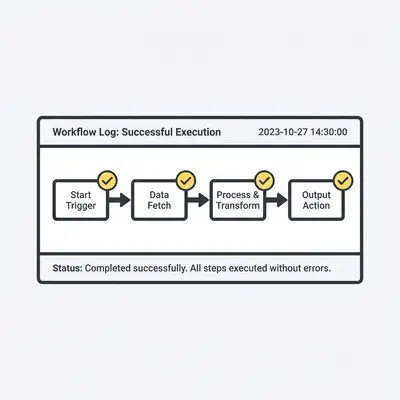
Activate the workflow and monitor the logs for errors.
Reality Check: Do not automate a broken process. If your manual onboarding is disorganized, automation will only scale that disorganization. Clean up your manual steps first.
How can Evalics help you scale your operations?
Evalics helps small business owners transition from manual, time-consuming tasks to fully automated systems. We provide end-to-end support, from workflow design and API integration to ongoing maintenance. Our goal is to ensure your business remains agile and focused on high-value client work rather than administrative overhead.
Quick Win: Schedule a consultation with Evalics to discuss your automation roadmap and identify the first process we can automate to save you 10+ hours a week.
Ready to automate your business?
Book a free consultation and discover how AI automation can save you hours every week.
Frequently Asked Questions
n8n is a workflow automation tool that connects your favorite apps to automate repetitive tasks without manual intervention.
You can automate onboarding by creating n8n workflows that trigger document signing, account creation, and welcome emails immediately after a contract is signed.
Yes, n8n features a visual node-based editor that allows you to build complex automation workflows using a drag-and-drop interface.
Yes, n8n offers self-hosted options that give you full control over your data security and privacy compliance.