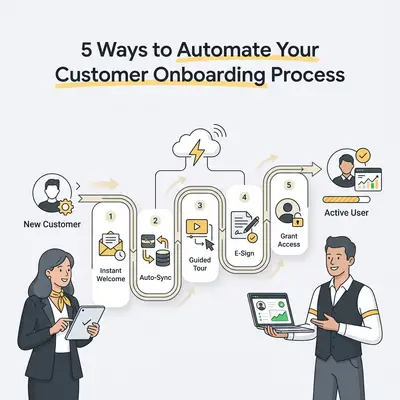
Customer onboarding is the structured process of guiding a new client from the moment they sign a contract to the point where they are fully integrated into your service. It is the bridge between a sale and long-term loyalty. By automating this phase, small businesses ensure consistent communication, reduce manual administrative tasks, and prevent new clients from feeling neglected.
A client who is chased for the same information twice in week one has already learned what working with you is like. Automating the initial client touchpoints also means you can see where every new client is in the process without manual check-ins.
![_ [GRAPH] Column chart. Manual Onboarding - 10 Hours/Client. Automated Onboarding - 2 Hours/Client. Chart title: Weekly Time Spent on Onboarding at top. Alt text: Column chart showing time savings from automation: 10 hours before vs 2 hours after](/blogs/automate_customer_onboarding/-graph-column-chart-manual-onboarding-10-hoursclie-400w.webp)
Why is customer onboarding the most critical phase for small businesses?
Onboarding sets the tone for the entire client relationship. When a client buys your service, they are often anxious about whether they made the right choice. A smooth, automated start provides immediate reassurance. It turns a one-time buyer into a repeat customer by delivering value immediately after the transaction is complete.
Key Insight: Your onboarding process is your first "product" delivery. If the experience is messy, the client assumes your actual service will be messy, too.
How can automated welcome email sequences build instant trust?
Automated welcome sequences provide immediate gratification by delivering essential information, login credentials, or "getting started" guides the moment a purchase occurs. By setting expectations early, you reduce buyer’s remorse and establish your brand as professional and organized. This is vital for building long-term trust with new clients.
- Pros: High open rates, sets clear expectations, requires zero manual effort.
- Cons: Can feel impersonal if not customized with dynamic fields.
| Feature | Manual Emailing | Automated Sequence |
|---|---|---|
| Speed | Delayed (Hours/Days) | Instant |
| Consistency | Variable | 100% Consistent |
| Personalization | High (but slow) | High (via dynamic fields) |
How do automated scheduling workflows eliminate back-and-forth emails?
Automated scheduling tools sync with your calendar to allow clients to book their own kickoff calls at their convenience. This eliminates the "what time works for you?" email chain, saves hours of administrative time, and ensures that the onboarding process moves forward without unnecessary delays.
Pro Tip: Use tools like Calendly or Cal.com integrated with your CRM to automatically create a Zoom link and add the meeting to your calendar the moment a client selects a time.
How does automated document collection streamline the intake process?
Automated intake forms and digital signature platforms allow you to collect contracts, questionnaires, and onboarding documents in one centralized location. Instead of chasing clients for paperwork, automated reminders nudge them to complete their tasks. This ensures you have everything you need to begin service without manual follow-ups.
Reality Check: Don't send a 20-page questionnaire on day one. Break your intake into smaller, automated steps to avoid overwhelming the client and causing them to stall.
How can automated progress tracking keep clients engaged?
Automated progress tracking uses status updates or milestone emails to show clients exactly where they are in the onboarding journey. By providing transparency, you reduce client anxiety and the number of "status check" emails you receive. This allows you to focus on delivering high-quality work rather than answering repetitive questions.
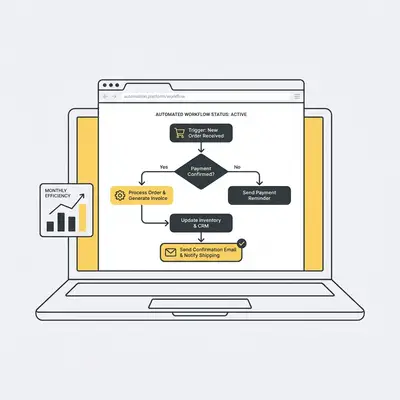
How do automated feedback loops improve your onboarding process?
Automated feedback loops trigger a survey or check-in request once the onboarding phase is complete. This allows you to capture the client’s sentiment while the experience is fresh. You gain actionable data to refine your processes and identify bottlenecks that might be hindering your growth.
Quick Win: Keep your feedback survey to three questions or fewer. Ask: "How easy was the onboarding process?" and "What is one thing we could have explained better?"
Next Steps for Your Business
Automation is not about replacing your human touch; it is about removing the friction that prevents you from being human. Start by mapping out your current onboarding steps on a whiteboard. Identify the one task you repeat every single time a new client signs up—like sending a contract or a welcome email—and automate that first.
If you are ready to move beyond manual tasks, contact Evalics today for a custom automation audit. We help small businesses build workflows that save time and improve the client experience.