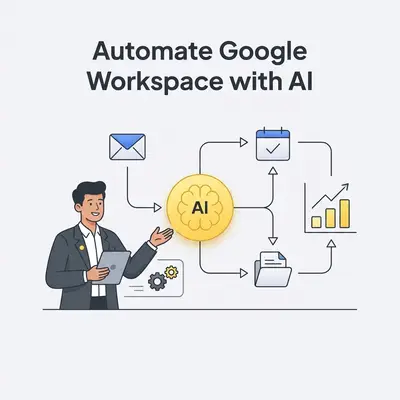
Running a small business means every minute counts. Manual, repetitive tasks often consume valuable time that could drive growth. But what if your Google Workspace could do more than just store documents and send emails?
What are the benefits of automating Google Workspace for SMBs?
Automating Google Workspace empowers small and medium-sized businesses (SMBs) by saving significant time, reducing manual errors, and freeing up staff for high-value tasks. It boosts productivity across operations, from sales and marketing to HR and project management. This happens without needing extensive coding or technical expertise, directly contributing to efficiency and growth.
Unlocking Efficiency and Growth
Automating your Google Workspace turns routine tasks into powerful, hands-free processes. This change helps your team focus on strategy and customer interaction, not endless admin.
- Time Savings: Automate repetitive tasks like data entry, email follow-ups, and document generation, reclaiming hours weekly.
- Reduced Errors: Minimize human error by letting AI handle precise, rule-based actions, ensuring accuracy every time.
- Scalability: Grow your operations without proportionally increasing manual workload, allowing your business to expand smoothly.
- Focus on Core Business: Reallocate employee time to strategic initiatives and customer engagement, fostering innovation and better service.
How can SMBs automate lead follow-up using Google Workspace?
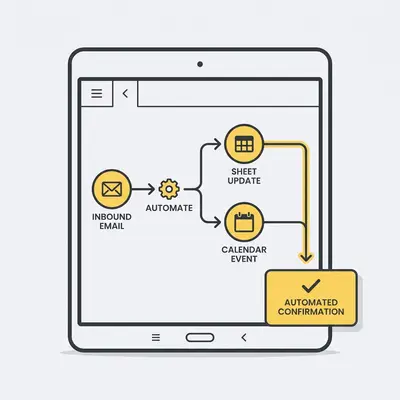
SMBs can automate lead follow-up by connecting new leads from forms (like Google Forms or a CRM) to a Google Sheet. This connection then triggers personalized email sequences in Gmail, and schedules reminders in Calendar for manual check-ins. This setup ensures timely communication, consistently nurtures leads, and significantly reduces the chance of missed opportunities due to manual oversight, ultimately boosting conversion potential.
Flow 1: Automated Lead Nurturing with Gmail & Google Sheets
Manual lead follow-up is a notorious bottleneck for small businesses, often leading to missed opportunities. This flow turns that challenge into a consistent, automated advantage.
- The Problem: Leads fall through the cracks; manual follow-ups are time-consuming and inconsistent, directly impacting sales.
- The Flow:
- Trigger: A new lead is added to a Google Sheet (e.g., from a Google Form submission, a webhook from your website, or a CRM export).
- Action 1: An AI system automatically sends a personalized welcome email from Gmail to the new lead, referencing their details from the sheet.
- Action 2: It schedules a follow-up reminder in Google Calendar for the sales team, ensuring no lead is forgotten.
- Action 3: The system updates the lead's status in the Google Sheet (e.g., "Welcome Email Sent"), maintaining clear records.
- Benefits for SMBs: Enjoy consistent and timely lead engagement, improved conversion rates, and free up your sales team for high-value interactions.
How can AI automate client onboarding processes?
AI can automate client onboarding by triggering a sequence of actions upon a new client sign-up, such as creating dedicated Google Drive folders, generating welcome documents in Google Docs from templates, and scheduling initial meetings in Google Calendar. This ensures a smooth, consistent, and professional client experience right from the start, minimizing manual setup time and allowing your team to focus on service delivery.
Flow 2: Streamlined Client Onboarding with Google Drive & Calendar
Manual onboarding is often a patchwork of tasks, prone to human error and inconsistency. This automation creates a seamless, professional start for every new client.
- The Problem: Manual onboarding is prone to errors, inconsistency, and consumes valuable administrative time that could be spent on client service.
- The Flow:
- Trigger: A new client is marked as "onboarded" in a Google Sheet or your CRM.
- Action 1: The system creates a dedicated client folder in Google Drive with pre-set subfolders (e.g., "Contracts," "Deliverables," "Communication").
- Action 2: It generates a welcome letter in Google Docs using a template, auto-populating client-specific data like their name, project details, and key contacts.
- Action 3: An introductory email is sent from Gmail to the client, providing access links to their new Drive folder and important resources.
- Action 4: An initial kickoff meeting is scheduled in Google Calendar for the relevant team members and the client, with all necessary details included.
- Benefits for SMBs: Make a professional first impression, drastically reduce administrative burden, and ensure all necessary onboarding steps are completed consistently every time.
How can AI improve internal communication and project reporting?
AI can improve internal communication and project reporting by automatically compiling project updates from Google Docs into concise summary reports and sharing them proactively via Google Chat or Spaces. This keeps teams informed without manual aggregation, ensuring everyone has access to the latest progress and preventing communication silos. The result is better-coordinated efforts and less time spent chasing updates.
Flow 3: Simplified Project Updates with Google Docs & Chat
Dispersed project information and constant requests for updates can slow down even the most agile small teams. This flow centralizes updates and pushes them to where they're needed.
- The Problem: Dispersed project information means team members spend too much time compiling updates or chasing information, hindering collaboration.
- The Flow:
- Trigger: Scheduled daily or weekly (e.g., Monday morning at 9 AM) or when a specific project update Google Doc is significantly updated.
- Action 1: AI reads specific, designated sections (e.g., "Progress This Week," "Blockers," "Next Steps") within the project update Google Doc.
- Action 2: It compiles a concise summary of key progress, identified blockers, and upcoming next steps.
- Action 3: The summary is then posted directly to a relevant Google Chat Space, or a group email is sent via Gmail to the project team.
- Benefits for SMBs: Gain real-time project visibility, significantly reduce meeting overhead, and foster transparent and efficient team communication.
Quick Win: Automating just one repetitive task, like sending welcome emails, frees up real time each week that your team can redirect to more impactful client work.
What are the first steps for SMBs to implement AI automation?
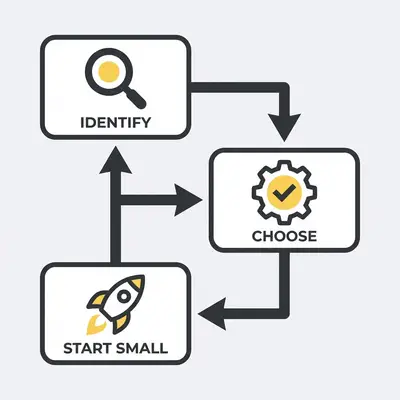
The first steps for SMBs to implement AI automation involve identifying repetitive tasks, choosing the right automation platform like Evalics that integrates seamlessly with Google Workspace, and starting with a single, high-impact flow to test and refine the process. Gradually expanding automation from there ensures a smooth transition, builds internal confidence, and delivers measurable ROI.
Identify Repetitive Tasks
- List out daily, weekly, or monthly tasks that are rule-based and consume significant time. Think about data entry, simple email responses, or routine report generation.
Choose the Right Platform
- Select an AI automation platform (like Evalics) that offers no-code solutions, strong Google Workspace integration, and dedicated support tailored for SMBs. Look for user-friendly interfaces.
Start Small, Then Scale
- Pick one or two simple, high-impact workflows to automate first, measure their success, and then gradually expand your automation efforts across other areas of your business. This approach minimizes disruption.
Frequently Asked Questions about Google Workspace Automation
Frequently asked questions about Google Workspace automation cover topics ranging from specific benefits for small businesses and technical requirements to data security and potential challenges. Addressing these concerns helps those new to AI-powered efficiency integrate automation into their daily operations confidently.
Why should small businesses use AI for Google Workspace automation?
AI-powered automation helps small businesses by eliminating mundane tasks, ensuring consistent operations, and providing data-driven insights. It allows teams to focus on strategic growth activities, improves customer satisfaction through faster responses, and scales operations without needing to hire more staff. This directly impacts the bottom line and fosters a more competitive edge.
Do I need coding skills to set up these automations?
No, platforms like Evalics are designed for no-code or low-code automation, meaning you don't need coding skills. They offer intuitive drag-and-drop interfaces and pre-built templates, making it accessible for any small business owner or team member to create powerful workflows. You can build robust automations without relying on developers or complex scripting.
What are common challenges when automating Google Workspace?
Common challenges include identifying the right tasks to automate, ensuring data privacy and security, managing integration complexities with other tools, and overcoming initial team resistance to new processes. Choosing a user-friendly platform, starting with simple, well-defined flows, and communicating benefits to your team can effectively mitigate these issues.
How secure is AI automation with Google Workspace data?
Reputable AI automation platforms prioritize data security, adhering to strict privacy protocols and encryption standards. They typically integrate via secure APIs (Application Programming Interfaces), ensuring your Google Workspace data remains protected and only accessible with explicit permissions. Evalics, for example, is built with enterprise-grade security, complying with major data regulations like GDPR and CCPA.
Pro Tip: Look for automation platforms that offer pre-built templates for common Google Workspace tasks. These templates drastically cut down setup time, letting you implement flows in minutes rather than hours.
Ready to implement these powerful Google Workspace automations for your business? Evalics makes it easy to save time and boost productivity without writing a single line of code. Visit Evalics.com today for a free consultation and discover how smart AI flows can transform your daily operations.