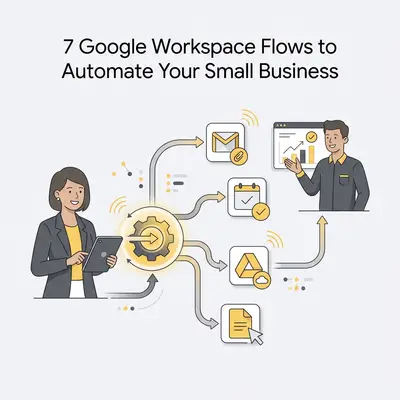
Google Workspace automation is the practice of using software triggers to perform repetitive tasks across your business apps without human intervention. By connecting tools like Gmail, Drive, and Sheets, you remove manual data entry and human error.
Why Should Small Businesses Automate Google Workspace?
Automating Google Workspace allows you to reclaim hours of manual work by connecting your core business apps. When you link Gmail, Drive, and Sheets, you eliminate repetitive data entry and reduce human error. This ensures your critical business processes run in the background, allowing you to focus on high-level growth strategies rather than busywork.
Key Insight: Automation isn't about replacing your team; it is about removing the "robot work" from your employees so they can focus on high-value client interactions.
How Can You Automate Lead Capture from Gmail?
Automating lead capture ensures that every inquiry sent to your inbox is immediately logged into your CRM or spreadsheet without manual intervention. By using AI tools like Make or Zapier to parse email content, you extract contact details and project requirements instantly. This ensures no potential client falls through the cracks while you manage operations.
- Pros: Instant response times and organized lead databases.
- Cons: Requires initial setup of parsing rules for varied email formats.
How Does Automated Document Filing in Google Drive Work?
Automated filing uses triggers to move, rename, and organize documents based on specific keywords or sender information. This keeps your cloud storage clutter-free and ensures that invoices, contracts, and project files are always exactly where your team expects them to be. You stop wasting time searching for lost files in a messy drive.
- Pros: Consistent folder structure and improved document security.
- Cons: Needs strict naming conventions to function effectively.
How Can You Streamline Meeting Follow-ups with Calendar?
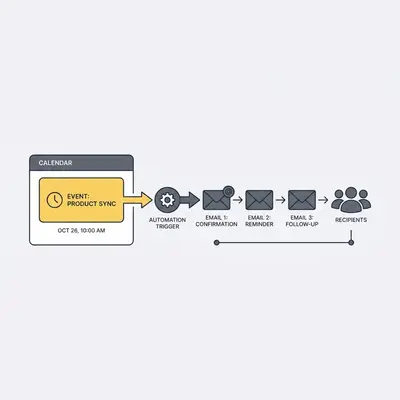
Automating meeting follow-ups involves triggering an email or Slack message immediately after a Google Calendar event concludes. This workflow sends meeting summaries, requests feedback, or provides next steps to attendees automatically. You maintain professional, consistent communication without typing a single follow-up email after your calls.
- Pros: Professionalism and higher engagement rates.
- Cons: Requires a standardized meeting template.
Pro Tip: Use a tool like Gemini to summarize your meeting transcripts, then have your automation tool email that summary to the client automatically.
How Does Automated Expense Tracking in Sheets Work?
Automated expense tracking pulls data from email receipts or digital invoices directly into a Google Sheet. By using AI to categorize expenses and calculate totals, you gain real-time visibility into your business burn rate and cash flow. This makes tax season significantly less stressful and ensures your records remain audit-ready.
- Pros: Real-time financial insights and audit-ready records.
- Cons: Requires integration with receipt-scanning software like Dext or Veryfi.
How Can You Automate Client Onboarding via Forms?
When a client submits a Google Form, automation instantly creates a new project folder in Drive, generates a contract, and sends a welcome email. This creates a seamless, high-end experience for your clients while removing the manual setup phase that often delays project kickoffs for small businesses.
- Pros: Faster time-to-value for clients and reduced administrative overhead.
- Cons: Complex initial setup for multi-step workflows.
Reality Check: Don't try to automate the entire onboarding process at once. Start by automating the folder creation, then add the contract generation once the first step is stable.
How Does Automated Task Assignment in Tasks Work?
Automated task assignment connects your incoming communications to Google Tasks, ensuring that every action item is tracked. When an email is flagged or a specific form is submitted, the system creates a task with a due date and assigns it to the appropriate team member. This keeps projects on schedule and improves team accountability.
- Pros: Accountability and clear project visibility.
- Cons: Requires team adoption of the Google Tasks interface.
How Can You Automate Social Media Content Scheduling?
By connecting a Google Sheet content calendar to your social media management tools, you automate the publishing process. Once a post is approved in your sheet, the automation pushes the content to your platforms. This allows you to manage your entire month of social media marketing from a single, centralized spreadsheet.
- Pros: Centralized content management and consistent posting schedule.
- Cons: Limited ability to handle last-minute platform-specific changes.
Quick Win: Download our Automation Starter Kit to get pre-built templates for these 7 workflows and start saving time today.