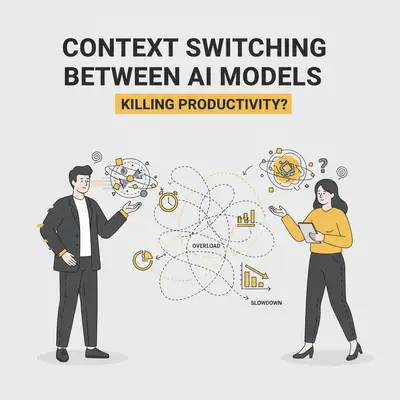
You likely have at least three tabs open right now. One for ChatGPT, one for Claude, and maybe one for Gemini or Perplexity.
You copy a paragraph from one, paste it into another to "double-check" the reasoning, and then move to a third to generate an image or handle a large document. It feels like you are assembling a super-team of AI assistants. You are leveraging the best tool for every micro-task.
But are you actually getting more done?
"Model hopping"—constantly switching between AI tools during a single workflow—is becoming a common habit for power users. While it seems efficient to use Claude for coding and Gemini for large documents, the friction of context switching often destroys the productivity gains you think you’re getting.
Here is the reality of managing a multi-model workflow, the hidden costs you aren't calculating, and how to fix it without giving up the superpowers of each model.
The "Best Tool for the Job" Trap
The logic behind context switching is sound on paper. In late 2025, the AI landscape is highly specialized:
- Claude (Anthropic): Generally regarded as the king of coding, nuance, and following complex system instructions.
- Gemini (Google): The leader in context windows (2 million+ tokens) and native integration with Google Workspace.
- ChatGPT (OpenAI): The best generalist with superior reasoning capabilities (O1/O-series) and voice features.
Naturally, you want the coding power of Claude and the document analysis of Gemini. But when you do this manually via browser tabs, you introduce a "toggle tax."
Reality Check: Every time you switch models, you reset the context. You have to re-explain the project, re-paste the background data, and re-establish the tone. This "re-prompting" time often exceeds the time saved by using the "better" model.
The Hidden Downsides of Manual Context Switching
If you are manually toggling between interfaces, you are likely facing three major drains on your business.
1. Fragmentation of "Project Memory"
When you work in a single thread (like a long ChatGPT conversation), the model builds up a "memory" of your project constraints, coding style, and goals.
When you switch to Claude for a specific task, that memory is gone. You are starting from zero. You might get a great snippet of code from Claude, but it might not match the variable naming convention you established in ChatGPT 30 minutes ago.
This leads to "integration hell," where you spend hours stitching together disparate outputs that don't quite fit together.
2. The Financial Cost (Subscription Stacking)
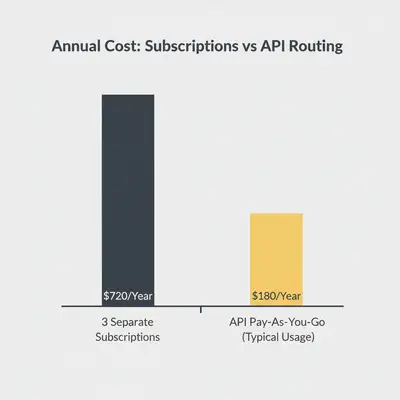
Most premium models cost roughly $20/month.
- ChatGPT Plus: $20
- Claude Pro: $20
- Gemini Advanced: $20
That is $720/year per employee just for chat interfaces. For a small team of five, that’s $3,600/year.
Key Insight: Most users rarely hit the usage caps on all three services simultaneously. You are paying for redundant capacity.
3. Cognitive Load and Prompt Fatigue
Different models require different prompting styles.
- Claude prefers XML tags and verbose context.
- ChatGPT prefers conversational, iterative instruction.
- Gemini handles data dumps well but can be sensitive to safety filters.
Switching tools forces you to switch mental gears. You have to remember how to talk to the machine. This cognitive load reduces your ability to focus on the actual strategic work.
When Context Switching Actually Makes Sense
Despite the downsides, sticking to one model blindly is also a mistake. There are specific "hard limits" where switching is necessary.
1. The "Context Window" Wall
If you need to analyze a 500-page PDF or a codebase with 50 files, ChatGPT (typically capped around 128k context in standard chat) will fail. It will "forget" the beginning of the document.
In this scenario, switching to Gemini 1.5 Pro (with its 2M+ token window) isn't a luxury; it's a requirement.
2. The "Reasoning" Check
If you are doing complex logic or math, and your primary model seems stuck in a loop, switching to a "reasoning" model (like OpenAI's o1-preview or similar high-compute models) can break the deadlock. Using a second model as a "QA" (Quality Assurance) agent to critique the work of the first model is a valid strategy.
3. Content Policy Refusals
Sometimes a model will refuse a benign request due to over-sensitive safety filters. Having a backup model ensures your workflow doesn't grind to a halt because one AI decided your marketing copy sounded too aggressive.
The Solution: Switch via Automation, Not Tabs
The most efficient way to handle context switching is to stop doing it manually. Move the complexity from your browser tabs into an automation workflow.
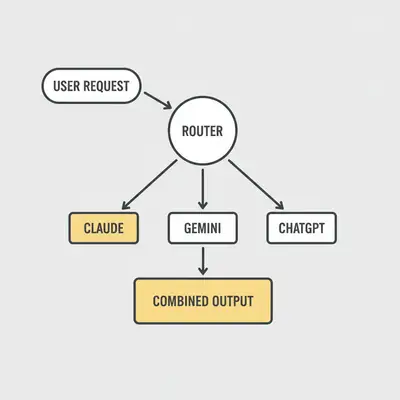
By using tools like n8n or Make, you can build a "Model Router." This allows you to use the best model for each step of a process without fragmented memory.
How a "Model Router" Works
Instead of you pasting text between tabs, you set up a workflow:
- Input: You send a request via a form or Slack command.
- Routing Logic: The automation decides which model to call based on the task.
- Is it a summary? Send to Gemini Flash (Cheap/Fast).
- Is it complex logic? Send to ChatGPT o1 (Smart/Expensive).
- Is it creative writing? Send to Claude Sonnet (Human-like).
- Unified Output: The system returns the answer to you in one place.
Why This is Better
- Unified Context: You can pass the same "System Prompt" (your brand voice, rules) to every model automatically.
- Cost Efficiency: You pay via API, which is often cheaper than maintaining three $20 subscriptions if you aren't a heavy user.
- No Copy-Pasting: The data flows automatically.
Pro Tip: Learn more about structuring these workflows in our guide on Make vs n8n for AI automation.
Practical Rules for the "Model Hopper"
If you aren't ready to build automations and must stick to browser tabs, follow these rules to minimize productivity loss.
1. Pick a "Daily Driver"
Commit to one platform for 80% of your work. Learn its quirks, shortcuts, and prompting style deeply.
- If you write code 6 hours a day: Claude.
- If you use Google Docs/Drive heavily: Gemini.
- If you need web search and general assistance: ChatGPT.
2. Batch Your Switches
Don't switch every 5 minutes. If you need to use Gemini for long-document analysis, do all your document analysis in a one-hour block. Finish that task, export the results, and then close the tab.
3. Standardize Your Context
Keep a "Context File" (a simple text document) open on your computer. This file should contain:
- Project summary.
- Key constraints.
- Stylistic preferences.
When you switch models, paste this file first. This quickly brings the new model up to speed, reducing the "re-prompting" tax.
Conclusion
Context switching between AI models is a double-edged sword. Used strategically, it gives you access to the specific superpowers of Gemini, Claude, and ChatGPT. Used reactively, it fragments your data, drains your wallet, and breaks your focus.
For most business owners, the goal should be consolidation. Pick one main interface for your daily thinking, and relegate the specialized tasks to automated background workflows where the "switching" happens instantly and without your manual effort.
Don't let the tools manage you. Pick your stack, stick to it, and automate the rest.
Related Resources
- Grok AI vs Claude vs Gemini: Which Model Fits Which Job?
- Building Your AI Platform Tech Stack
- Free vs Paid AI Tools: What's Actually Worth Your Money?
- Make vs n8n: 2025 AI Automation Comparison
Official Sources
By Kevin Michael Schindler, AI Automation Expert at Evalics