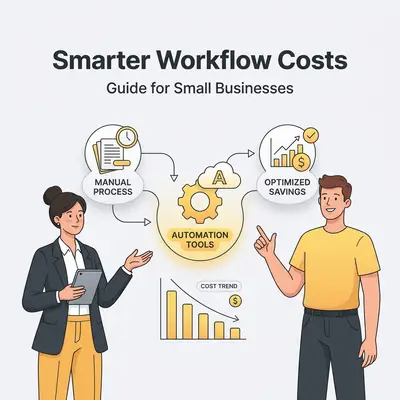
Workflow automation is the practice of using software to execute repetitive business tasks without human intervention. For small businesses, the true cost of implementing these systems typically ranges from $500 for basic DIY setups to over $10,000 for custom-engineered solutions. These costs depend on three variables: software subscriptions, initial development labor, and ongoing maintenance.
Understanding these variables is essential for calculating your specific return on investment (ROI) before committing to a platform. Map the cost of the build against the hours the process currently consumes, and you can tell whether a project pays for itself inside six months or never.
![_ [GRAPH] Column chart. DIY (No-Code) - $200. Automation Agency - $4,500. Custom Development - $10,000+. Chart title: Upfront Implementation Costs by Path at top. Alt text: A bar chart comparing the initial financial investment required for DIY, agency-led, and custom-built automation projects](/blogs/cost_implement_workflow/-graph-column-chart-diy-nocode-200-automation-agen-400w.webp)
Why should small businesses choose between DIY, agency, or custom solutions?
The right path depends on your technical capacity, budget, and the complexity of your business processes. DIY solutions offer low upfront costs but require significant time investment to learn platforms like Make or Zapier. Agencies provide speed and expertise at a premium, while custom solutions offer high scalability for businesses with unique, proprietary workflows.
| Option | Upfront Cost | Ongoing Cost | Technical Skill Required |
|---|---|---|---|
| DIY (No-Code) | $0 - $200 | Low ($50-$200/mo) | Moderate |
| Automation Agency | $2,000 - $7,000 | Moderate ($300+/mo) | Low |
| Custom Development | $10,000+ | High ($500+/mo) | None |
Reality Check: Automating a bad process only makes it faster to fail. Ensure your manual workflow is optimized before applying AI or automation to avoid scaling inefficiency.
How do you build a budget for your automation project?
Building an accurate budget requires accounting for both direct software costs and indirect labor costs. Start by auditing your current manual processes to identify the "cost of inaction," then allocate funds for the initial setup, platform subscriptions, and a contingency buffer for troubleshooting. A well-planned budget ensures that automation pays for itself quickly.
Identifying hidden operational costs
Hidden costs often lurk in the form of "context switching" and manual data entry errors. When an employee spends 10 hours a week moving data between a CRM and an accounting tool, the cost is not just their hourly wage. It includes the lost opportunity cost of what they could have achieved during those hours.
Calculating the ROI of time saved
To calculate ROI, multiply the hours saved per week by your team’s average hourly rate. If you save 10 hours a week at a $30/hour rate, you reclaim $1,200 in value monthly. If your automation stack costs $200 per month, your net monthly gain is $1,000. This clear math justifies the initial investment.
What is the framework for selecting the right automation tools?
The ideal framework for selecting tools involves evaluating your current tech stack, defining your integration requirements, and assessing the scalability of the platform. Prioritize tools that offer native integrations with your existing CRM, accounting software, and communication platforms to minimize the need for expensive custom middleware like Zapier or Make.
- Audit your stack: List every tool your team uses daily.
- Identify bottlenecks: Pinpoint where data moves manually between these tools.
- Check native support: Look for built-in "connectors" in your existing software.
- Test for scale: Ensure the tool can handle your projected volume for the next 18 months.
- Evaluate security: Confirm the platform meets your industry’s data privacy standards.
Pro Tip: Don't automate a broken process. Always map out your manual workflow on a whiteboard before spending a single dollar on automation software.
How can you minimize implementation costs without sacrificing quality?
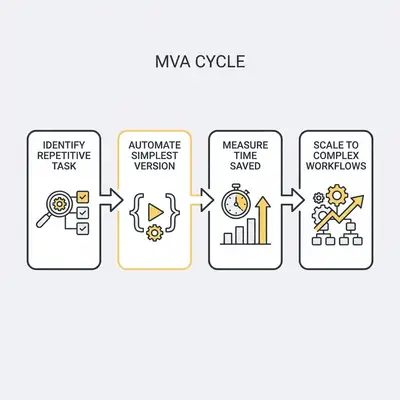
You can minimize costs by starting with a "Minimum Viable Automation" (MVA) approach, focusing on high-impact, low-complexity tasks first. By automating repetitive, high-volume tasks like lead entry or invoice generation, you generate immediate time savings. These savings can be reinvested into more complex, high-value automations later, effectively self-funding your digital transformation.
What are the common pitfalls to avoid during implementation?
The most common pitfalls include over-automating complex human-centric tasks, failing to document workflows, and neglecting security protocols. Many businesses also fall into the trap of "tool sprawl," where they pay for multiple overlapping subscriptions. Avoid these by focusing on a centralized automation hub and ensuring your team is trained to manage the new systems.
Key Insight: Automation is a living system, not a "set it and forget it" project. Plan for quarterly reviews to ensure your workflows still align with your current business goals.
Practical Next Steps
To begin your automation journey, start by tracking your time for one week to identify the most repetitive tasks. Once you have identified a high-volume, low-complexity process, sign up for a free trial of a platform like Make or Zapier. Build a simple, two-step automation to prove the concept, measure the time saved, and use that data to justify a larger budget for more complex integrations.