
Customer support automation is the use of software and AI to handle repetitive service tasks without human intervention. For small businesses, this means providing 24/7 support, reducing response times, and cutting operational costs.
Why Should Small Businesses Automate Customer Support?
Automation allows small businesses to scale support without increasing headcount. By handling routine inquiries, AI tools eliminate human error and free your team to focus on high-value customer relationships. This shift transforms your support department from a costly expense into a scalable growth engine that works while you sleep.
![_ [GRAPH] Column chart. Manual Support - 15 Minutes. Automated Support - 10 Seconds. Chart title: Average Response Time Comparison at top. Alt text: Column chart showing the drastic reduction in response time from 15 minutes manually to 10 seconds with automation](/blogs/customer_support_automation/-graph-column-chart-manual-support-15-minutes-auto-400w.webp)
How Do AI Chatbots Handle Routine Inquiries?
AI chatbots provide instant, 24/7 responses to common customer questions like "Where is my order?" or "What are your business hours?" By integrating with your internal knowledge base, these bots resolve simple issues instantly. This ensures customers never wait for a human agent to become available during off-hours.
- Pros: Immediate response, 24/7 availability, and low cost per interaction.
- Cons: Can struggle with complex, nuanced, or highly emotional issues.
Quick Win: Start by programming your chatbot to answer your top five most frequently asked questions. This usually covers 60% of your incoming ticket volume.
How Does Automated Ticket Routing Improve Efficiency?
Automated ticket routing uses AI to analyze incoming emails or messages and categorize them by intent, urgency, or language. The system then assigns the ticket to the most qualified team member. This prevents bottlenecks and ensures that high-priority issues are addressed by the right person immediately.
- Pros: Reduces manual sorting time and ensures faster resolution for VIP clients.
- Cons: Requires initial setup and periodic maintenance of routing rules.
How Can Automated Email Sequences Nurture Customers?
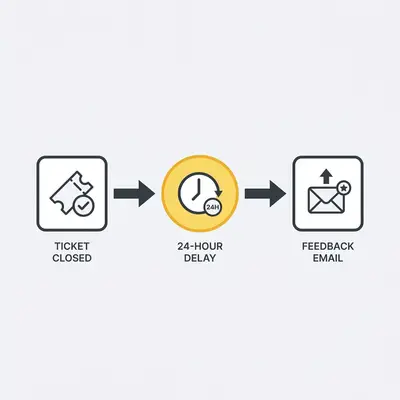
Automated email sequences trigger personalized follow-ups based on specific customer actions, such as a purchase or a support ticket closure. These sequences provide helpful resources, request feedback, or offer troubleshooting tips. This keeps your brand top-of-mind and builds trust without requiring manual intervention from your staff.
- Pros: Consistent communication and improved long-term customer retention.
- Cons: Risk of appearing "robotic" if the templates lack personalization.
How Does Sentiment Analysis Enhance Support Quality?
Sentiment analysis tools scan incoming messages to detect the customer's emotional state, such as frustration or satisfaction. If the AI detects negative sentiment, it automatically flags the ticket for a manager’s review. This allows you to de-escalate potential PR issues before they spiral into public complaints.
- Pros: Proactive conflict resolution and identification of training gaps.
- Cons: Requires sophisticated AI to accurately interpret sarcasm or regional slang.
Pro Tip: Use sentiment analysis to prioritize "at-risk" customers in your support queue. Addressing a frustrated customer first prevents churn and protects your brand reputation.
How Do Self-Service Knowledge Bases Reduce Support Volume?
A self-service knowledge base is an automated portal where customers search for answers to common problems independently. By providing searchable articles, video tutorials, and FAQs, you empower customers to solve their own issues. This significantly reduces the volume of incoming support tickets, allowing your team to focus on complex tasks.
- Pros: Empowers customers and drastically reduces support team workload.
- Cons: Requires regular content updates to remain relevant and accurate.
How Does Automated Feedback Collection Drive Growth?
Automated feedback collection triggers surveys immediately after a support interaction is resolved. By capturing the "Voice of the Customer" in real-time, you gain actionable data on your support team's performance and product usability. This data is essential for making informed decisions about your business growth.
- Pros: High response rates and real-time performance tracking.
- Cons: Risk of survey fatigue if sent too frequently to the same customer.
How Does CRM Integration Create a Unified Customer View?
CRM integration automatically pulls customer history, purchase data, and previous interactions into your support dashboard. This gives your team the full context of a customer's journey. They can provide faster, more personalized resolutions without the customer having to repeat their information or explain their history.
- Pros: Highly personalized support and significantly faster resolution times.
- Cons: Requires clean data and robust system integration between your tools.
Key Insight: Automation isn't about replacing humans. It is about giving your humans the data they need to be superheroes for your customers.
Next Steps for Your Business
To begin, identify the most repetitive task your team handles today. If your inbox is flooded with "Where is my order?" emails, start by implementing a simple chatbot or an automated status lookup tool. Once that is running, move to automated ticket routing to organize your workflow. By tackling one process at a time, you can build a robust support system that scales alongside your business.