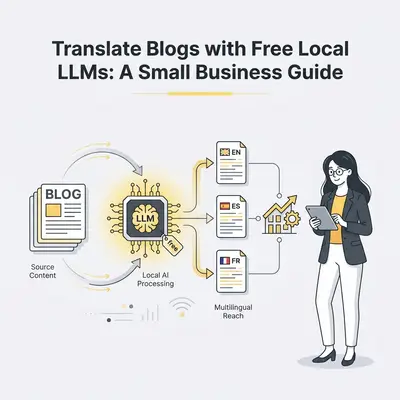
Translating your blog content is crucial for reaching a wider audience and expanding your customer base. By making your valuable insights accessible in multiple languages, you can tap into new markets, build stronger international relationships, and ultimately drive more traffic and sales to your small business.
Why Translate Your Small Business Blog?
Expanding your reach beyond your native language is no longer a luxury; it's a strategic imperative for growth. For small businesses, a translated blog can be a powerful engine for customer acquisition and brand building. Imagine opening your doors to customers in Germany, Japan, or Brazil, all through the content you've already created. This isn't just about reaching more people; it's about connecting with them on a deeper level by speaking their language.
Reaching New Markets and Customers
The internet has dissolved geographical boundaries, but language remains a significant barrier. By translating your blog, you directly address this barrier. For instance, a study by Common Sense Advisory found that 75% of consumers prefer to buy products and services in their native language. This statistic alone highlights the untapped potential waiting for businesses that invest in multilingual content. You can attract customers who might never have found you otherwise, opening up entirely new revenue streams and customer segments.
Building Global Brand Credibility
When potential customers see your content available in their language, it signals professionalism and a genuine commitment to serving a diverse audience. This builds trust and credibility, making your brand more appealing than competitors who only operate in a single language. It shows you understand and value their needs, fostering a stronger connection and encouraging them to engage with your business.
What Are Local LLMs and Why Are They Great for Translation?
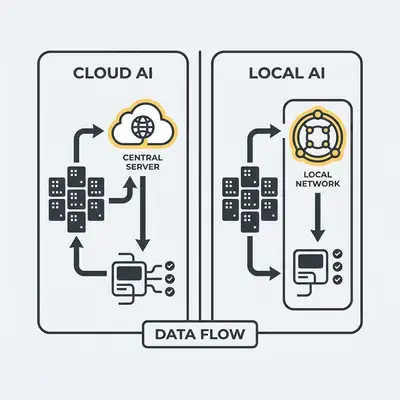
Local Large Language Models (LLMs) are AI models that run directly on your computer or local server. This offers significant advantages for small businesses, especially when it comes to sensitive tasks like translation. Unlike cloud-based services, local LLMs provide enhanced privacy, cost-effectiveness, and offline functionality. This makes them an ideal solution for translating markdown blogs without relying on external, potentially costly, or data-sharing cloud services.
Understanding Local LLM Advantages
The primary benefit of local LLMs is control. You download the model, install the software, and run the translation process on your own hardware. This means your blog content never leaves your premises, offering a level of security that cloud services often cannot match. Furthermore, once you have the hardware and the model, the operational cost for translation is minimal, primarily consisting of electricity. This eliminates recurring subscription fees often associated with online translation tools, making it a more sustainable and predictable expense for small businesses.
Privacy and Security Benefits
For small businesses handling proprietary information, customer data, or sensitive business strategies, privacy is paramount. Cloud-based translation services, while convenient, often involve sending your data to third-party servers. This can raise concerns about data breaches, intellectual property theft, or compliance with data protection regulations. Local LLMs circumvent these risks entirely. Your blog content remains on your secure network, giving you complete peace of mind. This is particularly important for businesses in regulated industries or those dealing with confidential information.
How Can You Set Up a Local LLM for Translation?
Setting up a local LLM involves a few key steps: choosing suitable hardware, selecting an appropriate LLM model, and installing the necessary software. This process allows you to run powerful AI translation capabilities directly on your own systems, giving you full control over your data and translation workflow. While it might sound technical, many user-friendly tools are emerging to simplify this process.
Hardware and Software Considerations
To run LLMs locally, you'll need a computer with sufficient processing power, particularly a robust GPU (Graphics Processing Unit). The more powerful your GPU, the faster and more efficiently your LLM will operate. For translation tasks, which can be computationally intensive, a dedicated graphics card with ample VRAM (Video RAM) is highly recommended. Software-wise, you'll need an operating system that supports the LLM framework you choose, such as Windows, macOS, or Linux. Many LLM interfaces are designed to be user-friendly, often with graphical interfaces that simplify the setup and operation.
Choosing the Right LLM Model
The LLM model you choose is critical for translation quality. Many open-source LLMs are available, and some are specifically fine-tuned for translation tasks or exhibit strong multilingual capabilities. Models like Llama, Mistral, or even specialized translation models can be downloaded and run locally. When selecting a model, consider its size (larger models are generally more capable but require more resources), its training data (look for models trained on diverse multilingual datasets), and community reviews regarding its translation performance. For instance, models that have been fine-tuned on parallel corpora (texts in multiple languages) will generally yield better translation results.
Step-by-Step: Translating Your Markdown Blog with Local LLMs
This guide will walk you through the essential steps to translate your markdown blog posts using a local LLM. From preparing your files to running the translation and reviewing the output, we'll cover everything you need to know to get started.
Step 1: Prepare Your Markdown Files
Ensure your markdown files are clean, well-formatted, and free of any complex or proprietary syntax that might confuse the LLM. This means removing any unusual HTML tags, custom markdown extensions, or deeply nested structures that aren't standard. Simple, clean markdown will yield the best results. For example, ensure your headings, lists, and emphasis are all using standard markdown syntax.
Step 2: Install and Configure Your Local LLM
Follow the installation instructions for your chosen LLM software. This might involve downloading a specific application like Ollama, LM Studio, or a Python-based framework. Once installed, ensure it's configured to access the LLM model you've downloaded. This typically involves pointing the software to the model's file location or selecting it from a list of available downloaded models within the application.
Step 3: Select Your Translation Model
Choose an LLM model specifically trained for translation tasks or one that demonstrates strong multilingual capabilities. Many open-source models are available on platforms like Hugging Face. Look for models that explicitly mention translation performance or have been fine-tuned on multilingual datasets. For example, a model fine-tuned on a large corpus of English-to-Spanish translations will likely perform better for that specific language pair than a general-purpose LLM.
Step 4: Input Your Markdown Content
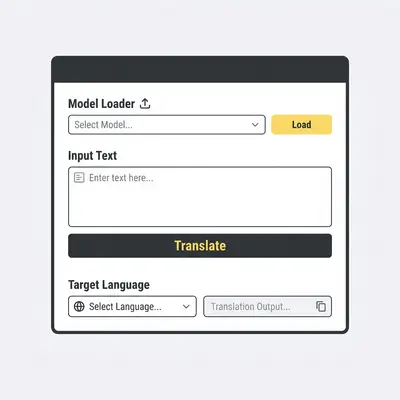
Load your markdown blog post into the LLM interface or command line. Most local LLM applications provide a text input area where you can paste your markdown content. If you're using a command-line interface, you'll typically pass the content as an argument or read it from a file.
Step 5: Specify Target Languages
Clearly indicate the languages you want to translate your blog into. This is usually done through a dropdown menu or by specifying language codes (e.g., "es" for Spanish, "fr" for French) in the LLM's settings or prompt. For example, you might instruct the LLM: "Translate the following English text into Spanish and French."
Step 6: Run the Translation Process
Initiate the translation and allow the LLM to process your content. This can take anywhere from a few seconds to several minutes, depending on the length of your blog post, the complexity of the model, and the power of your hardware. You'll see the translated text appear in the output area of your LLM application.
Step 7: Review and Refine Translations
Carefully check the translated output for accuracy, fluency, and cultural appropriateness. While LLMs are powerful, they are not perfect. Human review is essential to catch subtle nuances, idiomatic expressions, and cultural context that AI might miss. Make any necessary edits to ensure the translated content flows naturally and accurately conveys your original message.
Pro Tip: Always proofread translations thoroughly. While LLMs are powerful, human review is essential for nuanced language and cultural context.
Common Pitfalls to Avoid When Translating with Local LLMs
Navigating the world of local LLMs for translation comes with its own set of challenges. Being aware of common pitfalls can save you time, effort, and ensure higher quality translations for your small business blog.
Inaccurate or Awkward Translations
One of the most common issues is translations that are grammatically correct but sound unnatural or miss the intended nuance. This can happen if the LLM model isn't specifically trained for high-quality translation or if the source text contains idioms, slang, or cultural references that are difficult for AI to interpret. For example, a direct translation of an English idiom might make no sense in another language.
Over-reliance on Automated Output
It's tempting to accept the LLM's output without question, but this can lead to errors that damage your brand's credibility. Always remember that AI is a tool, not a replacement for human judgment. Thoroughly review and edit all translated content, especially for critical business communications or marketing materials. A poorly translated blog post can be worse than no translation at all.
Technical Setup Challenges
Setting up a local LLM can sometimes be technically demanding, especially for users who are not familiar with AI frameworks or command-line interfaces. Hardware compatibility issues, driver problems, or complex software configurations can be frustrating. However, the availability of user-friendly interfaces like Ollama and LM Studio is significantly lowering this barrier to entry.
Frequently Asked Questions
How much does it cost to run a local LLM for translation?
Running a local LLM for translation primarily involves the initial cost of hardware (a powerful computer with a good GPU) and electricity. Unlike cloud-based services, there are no recurring subscription fees for using the LLM itself, making it a cost-effective solution for small businesses over time. The main ongoing cost is electricity, which is generally much lower than monthly API fees for cloud translation services.
Can local LLMs handle complex technical jargon?
The ability of local LLMs to handle complex technical jargon depends heavily on the specific model's training data. Some models are better equipped than others. If your blog contains highly specialized technical terms, you may need to choose a model that has been trained on relevant technical literature or consider fine-tuning a model with your own technical documentation. You might also need to use specialized translation tools or glossaries for highly technical content.
What if my markdown has special formatting?
Markdown with special formatting can sometimes be challenging for LLMs. It's best to simplify formatting where possible before translation or be prepared to manually reapply formatting to the translated output to ensure it renders correctly. For instance, complex tables or embedded code blocks might not translate perfectly. You may need to reformat these sections after the translation is complete.
How do I ensure the translated content sounds natural?
Ensuring natural-sounding translations requires careful review and editing by a human. While LLMs provide a good starting point, a human reviewer with native language proficiency is essential to catch subtle nuances, idiomatic expressions, and cultural context that AI might miss. This human touch is what elevates a functional translation to one that truly resonates with your target audience.
Next Steps for Your Multilingual Blog
Ready to expand your reach? Start by identifying your target languages based on market research. Then, explore user-friendly local LLM interfaces like Ollama or LM Studio. Download a capable multilingual model and experiment with translating a few of your most important blog posts. Remember to always review and refine the output. By taking these steps, you can unlock new markets and connect with a global audience, all while maintaining control over your data and costs.