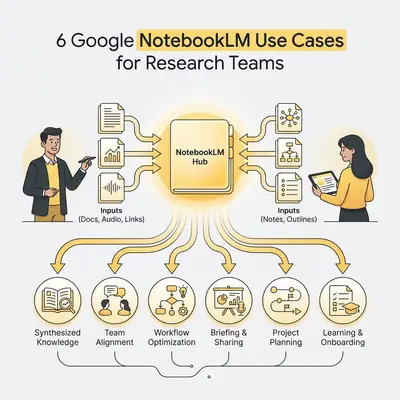
NotebookLM has quietly become one of the most useful AI tools for anyone who works with large volumes of documents. The concept is simple but powerful: you upload your own sources—up to 50 documents, PDFs, or web pages—and the AI answers questions strictly based on those sources, with citations. No hallucinations from training data. No invented references. Just answers from your documents, with a pointer to exactly where in the source the answer came from.
That grounded, citation-first design makes it genuinely useful for research workflows where accuracy matters. This post covers six specific use cases where NotebookLM saves real time for business teams.
Who this is for: Teams and individuals who regularly work with large amounts of text-based information: strategy, legal, product, research, sales, and operations roles that involve reading, synthesizing, and working with documents.
Why NotebookLM Works Differently Than General AI
The most important thing to understand about NotebookLM is its design constraint: it only answers from what you give it. It will not invent information from outside your sources. If the answer is not in your documents, it tells you so.
This constraint is also its greatest strength for business use. When you need to trust an answer, knowing that it came from a specific section of a specific document you uploaded—with a citation you can click to verify—is more valuable than a confident-sounding answer that might be fabricated.
The trade-off: NotebookLM cannot supplement your sources with outside knowledge. If your uploaded documents have gaps, the AI cannot fill them. For business use, this is almost always the right trade-off—you want answers from your own sources, not the model's general knowledge.
The 6 Use Cases
1. Market Research Synthesis
The problem: Market research involves reading analyst reports, competitor websites, customer interview transcripts, industry papers, and news articles—and then synthesizing across all of them to form a coherent view. This synthesis work takes hours and often gets rushed.
How NotebookLM helps: Upload your research sources (analyst report PDFs, exported customer interview transcripts, competitor comparison documents, relevant articles) into a notebook. Then ask synthesis questions that previously required hours of careful reading:
- "What are the three most common customer pain points across the interview transcripts?"
- "How does Competitor A's pricing compare to Competitor B based on the uploaded documents?"
- "What market trends appear across multiple sources?"
- "What does the research suggest about the highest-value customer segment?"
NotebookLM synthesizes across all sources simultaneously, cites where each finding came from, and lets you verify any claim immediately.
Time saved: Research synthesis that previously took 3-4 hours of careful reading and note-taking compresses to 30-45 minutes: time to upload sources, formulate questions, and review the grounded answers.
Pro Tip: Add a "questions I need to answer" note as one of your sources at the start of a research project. NotebookLM will reference it as context for all your queries and help you systematically work through your research agenda.
2. Internal Knowledge Base Q&A
The problem: Institutional knowledge lives in documents that nobody reads. Onboarding guides, SOPs, past project write-ups, strategy decks, and team wikis are written once, consulted rarely, and searched through manually when someone needs something specific.
How NotebookLM helps: Create a NotebookLM notebook as a queryable knowledge base. Upload your key internal documents: team playbooks, product documentation, process guides, past strategy documents. Share the notebook with your team.
Instead of searching through Notion or a Google Drive folder hoping the right document appears, team members can ask:
- "What is our process for handling a customer refund request?"
- "What are the main arguments from the Q3 strategy deck?"
- "What did we decide about the EU market entry last time it was discussed in our documents?"
The AI answers from the uploaded documents and cites exactly which document and section.
Best applications: Onboarding new team members (upload everything they need to know, let them ask questions), customer support knowledge bases (product documentation + FAQ documents), team institutional memory (upload past retrospectives, decision logs, and meeting summaries).
Limitation: NotebookLM is not a live knowledge base—it only knows about documents you have manually uploaded. It will not automatically update when new documents are created. Build a habit of adding important new documents to the notebook when they are finalized.
3. Legal and Compliance Document Navigation
The problem: Legal and compliance documents—contracts, regulatory requirements, policy manuals, terms of service—are long, structured with jargon, and rarely read in full. Key obligations and restrictions are buried in sections that are easy to miss.
How NotebookLM helps: Upload the relevant legal or compliance documents and query them in plain language:
- "What are our obligations under Section 7 of this contract?"
- "What happens if we miss the payment due date?"
- "What are we prohibited from doing under this agreement?"
- "Where in the regulatory guidance is data retention addressed?"
- "What are the conditions under which either party can terminate?"
The answer comes with a citation pointing to the exact clause, so the person reading it can verify and read the full context themselves.
This is not legal advice. NotebookLM is telling you what the document says—you still need qualified legal review for interpretation and risk assessment. But it makes the document navigable for non-lawyers, which reduces the billable hours spent on basic question answering.
Best applications: Understanding your own contracts before renewal negotiations, navigating regulatory guidance relevant to a specific business decision, training operations staff on what specific compliance documents require.
4. Competitive Intelligence Dossiers
The problem: Sales and product teams need current, detailed knowledge about competitors—pricing, positioning, feature comparisons, customer complaints, recent changes. Building and maintaining this knowledge is ongoing work that typically falls to one person and quickly goes stale.
How NotebookLM helps: Create a notebook per major competitor. Upload: competitor pricing pages (saved as PDFs), product documentation, G2 and Capterra review exports, blog posts and announcements, press coverage.
Sales and product team members can then query the dossier:
- "What do G2 reviewers say are the biggest weaknesses of this product?"
- "How does their enterprise pricing structure work based on these documents?"
- "What new features did they announce in the last six months?"
- "What are the most common reasons customers say they switched away from them?"
The answers are grounded in the actual source material, not memory or assumptions.
Maintenance: Update the notebook when new significant content appears—a new pricing page, a major announcement, new review clusters. NotebookLM does not auto-update, so building a lightweight update cadence (monthly or quarterly per competitor) keeps the intelligence current.
5. Audio Overview for Long Reports
The problem: Long strategy documents, board reports, and research papers are important but time-consuming to read carefully. Busy stakeholders often skim or skip them entirely, missing content that matters.
How NotebookLM helps: NotebookLM's Audio Overview feature converts your uploaded sources into a conversational podcast-style summary—two AI voices discussing the key themes, findings, and takeaways. Stakeholders can listen to a 15-minute audio summary of a 60-page report during their commute or while doing other tasks.
Best applications:
- Board or leadership team preparation: upload the board pack, generate an audio overview for stakeholders to listen to before the meeting
- Weekly research digests: upload the week's most important documents and generate a 10-minute audio recap
- New employee onboarding: upload key documents and let new hires listen to an audio orientation
Limitation: The audio overview is a summary—it captures themes and highlights, not every detail. For documents where every section matters, the audio overview is a complement to reading rather than a replacement.
Pro Tip: Combine audio overview with notebook Q&A. Listen to the audio overview to get oriented, then use the Q&A to drill into specific sections that need more attention. This is significantly faster than reading the full document cold.
6. Customer Interview and Feedback Analysis
The problem: Qualitative research produces transcripts, survey open-ends, and feedback documents that contain valuable signal buried in volume. Finding the patterns requires reading everything carefully and taking notes—time-consuming and prone to confirmation bias.
How NotebookLM helps: Upload customer interview transcripts, NPS open-end responses, support ticket samples, or user research session notes. Then ask analytical questions:
- "What are the three most frequently mentioned pain points across these interviews?"
- "What do customers say they love most about the current solution?"
- "Are there any customers who mentioned a problem we have not heard before?"
- "What features do multiple customers mention wanting that we do not currently offer?"
NotebookLM identifies patterns across all uploaded transcripts simultaneously and cites which interview each finding came from—allowing you to go back and read the full context for any finding that warrants deeper exploration.
Best applications: User research analysis, customer discovery synthesis, NPS follow-up open-end analysis, support ticket theme identification.
Limitation: NotebookLM works best when the transcripts have clear speaker attribution and reasonably clean text. Poorly formatted transcripts or heavy jargon may produce less accurate pattern identification. Test with a subset before uploading large transcript sets.
Getting the Most From NotebookLM
Formulate specific questions. "Tell me about this document" produces a vague summary. "What are the three main risks identified in this document and what mitigations are suggested for each?" produces a precise, useful answer.
Use it iteratively. Start with a broad question, then drill into the specific answer that needs more context. NotebookLM maintains conversation context within a session.
Check the citations. NotebookLM's value proposition is grounded answers. Every answer includes citations—use them. If a finding matters, click to the source and verify.
Add a source with your own questions. Create a text note with the questions you need this research to answer, upload it as a source, and reference it in your queries. This gives NotebookLM useful context about your research intent.
Share notebooks with your team. One person curating a well-structured notebook and sharing it saves everyone the setup effort and creates a shared research resource.
NotebookLM Versus Other Research Tools
| Use Case | NotebookLM | Perplexity AI | Claude (Direct) |
|---|---|---|---|
| Answering from your own documents | ★★★★★ | ★★★☆☆ | ★★★★☆ |
| Current web information | ★☆☆☆☆ | ★★★★★ | ★☆☆☆☆ |
| Citation accuracy | ★★★★★ | ★★★★☆ | ★★★☆☆ |
| Audio overview generation | ★★★★★ | ✗ | ✗ |
| Flexible prompting | ★★★☆☆ | ★★★☆☆ | ★★★★★ |
The tools are complementary. NotebookLM for your own document analysis. Perplexity for current information from the web. Claude for tasks requiring flexible prompting and creative generation.
Want to build a team knowledge management system that combines NotebookLM, Perplexity, and your automation stack? Book a call at evalics.com/contact to design the research workflow that fits your team's information environment.