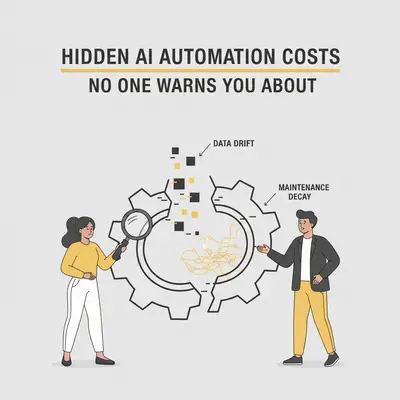
You sign up for a workflow tool for $29 per month. You connect your OpenAI account, expecting to pay another $10. Total budget: $40.
Two months later, your credit card is charged $450. Your automation stopped working on a Tuesday, costing you three leads. You spent your entire Saturday fixing a "JSON parse error."
The math on the sales page didn't account for reality.
Most small business owners treat AI automation like a Netflix subscription: set it and forget it. In reality, automation is software development. Even low-code solutions carry hidden taxes—some financial, some operational.
If you don't calculate these upfront, your "cost-saving" robot will become your most expensive employee. Here is the breakdown of the costs no one warns you about.
1. The Token "Multiplier Effect"
The most common financial shock comes from how AI models charge for usage. You aren't charged per question; you are charged per "token" (roughly 0.75 words).
Here is the trap: History counts.
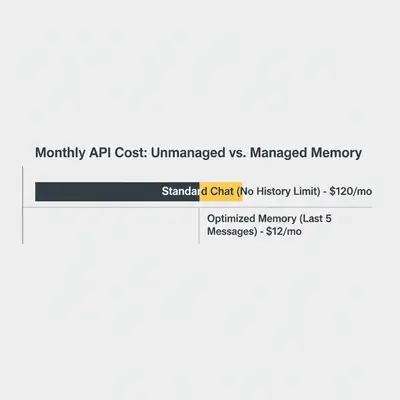
If you build a chatbot or a long-chain workflow, you often have to send the entire conversation history or entire document context back to the AI with every single new message so it "remembers" what is happening.
- Message 1: You send 100 tokens. Cost: $0.001.
- Message 10: You send 1,000 tokens (history) + 100 new tokens. Cost: $0.01.
- Message 50: You send 5,000 tokens per message.
Suddenly, a simple customer service bot costs 50x more per interaction at the end of a chat than at the start.
Key Insight: The "Context Window" is your wallet's enemy. Just because an AI can read a 500-page PDF doesn't mean you should pay for it to read that PDF 1,000 times a day.
For a deeper dive on calculating this, read our guide on how to calculate token costs for an AI project.
2. The "Operations" Tax (Make vs. n8n)
SaaS automation platforms like Zapier or Make.com charge by the "operation" or "task."
Beginners assume one automation run equals one operation. It rarely does.
- A trigger counts as one.
- Formatting the date counts as one.
- Searching your CRM counts as one.
- The AI request counts as one.
- Updating the row counts as one.
A single lead processing workflow might consume 15-20 operations. If you get 50 leads a day, that’s 30,000 operations a month. You just blew past the $29/month plan and are now in the $100+ tier.
This is why understanding platform architecture matters.
Quick Win: If your volume is high, consider self-hosted options. Moving from a per-task pricing model to a fixed server cost can save thousands. See our comparison of Make vs. n8n to see the math.
3. The Maintenance Reality
Automation is not static because the web is not static.
- Google changes its Gmail security policy.
- OpenAI deprecates a model version (e.g., GPT-3.5 to GPT-4o-mini).
- Your CRM changes how it labels "Phone Number" in the API.
When these break, your workflow stops. You don't pay in dollars; you pay in panic.
If you are the business owner, you have to stop selling to fix the code. If you hired a freelancer, you have to pay them an hourly rate to debug it.
The Rule of 10%: Budget 10% of the initial build cost per month for maintenance. If you paid $5,000 to have a system built, expect to spend $500/year (or 5-10 hours of your own time) keeping it alive.
4. Error Handling Costs
Cheap automation assumes everything goes right. Expensive automation plans for things going wrong.
When an AI hallucinates or an API times out, a cheap workflow just fails silently. You lose the data.
- The Cost: Lost leads, angry customers, missing invoices.
- The Fix: You need to build "error handlers." This doubles the size of your automation (more operations, more complexity) but ensures that if the AI fails, you get an email alert or the data is saved to a backup sheet.
Understanding how to debug automation is a critical skill if you want to avoid paying consultants for every minor glitch.
5. Data Cleaning (The Hidden Labor)
AI is smart, but it's not a magician. If you feed it messy data, you get expensive errors.
Example: You want AI to personalize emails based on your CRM data.
- Reality: Your CRM has names like "DAVID," "sarah," and "Mr. Smith."
- Result: The AI sends emails saying "Hi DAVID" or "Hi Mr. Smith."
- The Cost: You look like a bot.
You either pay for a human to clean the data first, or you pay for extra AI steps (and tokens) to "clean" the data before using it. This is often called the "Pre-processing tax."
Reality Check: Your automation is only as good as your data. Before you automate, audit your inputs. Read more on why data quality matters.
Total Cost of Ownership (TCO) Example
Let's look at a realistic scenario for a Lead Qualification Agent handling 1,000 leads/month.
The "Sales Page" Expectation:
- SaaS Subscription: $29/mo
- AI API Fees: $10/mo
- Total: $39/mo
The Reality (Month 3):
- SaaS Subscription: $109/mo (Tier upgrade due to high operation count).
- AI API Fees: $45/mo (Input tokens were higher than expected due to large email threads).
- Storage/Database: $15/mo (Moving from Sheets to a real database).
- Maintenance: 4 hours of owner time (valued at $100/hr) = $400.
- Total: $569/mo
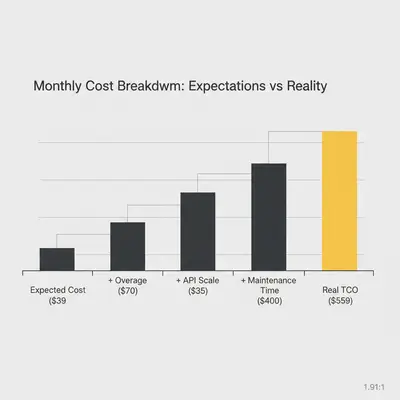
Is it worth it? Yes. If those 1,000 leads generate $20,000 in sales, spending $569 is a bargain. But if you budgeted $39, you are in trouble.
How to Protect Your Budget
- Estimate High on Tokens: Use a token calculator and assume your average input will be 3x longer than your test cases.
- Monitor Context Windows: Don't feed the AI your entire company handbook for every query unless necessary. Understand context windows to optimize this.
- Audit "Ghost" Operations: Check your automation logs weekly. Are you running loops that check for data that isn't there? That's burning money.
- Value Your Time: If you spend 5 hours a week fixing a $20 tool, upgrade to the $100 tool that doesn't break.
Conclusion
Automation is an investment, not a magic trick. The businesses that succeed with AI aren't the ones looking for the cheapest tool; they are the ones who calculate the True Cost of Ownership and budget for reliability.
Don't let hidden costs scare you away from automation. Just make sure you walk in with your eyes open.
Ready to build a reliable system? Start by measuring what matters. Check our guide on how to measure if your AI automation is working.