
An n8n worker is a dedicated process that executes workflows independently of your main n8n instance. By offloading heavy tasks to these separate workers, your business can handle high-volume data processing without slowing down your primary operations. This architecture ensures your automation remains stable, scalable, and responsive as your business grows.
A single n8n instance processes executions in one queue, so a long-running workflow blocks everything behind it. Distributing execution across workers is what stops peak traffic from turning into timeouts.
![_ [GRAPH] Column chart. Single Instance - 45% Success Rate. Worker Architecture - 98% Success Rate. Chart title: Workflow Reliability Under Load at top. Alt text: Column chart comparing workflow success rates between a single-instance setup and a worker-based architecture](/blogs/scale_automation_n8n/-graph-column-chart-single-instance-45-success-rat-400w.webp)
How Do You Determine If Your Business Needs n8n Workers?
You need n8n workers when your automation volume exceeds the capacity of a single-instance setup. Common indicators include frequent workflow timeouts, memory crashes, or sluggish execution speeds during busy periods. If your business relies on high-frequency data processing, large file handling, or complex API integrations, moving to a worker-based architecture is essential for maintaining reliability.
Reality Check: If your automations run once or twice a day, workers are overkill. You only need this architecture when your "Main" instance struggles to manage the UI while simultaneously processing hundreds of background tasks.
How Does the n8n Worker Architecture Actually Work?
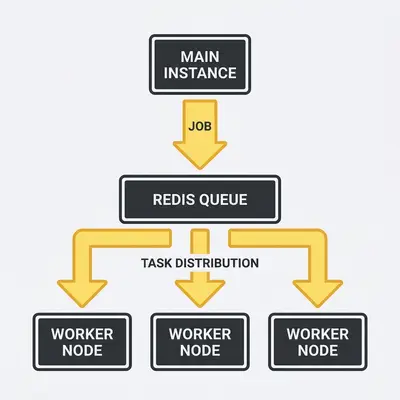
The n8n worker architecture functions by decoupling the "Main" node from the "Worker" nodes. The Main node manages the user interface, workflow scheduling, and credential storage. Meanwhile, Worker nodes handle the heavy lifting of executing tasks. A message queue, typically Redis, acts as the bridge that passes execution jobs from the Main instance to available workers.
This distributed model allows for horizontal scaling. If your business experiences a sudden spike in orders or data imports, you can spin up additional worker nodes to handle the load. Once the spike subsides, you can scale back down to save on infrastructure costs.
How Do You Set Up Your First n8n Worker?
Setting up an n8n worker involves configuring your environment to run the n8n binary in "worker" mode. You must ensure the worker points to the same database and message queue as your main instance to maintain data integrity.
- Provision a Server: Deploy a new server or container with sufficient CPU and RAM for your expected workload.
- Install n8n: Ensure the same version of n8n is installed on the worker node as on your main instance.
- Configure Environment Variables: Set
EXECUTIONS_PROCESS=queueand provide the connection string for your Redis instance. - Set Database Access: Ensure the worker has read/write access to the same PostgreSQL database used by the main instance.
- Launch the Worker: Start the n8n process using the
n8n workercommand. - Verify Connection: Check the n8n dashboard to confirm the new worker appears in the "Workers" monitoring tab.
- Test a Workflow: Trigger a test workflow to ensure the job is successfully picked up and processed by the new worker.
Pro Tip: Always use the exact same version of n8n across your Main and Worker nodes. Version mismatches are the leading cause of "silent" workflow failures in distributed setups.
What Are the Common Pitfalls When Scaling with Workers?
The most common pitfalls include misconfiguring the Redis connection, version mismatches, and failing to monitor resource utilization on individual nodes. These issues can lead to "zombie" executions, data inconsistencies, or silent failures. Without proper logging, you might not realize a workflow failed until a customer complains about a missing email or an unfulfilled order.
Key Insight: Treat your workers as disposable infrastructure. If a worker node becomes unresponsive, your setup should be configured to automatically restart or replace it without manual intervention.
How Can You Optimize Worker Performance for Maximum Efficiency?
You optimize worker performance by grouping similar workflows onto specific worker queues. This allows you to prioritize critical business tasks over background data processing. By assigning high-priority workflows to dedicated, high-performance workers, you ensure that customer-facing automations always execute instantly, regardless of how many low-priority tasks are currently running in the background.
For example, you might create a "Fast-Lane" queue for customer checkout confirmations and a "Bulk-Processing" queue for nightly inventory updates. This prevents a massive data import from delaying a critical customer notification.
Quick Win: Start by isolating your most time-sensitive workflows into a dedicated queue. This simple change often solves performance issues without needing to add more hardware.
If your current automation setup is struggling to keep up with your growth, contact Evalics today for a free infrastructure audit. We specialize in building high-performance n8n environments tailored to the needs of small businesses.