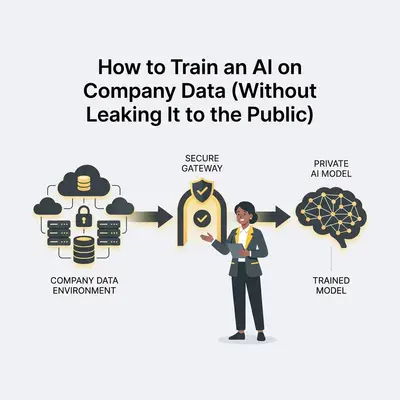
You want an AI that knows your business inside and out. You want it to instantly draft emails in your brand voice, answer complex client questions using your internal wikis, and analyze your financial spreadsheets.
But you have a massive problem. Pasting proprietary company data—client records, source code, or unreleased financials—into a public AI chatbot is a massive security risk.
Samsung learned this the hard way when employees pasted proprietary source code into ChatGPT. That code became part of OpenAI’s training data. It was out in the wild, permanently.
If you run a business, data privacy isn't optional. It is the foundation of client trust and legal compliance.
The good news? You do not have to choose between keeping your data safe and using powerful AI. You just need to change how you connect the two.
Here is exactly how to train an AI on your private company data without leaking it to the public.
The Big Misconception: "Training" vs. "Providing Context"
When business owners say they want to "train" an AI on their data, they usually misunderstand how modern AI works.
You actually have two completely different options. Choosing the wrong one costs thousands of dollars and creates major security holes.
1. Fine-Tuning (What you think you want)
Fine-tuning involves taking a base model (like GPT-4) and permanently altering its "brain" by feeding it thousands of highly structured examples.
Reality Check: Fine-tuning is rarely the right move for small to medium businesses. It is incredibly expensive. It requires perfectly formatted data. Worst of all, the AI cannot unlearn information. If client data changes, or if an employee leaves, you cannot easily delete their records from a fine-tuned model's memory.
2. Retrieval-Augmented Generation (What you actually need)
Retrieval-Augmented Generation (RAG) is the industry standard for business AI.
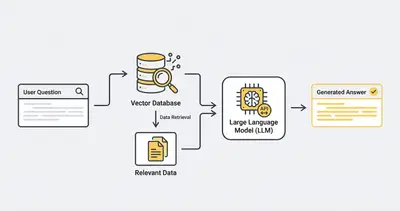
Instead of baking your data into the AI’s brain permanently, RAG acts like an open-book test. You store your company documents in a secure, encrypted database. When a user asks a question, the system searches your secure database, grabs the relevant paragraphs, and temporarily hands them to the AI.
The AI reads the document, answers the question, and then instantly forgets the information.
RAG is cheaper, faster, and infinitely more secure. You can update documents instantly, restrict access based on employee permissions, and easily delete data to comply with privacy laws.
Learn more about how vector databases power RAG here.
How Data Leaks Happen (The Consumer vs. API Trap)
To protect your data, you must understand the difference between consumer AI interfaces and API connections.
The Consumer Interface (High Risk)
When your employees log into the free version of ChatGPT, Claude, or Gemini via their web browser, they are using a consumer product.
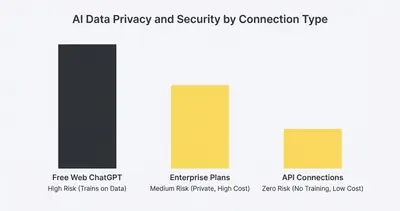
By default, the terms of service for most free consumer AI tools state that user prompts and data may be used to train future models. If your sales rep pastes a confidential client contract into free ChatGPT to summarize it, that contract is potentially compromised.
The API Connection (Secure)
An API (Application Programming Interface) is how software programs talk to each other directly in the background.
When you use the official APIs from OpenAI, Anthropic, or Google to build your own internal tools, the rules change entirely.
Enterprise API agreements generally feature strict zero data retention policies. This means:
- Your data is not used to train their models.
- Your data is not stored long-term.
- Your data remains your property.
If you want absolute privacy, you must stop using free web interfaces and start building workflows that connect to AI models strictly via their APIs.
3 Architectures for Secure Company AI
Depending on your budget and technical expertise, you have three distinct paths to build a private AI.
Option 1: The RAG + API Architecture (Best for Most Businesses)
This is the sweet spot. You get the intelligence of the world's best models without sacrificing privacy.
You build an internal tool using a platform like n8n or Make. You upload your company documents to a secure vector database. You then use an API key to connect your database to an AI model like Claude 3.5 Sonnet or GPT-4o.
Pros:
- Complete control over your data.
- Zero data training (via API rules).
- Highly customizable for specific workflows.
- Very cost-effective (you only pay fractions of a cent per API call).
Cons:
- Requires initial setup and basic technical knowledge to connect the tools.
Option 2: Walled Garden Enterprise Plans (Easiest)
If you don't want to build anything, you can pay for enterprise-grade SaaS products.
Tools like ChatGPT Enterprise, Microsoft Copilot for Microsoft 365, or Google Workspace Gemini Enterprise offer closed ecosystems. They explicitly guarantee that your data stays within your specific corporate tenant and is not used for model training.
Pros:
- Zero setup required.
- Native integration with tools you already use (Word, Excel, Docs).
- Built-in compliance and enterprise security.
Cons:
- Very expensive. These tools often require annual contracts, high minimum seat counts, and cost $20-$30 per user, per month.
- You are locked into their specific ecosystem.
Option 3: Local Self-Hosted Models (Most Secure, Hardest)
For healthcare providers, law firms, or defense contractors dealing with highly regulated data, even API connections might violate compliance rules.
The solution is running an open-source model (like Meta's Llama 3) entirely locally on your own private servers. The data never travels over the internet. The AI lives entirely inside your building.
Pros:
- Absolute, mathematically guaranteed privacy.
- No reliance on third-party cloud providers.
- No recurring API usage costs.
Cons:
- Requires incredibly expensive server hardware and GPUs.
- Requires highly paid engineers to maintain and update.
- Local models are generally not as smart as the massive frontier models from OpenAI or Anthropic.
Pro Tip: Unless you are handling Top Secret government clearance data or highly protected health information (HIPAA), Option 1 (API + RAG) provides the perfect balance of enterprise-grade security and affordability.
Step-by-Step: Building a Secure AI Knowledge Base
Ready to build a private AI for your team using the API method? Here is the exact playbook to follow.
Step 1: Audit and Silo Your Data
AI is only as good as the data you feed it. Do not dump your entire Google Drive into an AI tool.
If your folders are a mess of outdated policies and conflicting pricing sheets, the AI will confidently give your team the wrong answers.
- Clean your data first. Delete old versions.
- Create a dedicated "AI Source" folder.
- Only move verified, finalized, and approved documents into this folder.
Step 2: Set Up a Vector Database
To use RAG, your text documents must be converted into numbers (vectors) that an AI can instantly search.
You need a vector database. Pinecone, Weaviate, and Qdrant are industry leaders. For a small business, Pinecone is incredibly easy to set up and offers a generous free tier that easily handles thousands of documents.
Step 3: Connect Your Automation Platform
You need a central brain to route data securely. n8n is widely considered the best choice for privacy-focused automation because you can self-host it, keeping all logic on your own servers.
Create a workflow in n8n that:
- Watches your "AI Source" folder for new documents.
- Reads the document.
- Sends the text to an embedding model (which turns text into vectors).
- Stores those vectors securely in your Pinecone database.
Step 4: Build the Internal Chat Interface
Now, build the interface your employees will actually use.
You can use no-code app builders like Streamlit, or simply use platforms like Slack or Discord.
When an employee types a question into your private Slack channel:
- n8n catches the question.
- n8n searches Pinecone for the answer.
- n8n sends the retrieved facts + the employee's question to the OpenAI API.
- The AI generates an answer and sends it back to Slack.
Because this happens via API, OpenAI instantly discards the data after answering. Your employees get immediate answers. Your data stays completely safe.
Quick Win: Want to bypass the custom coding entirely? Tools like Flowise or LangFlow allow you to visually drag and drop this exact RAG architecture in under an hour. Read our guide on building a custom AI assistant for the exact steps.
Essential Security Policies You Must Enforce Today
Technology alone will not protect you. Human error is still the biggest vulnerability. If you implement AI in your business, you must enforce the following policies immediately.
Ban Shadow AI
"Shadow AI" occurs when employees secretly use unsanctioned AI tools to do their work faster.
If your marketing manager is pasting internal strategy docs into a random free PDF-summarizer they found on Google, your data is already compromised.
You must formally ban the use of unapproved AI tools in your employee handbook.
Provide a Secure Alternative Fast
You cannot ban Shadow AI effectively unless you give your team a better, safer tool.
If you ban free ChatGPT but provide a secure internal portal built via the API, employees will happily use the secure version. They just want to do their jobs faster. Give them the safe path.
Implement Role-Based Access Control (RBAC)
Do not put your company's payroll spreadsheets and marketing copy in the same AI database.
If an intern asks the AI, "What is the CEO's salary?", the AI will answer accurately if it has access to that document.
Set up distinct vector databases for different departments. The HR database should only be accessible via the HR team's specific chat interface. The Sales database should only be accessible by the sales team. Use Model Context Protocol (MCP) principles to strictly govern what databases your agents can read.
The Cost Breakdown: Privacy Is Cheaper Than You Think
Many business owners assume enterprise-grade privacy requires an enterprise budget. This is completely false if you use API architecture.
Let's look at the math for a 15-person agency.
The SaaS Walled Garden Approach:
- ChatGPT Enterprise: $30/user/month.
- Total Cost: $450 per month ($5,400 annually).
The API + RAG Architecture Approach:
- Pinecone Vector Database: $0 to $70/month.
- n8n Automation Platform: $24/month (Cloud) or Free (Self-Hosted).
- OpenAI API Usage: ~$15/month (You only pay per token/word used).
- Total Cost: Roughly $40 to $100 per month.
You get the exact same underlying intelligence, better workflow integration, and strict data privacy, for a fraction of the cost.
[Embed this demo video: https://www.youtube.com/watch?v=placeholder]
Final Thoughts and Next Steps
Using AI safely is not about avoiding the technology. It is about controlling the pathways.
Pasting data into public web interfaces is a recipe for disaster. But connecting your verified, siloed data to frontier models via strict API agreements gives you a massive competitive advantage. You get a tireless, brilliant assistant that knows every policy, contract, and process your company has ever created—without risking a single leak.
Here is your action plan:
- Formally ban the use of free consumer AI interfaces for sensitive company data today.
- Clean and organize the specific documents you want the AI to learn from.
- Choose your path: Pay a premium for a walled garden like Copilot, or build a highly customized, cost-effective RAG system using n8n and API keys.
Ready to build a secure AI knowledge base for your company but don't want to deal with vector databases yourself? Book a demo with Evalics today. We build custom, private AI systems that integrate directly into your workflows while keeping your data strictly under your control.
Related Resources
- What Is a Vector Database? Pinecone & Weaviate Explained
- Build a Custom AI Assistant in Under an Hour (No Code Required)
- What Is MCP (Model Context Protocol)? Plain English Guide for Business
- N8n v2.0 Security Features: How to Secure Your Workflows in 2026
Official Sources
- OpenAI Enterprise Privacy Policy
- Microsoft Copilot Data Security and Privacy Guidelines
- Anthropic Commercial Terms of Service
By Kevin Michael Schindler, AI Automation Expert at Evalics