Integrate AI automation with your CRM to streamline lead scoring and data entry. Boost conversion rates by 20% while your business runs on autopilot today.
Integrating AI automation with your CRM means connecting your customer relationship management software to artificial intelligence models to handle data entry, lead scoring, and communication automatically. This process turns static contact lists into a dynamic engine that works while you sleep.
Why Should Small Businesses Integrate AI With Their CRM?
Integrating AI with your CRM transforms static customer data into an active engine for growth. By automating manual entry, lead scoring, and personalized outreach, you save hours of administrative work while increasing conversion rates. This synergy allows your team to focus on high-value human interactions rather than repetitive data management tasks.
Key Insight: Automation is not about replacing your team. It is about removing the "busy work" that prevents your best people from closing deals.
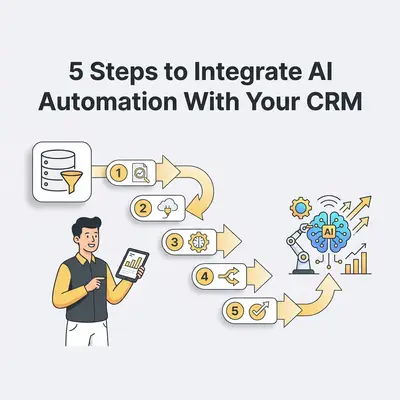
What Are the 5 Steps to Integrate AI Automation With Your CRM?
To successfully integrate AI, you must follow a structured approach that prioritizes data integrity and clear objectives. By auditing your current processes, selecting the right tools, and testing workflows in small batches, you ensure a seamless transition that enhances your existing sales and marketing operations.
Audit Your Current CRM Workflows: Identify the most time-consuming, repetitive tasks like manual data entry or lead follow-ups.
Clean and Standardize Your Data: Ensure your CRM data is accurate and formatted correctly, as AI performance depends entirely on the quality of the input.
Select Your AI Integration Tool: Choose a platform like Zapier, Make, or native CRM AI features that bridge the gap between your CRM and AI models.
Map Your Automation Logic: Define the "If This, Then That" triggers that dictate how the AI should handle specific customer interactions.
Test, Monitor, and Optimize: Run small-scale tests to verify accuracy before scaling the automation across your entire customer database.
If you want the CRM to stay the system of record, AI Orchestration From Your CRM, Not Around It from Super Easy CRM shows that split: the CRM decides when something matters, and n8n runs the action.
How Do You Identify Which CRM Processes to Automate First?
Prioritize processes that are high-volume, low-complexity, and prone to human error. Start by tracking how much time your team spends on manual data entry, lead qualification, and email scheduling. Tasks that require repetitive logic but minimal creative judgment are the ideal candidates for your first AI automation project.
Pro Tip: Don't try to automate everything at once. Start with one "quick win," such as automated lead response emails, to build confidence and prove ROI.
What Are the Most Common Pitfalls During Integration?
The most common pitfalls include poor data quality, lack of clear objectives, and failing to account for the human touch. Many businesses attempt to automate complex, nuanced conversations too early, leading to robotic customer experiences. Additionally, neglecting to monitor the AI’s output can result in "automation drift," where errors compound over time.
Pitfall
Consequence
Solution
Dirty Data
Inaccurate AI outputs
Run a data audit before connecting AI
Over-Automation
Loss of personal touch
Keep humans in the loop for final approvals
Ignoring Security
Data leaks or compliance issues
Use encrypted, compliant integration platforms
How Do You Ensure Data Security During AI Integration?
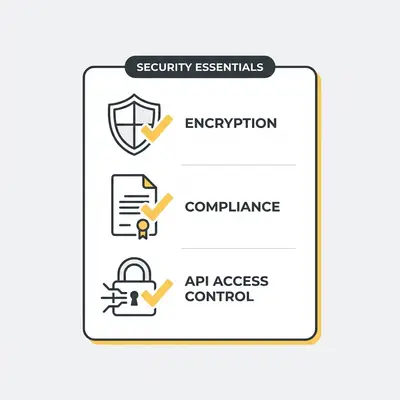
Data security is maintained by using reputable integration platforms that offer end-to-end encryption and strict API access controls. Always ensure your AI tools are GDPR or CCPA compliant. Never feed sensitive, personally identifiable information (PII) into public AI models that might use your data for training purposes.
How Do You Measure the Success of Your AI Integration?
Success is measured by tracking key performance indicators (KPIs) such as time saved per lead, reduction in manual data entry errors, and improvements in lead response time. By comparing your pre-automation metrics against post-automation data, you can quantify the exact ROI of your AI investment and identify areas for further refinement.
Example: If your team previously took 4 hours to respond to a web lead, and your new AI workflow reduces that to 30 seconds, your "Speed to Lead" metric has improved by 99.8%. This directly correlates to higher conversion rates.
Next Steps for Your Business
Start by choosing one specific, repetitive task in your CRM that frustrates your team. Spend one hour this week mapping out the steps of that task on paper. Once you have the logic defined, look for a no-code tool like Make or Zapier to build your first "If This, Then That" workflow. If you need help architecting your first automation, reach out to our team at Evalics to discuss your specific CRM setup.
Ready to automate your business?
Book a free consultation and discover how AI automation can save you hours every week.
Frequently Asked Questions
AI CRM integration connects your customer database to artificial intelligence tools to automate repetitive tasks like data entry, lead scoring, and email follow-ups.
Begin by identifying your most time-consuming manual tasks, such as lead qualification. Then, use integration platforms like Zapier or native AI features to connect your CRM to an AI model.
Yes, AI improves conversion by prioritizing high-intent leads and ensuring timely, personalized communication, which helps sales teams focus on closing deals.
Many AI automation tools offer scalable pricing models, making them accessible for small businesses looking to increase efficiency without a massive upfront investment.
![_ [GRAPH] Column chart. Manual Data Entry - 15 Hours/Week. AI-Automated Entry - 1 Hour/Week. Chart title: Weekly Time Spent on CRM Admin at top. Alt text: Column chart showing a significant reduction in weekly administrative hours after implementing AI automation](/blogs/integrate_automation_crm/-graph-column-chart-manual-data-entry-15-hoursweek-400w.webp)