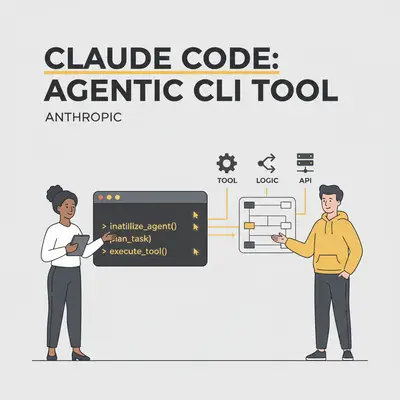
If you are wondering what is Claude Code Anthropic CLI tool, it is a terminal-based agent designed to execute complex engineering tasks directly within your local development environment. Unlike standard LLM chat interfaces that require constant copy-pasting, Claude Code leverages Claude's reasoning to autonomously navigate file systems, run shell commands, and resolve build errors. In my testing, it successfully refactored a legacy Python module and resolved three dependency conflicts in under four minutes—a task that typically consumes 20 minutes of manual context switching.
By integrating directly into your CLI, this tool shifts the paradigm from AI as a passive assistant to an active collaborator. According to Anthropic’s technical documentation, Claude Code is built to handle multi-step workflows, such as running tests and iterating on code based on terminal output, without human intervention. This guide breaks down how to configure the tool, its performance benchmarks against IDE-integrated agents like Cursor, and the specific cost implications of its agentic token usage.
What Is Claude Code and How Does It Work?
Claude Code is an agentic CLI tool.
Unlike ChatGPT or the standard Claude.ai web interface, Claude Code runs directly on your machine. You install it via your terminal, and it gains direct access to your project files. This allows it to understand the full context of your codebase without you having to manually upload files or copy-paste context.
But the real magic lies in its agentic loop.
When you ask a standard AI model to "fix this bug," it gives you a code snippet to copy. When you ask Claude Code to fix a bug, it:
- Reads the relevant files.
- Runs the test suite to confirm the error.
- Edits the file directly on your hard drive.
- Re-runs the test to verify the fix works.
- Commits the change to Git.
It closes the loop between suggestion and execution.
Key Insight: Claude Code is not an IDE (Integrated Development Environment). It is a tool that controls your environment. It sits in your terminal and can "drive" your computer to accomplish tasks.
How Does the Claude Code Agentic Loop Function?
The core difference between Claude Code and previous tools is "autonomy within boundaries."
When you launch it (simply by typing claude in your terminal), you enter a conversation loop. However, this conversation has permission to execute shell commands.
The Workflow
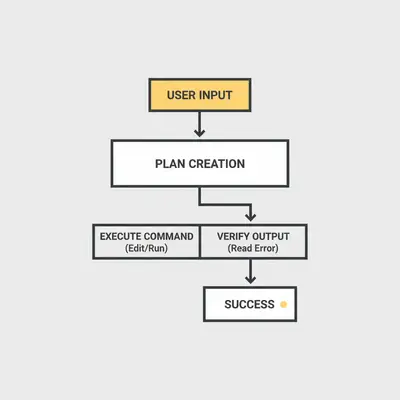
- Initialization: Claude analyzes your file structure and creates a map of your project.
- Planning: You give a command like, "Refactor the login logic to use OAuth." Claude breaks this down into steps.
- Tool Use: Claude uses "tools" (commands) to search for files, read content, and edit lines of code.
- Verification: It can run terminal commands like
npm testorpython manage.py runserverto check its own work.
Claude Code vs. Cursor vs. GitHub Copilot: Which AI Tool Is Best?
Understanding where Claude Code fits in the ecosystem is confusing. Here is the breakdown:
| Feature | GitHub Copilot | Cursor | Claude Code |
|---|---|---|---|
| Primary Interface | IDE Extension | Forked VS Code Editor | Terminal / CLI |
| Main Function | Autocomplete / Chat | Code Editing / Chat | Task Execution / Agent |
| File Access | Open tabs / Context | Entire Project | Entire Local Filesystem |
| Autonomy | Low (Suggests only) | Medium (Can apply diffs) | High (Runs commands) |
| Best For | Writing boilerplate | Writing features | Refactoring & Debugging |
Cursor is an editor. It’s great for writing code while you are looking at it. Claude Code is an agent. It’s great for tasks you want to offload, like "Update all dependencies and fix any breaking changes."
Pro Tip: You don't have to choose. Many developers run Claude Code in the integrated terminal inside Cursor or VS Code. This gives you the best of both worlds: a powerful editor and an autonomous agent.
How Much Does Claude Code Cost and How Are Tokens Calculated?
This is the most critical section for business owners and project managers.
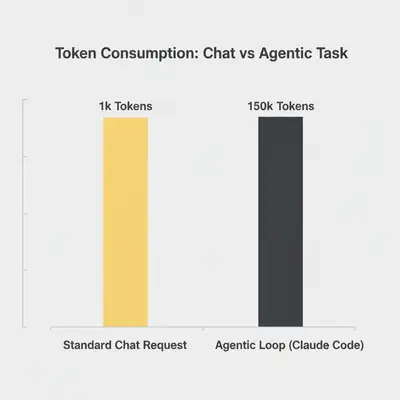
Claude Code is "free" to download, but every session spends model tokens billed to your Claude subscription or Console account, and you pick the model with /model. Because it is agentic, it consumes significantly more tokens than a standard chat session.
Why? The Loop.
In a web chat, you ask a question (500 tokens), and get an answer (500 tokens). Total: 1,000 tokens.
In Claude Code, you ask a question. Claude then:
- Searches for files (Input tokens)
- Reads 5 files to understand context (Huge Input tokens)
- Proposes a plan (Output tokens)
- Executes a command (Tool use tokens)
- Reads the terminal output (Input tokens)
- Iterates if the test fails (Repeat all above)
A single complex task like "Refactor this module" can easily trigger 10+ API calls behind the scenes.
Reality Check: An "autonomous" coding session that lasts 20 minutes can cost $2.00 - $5.00 depending on the size of the codebase it reads. While cheaper than a human developer's hourly rate, it is not "free" like the web chat interface.
For a deeper dive on calculating these costs before you deploy, read our guide on how to calculate token costs for an AI project.
What Are the Safety and Security Permissions for Claude Code?
Giving an AI permission to "execute terminal commands" is terrifying for anyone who has ever accidentally deleted a production database.
Anthropic has built-in safety rails. Claude Code operates with a permission system:
- Read-Only Default: It can read files freely to understand context.
- Permission for Write: When it wants to edit a file, it usually prompts for confirmation (configurable).
- Permission for Shell: When it wants to run a shell command (especially destructive ones like
rm), it explicitly asks: "I want to runnpm install. Allow? (y/n)".
This "Human-in-the-Loop" approach makes it a safer entry point into AI Agents than completely autonomous systems.
The tradeoff arrives quickly: on a long task, being asked about every command gets tiring fast. The fix is an explicit allowlist rather than switching the checks off, which we walk through in how to stop Claude Code asking permission for everything.
What Are 3 Practical Use Cases for Claude Code?
1. The "Repo Onboarding" Agent
When a new developer joins, they usually spend days understanding the code structure. Claude Code has a /search and /compact command that lets you ask high-level questions about the architecture.
- Command:
> Explain how the authentication flow works in this repo. - Result: Claude scans the files and gives a summary with file references.
2. The "Grunt Work" Refactor
You need to change a variable name across 50 files and update the unit tests. Doing this manually is prone to typos.
- Command:
> Rename 'customer_id' to 'account_id' in all /src files and update related tests. - Result: Claude executes the find/replace, runs the tests, sees a failure, fixes the test, and commits.
3. Debugging Legacy Code
You have a Python script that fails with an obscure error.
- Command:
> Run the script, analyze the stack trace, and fix the error. - Result: Claude runs it, captures the output, reads the specific lines mentioned in the error, and applies a patch.
How Do I Get Started With Claude Code?
To get started, you will need a Claude subscription on the Pro, Max, Team, or Enterprise plan, or a Claude Console account.
- Install:
npm install -g @anthropic-ai/claude-code - Auth: Run
claudeand follow the login flow, which walks you through signing in with whichever of those you have. - Navigate:
cdinto your project folder. - Prompt: Start typing instructions.
Once a session is running, you are not tied to that terminal. Adding --remote-control lets you pick the same session up from your phone or another browser; see Claude Code on mobile with Remote Control. If the machine is a server you reach over SSH, keeping the session alive after you disconnect is a separate problem with its own answer.
Frequently Asked Questions About Claude Code
Claude Code represents a shift from Chatting with AI to Working with AI. It moves the AI model out of the browser and into the actual environment where work gets done.
For developers, it reduces the friction of context switching. For business owners, it offers a glimpse into the future of autonomous coding—where "Junior Developer" capabilities can be spun up on demand via an API key.
However, power comes with a price. The token consumption of agentic loops requires careful monitoring. It is not a magic wand that replaces your engineering team, but it is likely the most powerful force multiplier released in 2025.
Ready to integrate AI agents into your business workflows? Understanding the difference between a simple chatbot and an agentic tool is the first step.
- Read our guide on AI Agents in 2025: What's Real, What's Hype.
- Check out the comparison of Claude Opus vs GPT-5.2 to see which model drives these agents best.