
AI automation is the use of software and artificial intelligence to perform repetitive, rule-based tasks without human intervention. For solo entrepreneurs, it acts as a force multiplier, allowing one person to handle the workload of a small team. By automating administrative, marketing, and customer service tasks, you can reclaim 10–20 hours per week for high-value revenue-generating activities.
Is AI Automation Actually Practical for Solo Entrepreneurs?
AI automation is highly practical for solo entrepreneurs because it removes the "founder fatigue" that often stalls growth. By delegating low-leverage tasks to automated workflows, you reduce human error and ensure consistent business operations without the overhead of hiring staff.
![_ [GRAPH] Column chart. Off-the-Shelf Tools - Low. No-Code Integrations - Medium. Custom AI Agents - High. Chart title: Time-to-Value Ratio by Automation Type at top. Alt text: Column chart comparing the complexity and time-to-value of different automation options for solo businesses](/blogs/automation_practical_solopreneurs/-graph-column-chart-offtheshelf-tools-low-nocode-i-400w.webp)
What Are Your Options for Implementing AI?
| Option | Best For | Cost | Complexity |
|---|---|---|---|
| Off-the-Shelf Tools | Beginners/Simple tasks | Low | Low |
| No-Code Integrations | Connecting existing apps | Medium | Medium |
| Custom AI Agents | Complex, unique workflows | High | High |
Key Insight: You do not need to build a custom AI model to see results. Most solo businesses achieve 80% of their efficiency gains by connecting existing apps like Gmail, Slack, and Airtable using platforms like Make or Zapier.
How Do You Decide If a Process Should Be Automated?
To determine if a task is ready for automation, apply the "Rule of Three." If you perform a task more than three times a week, it is rule-based, and it involves digital data, it is a prime candidate for automation. Use this framework to audit your daily routine:
- Is the task repetitive?
- Does it follow a predictable logic?
- Does it require human empathy or complex judgment? (If yes, do not automate).
Pro Tip: Download our Automation Audit Worksheet to identify which of your daily tasks are costing you the most time.
What Does a Successful AI Implementation Look Like?
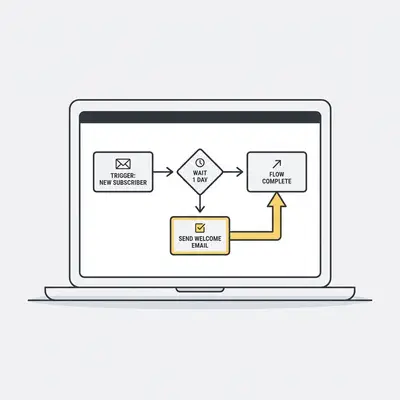
A successful implementation starts with a single, high-impact workflow rather than a total business overhaul. For example, a solo consultant might automate their lead intake process. When a prospect fills out a form, an AI agent qualifies them, schedules a meeting, and sends a personalized follow-up email. This creates a "hands-off" sales funnel that works while you sleep.
How Can You Avoid Common Automation Pitfalls?
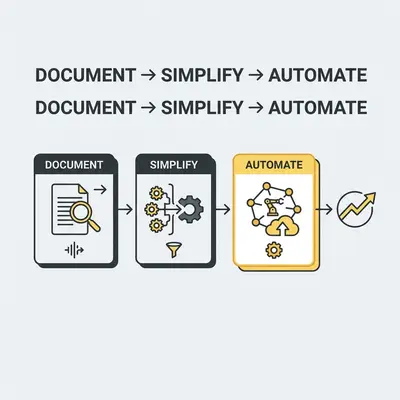
The biggest mistake solo owners make is over-automating before a process is optimized. If you automate a broken process, you simply break things faster. Start by manually documenting your workflow, then simplify the steps, and only then apply automation. Avoid "shiny object syndrome" by sticking to tools that integrate directly with your current tech stack.
Reality Check: Automation is not a "set it and forget it" solution. You must monitor your workflows for the first week to ensure the logic holds up when real-world data enters the system.
What Are the Next Steps to Get Started?
- Audit your week to find the top three time-draining tasks.
- Select one low-risk process to automate first.
- Choose a no-code platform like Make or Zapier to connect your tools.
- Build a simple "If This, Then That" workflow.
- Test the automation with dummy data.
- Monitor for errors for one week.
- Scale the automation to other areas of your business.
Quick Win: Start by automating your email attachments. Use an automation tool to automatically save every invoice or contract you receive into a specific folder in Google Drive or Dropbox. This saves minutes every day and keeps your files organized without manual effort.
If you need help building your first workflow, book a discovery call with Evalics to see how we can automate your business in under 48 hours.