Why n8n's New AI Playbook is the Reality Check Businesses Need
n8n just dropped their Production AI Playbook. It’s a masterclass in why deterministic workflows, not just LLMs, are the secret to building reliable AI systems.
n8n recently published their Production AI Playbook: Introduction, and it is exactly the wake-up call the industry needs. For the past two years, I’ve watched businesses treat AI like a shiny new toy—tinkering with chatbots and prompt engineering without a shred of operational oversight.
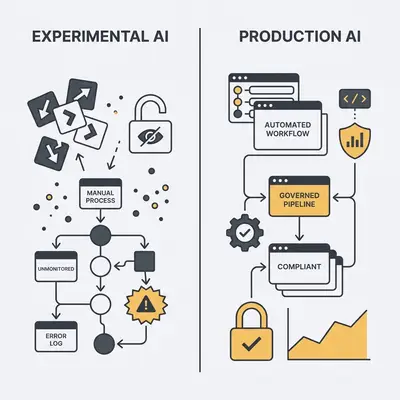
This playbook marks a shift from "AI novelty" to "AI reliability." It’s no longer enough to have a model that writes a decent email; you need a system that handles data, respects security, and doesn't break when your volume spikes. If you are still running your business on experimental AI, you are one bad hallucination away from a PR disaster or a broken workflow.
Why is the "Production AI" Shift Critical for Small Businesses?
Small businesses often treat AI as a creative experiment, but production-grade AI is about business continuity. When you move to production, you stop treating AI as a "magic box" and start treating it as a deterministic software component.
This shift is critical because it moves your operations from "hope-based" AI to "governance-based" automation. You need systems that don't break when you aren't looking. If your AI agent is handling customer support or lead qualification, it needs to be as reliable as your accounting software.
Reality Check: If you cannot explain the AI's decision-making process to a customer, it is not ready for production.
What are the Core Options for Implementing AI Automation?
When you decide to scale, you have to choose your architecture carefully. Most businesses fall into one of three buckets, and the trade-offs are significant.
Approach
Reliability
Customization
Maintenance Effort
Custom Code
High
Infinite
Very High
SaaS Wrappers
Low
Minimal
Low
Workflow Orchestration
High
High
Moderate
Custom code gives you total control, but it’s a nightmare to maintain unless you have a dedicated engineering team. SaaS wrappers are easy to start, but you’re trapped in their feature set. Workflow orchestration—using tools like n8n—is the sweet spot. It gives you the power to build custom logic without needing to write thousands of lines of code from scratch.
How Do You Build a Decision Framework for AI Integration?
To decide if an AI project is ready for production, you must evaluate it against three pillars: reliability, governance, and maintainability. Use this framework to audit your current AI tools:
Define the Deterministic Guardrails: Can you define the input/output boundaries? If the AI can output anything, it will eventually output something wrong.
Assess Data Residency: Does the tool allow for private, secure data handling? Never send sensitive customer data to a model that doesn't guarantee privacy.
Evaluate Human-in-the-Loop (HITL): Is there a clear point for manual intervention? High-stakes decisions should always require a human "yes" before execution.
Monitor Performance: Do you have a system to track failure rates? You need to know when a node fails before your customer does.
Plan for Scalability: Can the workflow handle 10x the current volume? If your process breaks at 100 leads, it will be a catastrophe at 1,000.
What Lessons Can SMBs Learn from n8n’s Architecture?
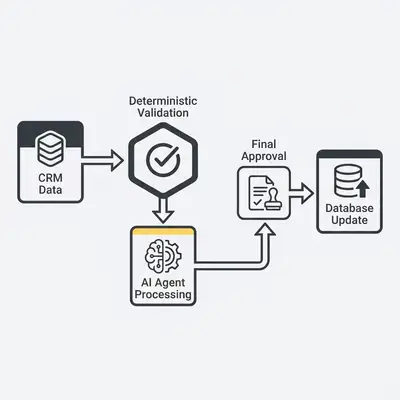
The biggest takeaway from the n8n playbook is that AI should be a component of a larger workflow, not the entire system. By chaining deterministic logic—standard "if/then" statements—with AI nodes, you create a "safety net."
This prevents the AI from hallucinating or executing unauthorized actions. For example, you can use an AI node to summarize a meeting, but use a deterministic node to ensure that summary is only sent to the specific email address found in your CRM.
Why Visual Workflows Matter
Visualizing your AI pipeline allows non-technical owners to audit the logic. When you can see the data flow, you can identify exactly where an AI agent might fail. If you can't draw your process on a whiteboard, you shouldn't be automating it with AI.
The Importance of Self-Hosting
For businesses with sensitive data, the ability to self-host ensures that your proprietary information never leaves your infrastructure. This is the gold standard for compliance. It keeps your data under your roof, not on a third-party server where you have no control over how it’s used to train future models.
How Do You Transition from Prototype to Production?
Moving from a "cool demo" to a "business asset" requires discipline. Follow these steps to ensure your AI automation is robust enough for daily operations:
Map the Workflow: Document the manual process before adding AI. If the manual process is broken, AI will just make it broken faster.
Identify AI Nodes: Replace only the specific tasks requiring cognitive processing. Don't use AI to do what a simple database query can do better.
Implement Guardrails: Add validation nodes to check AI output against business rules. If the AI returns a format you don't recognize, the workflow should stop.
Set Up Monitoring: Create alerts for when an AI node fails or returns an error. You need to be the first to know when something goes wrong.
Establish HITL: Design a trigger that pauses the workflow for human approval. This is your final line of defense.
Test for Edge Cases: Run the workflow with "bad" data to see how it handles errors. What happens if the AI gets a blank input?
Deploy and Iterate: Start with a small subset of data before full-scale rollout. Don't flip the switch for your entire customer base on day one.
Pro Tip: Automation is not about replacing humans; it is about removing the friction that prevents humans from doing their best work.
Source
This post is a strategic response to the "Production AI Playbook: Introduction" published by n8n. Read the original article here:
Production AI Playbook: Introduction
Book a free consultation and discover how AI automation can save you hours every week.
Frequently Asked Questions
Deterministic workflows provide the guardrails necessary to validate inputs and outputs, ensuring that AI agents operate within predictable business logic.
Yes, its self-hosting capabilities, encrypted credential management, and role-based access controls make it a strong candidate for secure, compliant AI operations.
We help businesses design, deploy, and maintain complex AI workflows that integrate seamlessly with existing infrastructure to ensure real operational value.