Struggling with endless repetitive tasks in your small business? Imagine reclaiming hours each week, boosting productivity, and cutting operational costs, all without touching a single line of code. n8n, a powerful open-source workflow automation tool, makes this vision a reality, offering completely free options that are perfect for small business owners looking to grow without breaking the bank.
What is n8n and Why is it Perfect for Small Businesses?
n8n is an open-source automation platform that connects various applications and services to automate your workflows visually. It allows you to build complex sequences of tasks, from data synchronization to sending automated emails, all through a drag-and-drop interface. This makes it ideal for small businesses because its free tiers and open-source nature significantly reduce software costs, freeing up valuable budget. n8n empowers growth by eliminating manual chores, allowing you to focus on strategic initiatives rather than daily drudgery.
How Can Small Businesses Access n8n for Free?
Small businesses can start using n8n for free through three convenient methods, each tailored to different technical comfort levels and needs. You can begin with the n8n.cloud Starter plan for a managed cloud experience, opt for self-hosting the open-source version on your own server for maximum control, or simply download the desktop application for local development and learning. These accessible options ensure that powerful automation is within reach for virtually any small business.
Exploring n8n.cloud Starter Plan Features
The n8n.cloud Starter plan offers a quick and easy way to begin automating without server setup. This free tier typically includes a generous number of execution credits per month, allowing you to run a significant amount of workflows. While it has limits on executions and might not support every advanced integration, it's an excellent entry point for testing ideas and automating simpler tasks. It provides a managed environment, meaning n8n handles the infrastructure, letting you focus solely on building your workflows.
Self-Hosting n8n: What You Need to Know
For those with a bit more technical comfort or needing unlimited executions and full control, self-hosting n8n is the way to go. You can install the open-source version on your own server, whether it's a dedicated machine, a cloud VM (like from DigitalOcean or AWS), or even a Raspberry Pi. This often involves using Docker for an easier setup, providing complete freedom from execution limits found in cloud plans. Self-hosting grants you full data privacy and the flexibility to customize your environment as needed, perfect for businesses with specific compliance or scale requirements.
Using the n8n Desktop App for Local Development
The n8n desktop application offers the simplest, no-setup entry point for exploring the platform. You download it, install it, and immediately start building workflows directly on your computer. This version is fantastic for learning n8n, experimenting with nodes, and developing workflows locally without impacting a live environment or using cloud credits. Once perfected, these local workflows can then be easily migrated to a self-hosted instance or an n8n.cloud deployment, providing a smooth transition from learning to production.
What are the Key Components of an n8n Workflow?
An n8n workflow is a sequence of connected steps designed to automate a specific process. The key components are triggers, which start the workflow, and nodes, which perform actions or process data, all linked together by connections that dictate the flow of information. Understanding how these elements interact is fundamental to designing and building effective and efficient automations. By combining these, you can create sophisticated systems that run automatically.
Triggers: Starting Your Automation
Triggers are the entry points for your workflows; they listen for specific events or occur at scheduled intervals to initiate an automation. Common trigger types include webhook triggers, which respond to incoming data from other applications, and cron triggers, which run workflows on a set schedule (e.g., every morning). App-specific triggers, like "Google Sheets Trigger" for new rows, also exist. Choosing the right trigger ensures your automation starts exactly when needed, making your systems proactive rather than reactive.
Nodes: The Building Blocks of Action
Nodes are the individual steps within an n8n workflow that perform specific functions. These can range from connecting to external applications (like Slack, Google Drive, or your CRM) to performing logical operations, transforming data, or executing custom code. n8n offers hundreds of pre-built nodes categorized for different purposes, such as app nodes for integrations, logic nodes for conditional routing, and data manipulation nodes for text or JSON processing. Each node has specific inputs and outputs, allowing them to pass data seamlessly from one step to the next.
Key Insight: Think of n8n nodes as miniature experts. Each one knows how to do a specific job, and by connecting them, you create a team that handles your entire process.
How Do I Create a Simple Workflow to Automate a Small Business Task?
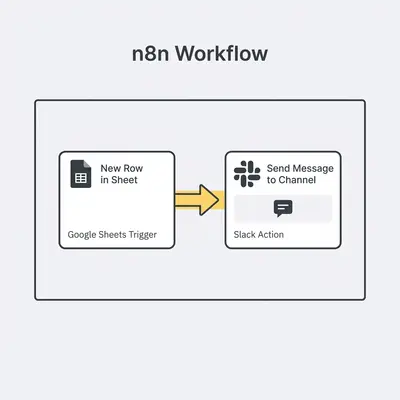
Creating a simple workflow in n8n involves a straightforward process: you identify a repetitive task, choose a trigger to start the automation, add action nodes to process data, connect them logically, and then test and activate your workflow. For instance, you could automate sending a Slack message every time a new row is added to a Google Sheet. A recent report from Process Improvement Group found that businesses using workflow automation could save an average of 10-15 hours per employee each week on repetitive tasks. This significantly reduces manual effort, saving precious time and ensuring consistency.
Here’s a step-by-step guide to building a basic workflow:
- Choose Your Free n8n Environment (Cloud, Self-Hosted, Desktop): Start by deciding whether you'll build your workflow using the n8n.cloud Starter plan, a self-hosted instance, or the desktop app. Each offers a full visual editor.
- Identify a Repetitive Task to Automate (e.g., Google Sheet row to Slack message): Pick a task that consumes valuable time and has clear, repeatable steps. A great starting point is when new data in one app needs to be communicated to another.
- Set Up Your Trigger Node: In the n8n editor, click "Add new" and select the appropriate trigger. For our example, search for "Google Sheets Trigger" and configure it to listen for "New Row" events in your specific spreadsheet.
- Add Action Nodes to Process Data: Next, add nodes that perform actions. After the Google Sheets trigger, you might add a "Google Sheets" node to read more specific data if needed, or directly add a "Slack" node to send a message.
- Connect Nodes and Test Your Workflow: Drag a line from the output of your trigger node to the input of your first action node. Configure the Slack node to send a message using data from the Google Sheet trigger (e.g.,
{{$json.ColumnName}}). Use the "Execute Workflow" button to run a test and see data flow through each step. - Activate and Monitor Your Workflow: Once your workflow runs successfully during testing, toggle the "Active" switch to turn it on. It will now automatically execute whenever the trigger condition is met. Monitor its execution history to ensure it's running as expected.
- Iterate and Optimize: Review your workflow's performance. Refine node configurations, add error handling to catch unexpected issues, or expand it to include more steps. Automation is an iterative process!
What Common Small Business Tasks Can n8n Automate for Free?
n8n can automate a wide range of common small business tasks, significantly reducing manual workload without any cost for the tool itself. These automations include seamlessly capturing leads and updating your CRM, distributing content to your social media channels, setting up internal notification systems, and synchronizing data across various applications. By automating these processes, SMBs can operate with enterprise-level efficiency, allowing teams to focus on revenue-generating activities and core business growth rather than tedious administration.
Automating Lead Capture and Follow-up
You can connect your lead generation forms (like those from Typeform, Google Forms, or your website's contact form) directly to your CRM system (e.g., HubSpot, Airtable, or a custom Google Sheet). n8n can then automatically create a new contact, update their details, and even trigger an automated email sequence via Gmail or SendGrid. This ensures no lead falls through the cracks and follow-up begins instantly.
Streamlining Social Media Content Distribution
Managing multiple social media channels can be time-consuming. With n8n, you can create a workflow that monitors your blog's RSS feed or a specific database. Whenever new content is published, n8n can automatically draft and post updates to platforms like Twitter, LinkedIn, and Facebook. This keeps your audience engaged with fresh content without constant manual intervention, maintaining a consistent online presence.
Enhancing Internal Communication with Notifications
Keep your team informed about critical business events without manual alerts. n8n workflows can be set up to send instant notifications to Slack channels or email addresses whenever a new sale is made, a critical system error occurs, or a project milestone is reached. This improves internal communication, ensures timely responses, and fosters a more responsive work environment, preventing delays and missed opportunities.
Pro Tip: Start with one small, highly repetitive task. Success with a simple automation builds confidence and provides a clear ROI, making it easier to identify and tackle more complex workflows.
What Are the Common Challenges Small Businesses Face with n8n Free?
While n8n Free offers immense value, small businesses might encounter a few common challenges. These include navigating resource limits on the n8n.cloud Starter plan, understanding how to configure complex nodes and integrations, dealing with the technicalities of self-hosting, and effectively debugging workflows when things don't go as planned. Overcoming these hurdles requires a willingness to learn, careful planning, and consistent testing. However, the power of automation makes these efforts worthwhile.
Navigating n8n.cloud Starter Plan Limitations
The n8n.cloud Starter plan is fantastic for getting started, but its execution credit limits can become a constraint as your automation needs grow. Small businesses should regularly monitor their execution usage and optimize workflows to be as efficient as possible. This might mean consolidating steps, reducing unnecessary checks, or setting workflows to run less frequently. If limits are consistently hit, it's a clear signal to consider upgrading to a paid plan or exploring a self-hosted solution for unlimited use.
Debugging Workflows and Handling Errors
Even well-designed workflows can encounter issues, especially when external services change or data is unexpected. Debugging involves systematically checking each node's output and input during execution to pinpoint where the workflow failed. n8n provides excellent execution logs and a visual interface for this. Incorporating "Error Trigger" and "Continue On Error" nodes can make your workflows more robust by catching errors and executing alternative paths, preventing entire processes from failing silently.
Security Considerations for Self-Hosted Instances
If you choose to self-host n8n, managing security becomes your responsibility. This involves ensuring your server is properly secured with firewalls, access controls, and regular software updates. Implementing robust authentication for your n8n instance and encrypting sensitive data are also critical. While more technical, self-hosting offers maximum control over your data security posture, making it a viable option for businesses with specific security or compliance requirements.

How Can Evalics Help You Maximize Your n8n Automation?
Evalics specializes in transforming the way small businesses operate by designing, implementing, and managing sophisticated n8n workflows. We help you move beyond the free tier's limitations or navigate the complexities of self-hosting, turning your automation ideas into practical, scalable solutions. Our expertise ensures your systems run smoothly, allowing you to optimize existing processes and confidently scale your operations without the overhead of hiring an in-house automation specialist. Partnering with Evalics means unlocking n8n's full potential, freeing you to focus on what you do best: growing your business.
Quick Win: Not sure where to start? We can help identify your most time-consuming tasks and design a simple, impactful n8n workflow for immediate time savings.