You have a complex business process to automate. In 2024, the choice was usually between a visual builder like Zapier/Make or hiring a developer.
In 2025, the game has changed completely.
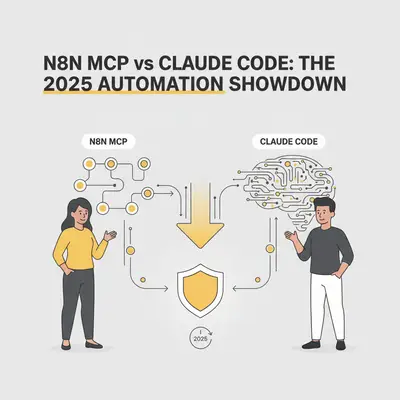
Now, you have two AI-driven superpowers fighting for dominance:
- n8n with MCP (Model Context Protocol): An AI agent (inside Cursor or Claude Desktop) that "drives" the n8n visual builder for you.
- Claude Code: An autonomous CLI agent that writes, tests, and deploys raw code (Python/Node.js) directly from your terminal.
The line between "low-code" and "pro-code" hasn't just blurred; it’s vanished. But choosing the wrong path can still cost you weeks of maintenance headaches.
Here is the definitive guide to choosing between the Architect Approach (n8n MCP) and the Builder Approach (Claude Code).
The Contenders Defined
Before we pick a winner, let's clarify what these tools actually do in a modern workflow.
1. n8n + MCP (The AI Architect)
n8n has adopted the Model Context Protocol (MCP). Think of this as giving your AI "hands." Instead of you dragging and dropping nodes, you connect Cursor or Claude Desktop to your n8n instance.
You say: "Build a workflow that takes new Stripe payments and puts them into Airtable."
The AI talks to n8n, adds the nodes, configures the connections, and hands you a finished visual workflow. You get the observability of a visual tool without the tedious clicking.
2. Claude Code (The AI Builder)
Claude Code is Anthropic’s autonomous coding agent. It lives in your terminal. It doesn't use a drag-and-drop interface. It writes raw code files (usually Python or TypeScript).
You say: "Write a script that monitors Stripe for payments and updates Airtable."
It writes the code, installs the libraries (pip install airtable-python-wrapper), runs the tests, fixes its own bugs, and deploys the script.
Key Insight: n8n MCP is about orchestrating pre-built blocks. Claude Code is about manufacturing custom logic.
Round 1: Handling Authentication (The "OAuth Nightmare")
The biggest friction point in automation isn't logic; it's permission.
The n8n Advantage: n8n shines here. It has thousands of pre-built nodes with authentication handled for you. You don't need to read the Gmail API documentation to learn how to refresh a token. You just click "Sign in with Google." Even when using MCP, the AI utilizes these pre-existing connections.
The Claude Code Reality: If you ask Claude Code to "read my emails," it has to write code to handle the Google Cloud Console OAuth flow. It needs to store tokens securely. It needs to handle token refreshes.
Winner: n8n. If your automation relies on connecting SaaS apps (Slack, Gmail, HubSpot, Salesforce), n8n saves you hours of "token management" hell.
Round 2: Data Processing & Logic
This is where the visual paradigm often breaks down.
Imagine you need to:
- Scrape 500 websites.
- Extract specific pricing data using Regex.
- Compare it to a CSV file with 50,000 rows.
- Formatting the output as a PDF.
The n8n Struggle: Doing this in n8n (or Make) requires loops. Visual loops are notoriously slow and consume a massive amount of "execution" credits. Managing complex Regex in a small text box inside a node is frustrating.
The Claude Code Advantage:
Claude Code will write a Python script using BeautifulSoup and Pandas. It processes 50,000 rows in seconds, not minutes. It handles complex logic naturally because code is meant for logic. It doesn't care if the logic has 50 branches; a visual builder becomes a "spaghetti monster" with that many routes.
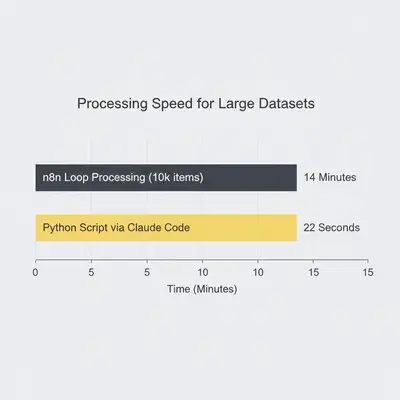
Winner: Claude Code. For heavy data lifting, scraping, or complex algorithmic logic, raw code is superior.
Round 3: Maintenance & Observability
You built the automation. It runs for a month. Then it breaks. Who fixes it?
The "Bus Factor" with Claude Code: If you built a Python script using Claude Code, but you don't know Python, you are in a dangerous spot. If the script fails, you have to spin up the agent again and hope it can diagnose the error from the logs. You cannot simply "look" at the code and see where the data stopped flowing unless you are a developer.
The n8n Safety Net: n8n provides visual execution history. You can see the green line turn red. You can click the exact node that failed and see the input/output JSON. Even non-technical team members can look at an n8n workflow and understand roughly what it's supposed to do.
Pro Tip: If you are handing this automation off to a client or a non-technical operations manager, use n8n. Handing them a Python script they can't read is a recipe for churn.
Comparison: The Decision Matrix
Here is how the two approaches stack up for specific business needs.
| Feature | n8n (via MCP/Cursor) | Claude Code (Raw Code) |
|---|---|---|
| Setup Speed | Very High (Pre-built nodes) | High (Fast generation) |
| Connectivity | Excellent (Managed Auth) | Good (Requires API setup) |
| Scalability | Medium (Node execution limits) | High (Server/Lambda limits only) |
| Debugging | Visual / Intuitive | Requires coding knowledge |
| Hosting | Self-hosted or Cloud | AWS Lambda, Vercel, VPS |
| Best For | SaaS Interconnectivity | Data Processing / Scraping |
How Cursor Fits Into the n8n Workflow
You might be wondering: "Why use Cursor with n8n? Isn't n8n drag-and-drop?"
This is the power of the n8n MCP integration.
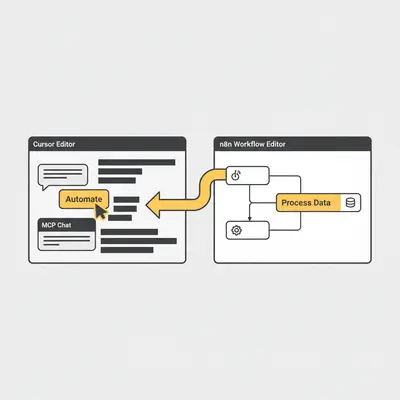
Traditionally, n8n requires you to know JavaScript for the "Code Node" if you want to do something custom. Now, inside Cursor (the editor), you can have your n8n workflow open on one side and the AI chat on the other.
- Connect Cursor to n8n: You provide Cursor with your n8n API key via MCP.
- Context Awareness: Cursor can "read" your current workflow JSON.
- Complex Transformations: You can ask Cursor: "Look at the JSON output from the Shopify node. Write a JavaScript function in the Code Node to filter out orders under $50 and format the rest for Slack."
Cursor writes the code directly into the n8n node. You get the best of both worlds: the visual structure of n8n and the coding power of an LLM.
The Hybrid Approach: The "Function Calling" Model
The smartest engineers in 2025 aren't choosing just one. They are combining them.
We call this the Core & Satellite method.
- The Core (n8n): Use n8n as the backbone. It handles the triggers (Webhooks, Cron jobs), the authentication (connecting to Gmail/Slack), and the routing.
- The Satellite (Code): When you hit a complex data step, don't try to solve it with 20 n8n nodes. Use an "HTTP Request" node or a "Code Node."
- The Execution: Use Claude Code or Cursor to write a robust Python/JS script that does the heavy lifting. Host that script as a serverless function (or just paste it into the n8n Code Node).
Reality Check: Don't be a purist. Pure code is hard to maintain for simple things (like sending a Slack DM). Pure no-code is hard to maintain for complex things (like fuzzy matching strings). Mix them.
3 Rules for Choosing Your Path
If you are staring at a blank screen right now, here is your decision logic:
- Is the main difficulty "Authentication"? (e.g., I need to listen to Outlook emails and save attachments to OneDrive).
- Choose n8n. The OAuth handling alone is worth the price of admission.
- Is the main difficulty "Logic/Looping"? (e.g., I need to cross-reference a 20MB CSV against a SQL database and fuzzy match names).
- Choose Claude Code. Build a standalone script. n8n will time out or cost a fortune in execution credits.
- Do you need a UI? (e.g., I need a form for a human to approve the draft).
- Choose n8n. It has built-in "Wait for Form" nodes and approval logic. Building a UI from scratch with code is overkill for internal tools.
Conclusion
The debate between "n8n MCP" and "Claude Code" isn't really about which tool is better—it's about where you want the complexity to live.
With n8n MCP, the complexity lives in the graph. You see lines and nodes. It is visual, accessible, and easier to hand off.
With Claude Code, the complexity lives in the syntax. It is faster, cheaper to run at scale, and infinitely flexible, but opaque to non-coders.
My recommendation for 2025: Start with n8n. Use the new MCP capabilities in Cursor to write complex transformations inside the Code Nodes. Only graduate to a pure Claude Code/Python build if you hit a performance wall or a cost ceiling.
Automation is about results, not code purity. Pick the tool that lets you sleep at night knowing the bot is working.
One practical asymmetry worth planning for if you go the Claude Code route: n8n runs on a server and keeps going without you, while a Claude Code session is a process on a machine that has to stay awake. Both problems have answers - Remote Control for steering a running session from your phone, and tmux or background sessions for keeping one alive on a box you SSH into - but they are setup you should cost in before you commit.
Ready to modernize your automation stack? Don't let legacy workflows slow you down. Book a demo with Evalics to see how we blend n8n and AI agents for enterprise-grade efficiency.