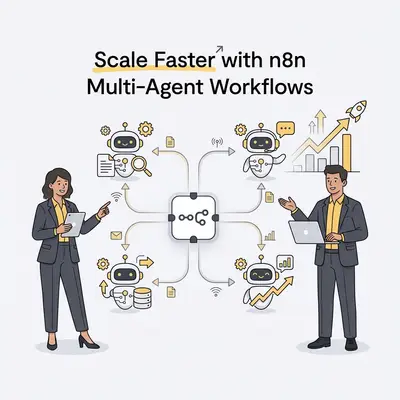
n8n multi-agent workflows are automated systems where specialized AI agents collaborate to complete complex business tasks by passing data and instructions between one another. Unlike a single chatbot, these agents function as a digital team, allowing small businesses to automate end-to-end processes like lead qualification or content production without manual oversight.
Small businesses often struggle with single-agent setups because they hit a "reasoning ceiling" when tasks become too complex. Modular, multi-agent systems isolate specific functions like research, drafting, and editing, so each step has one job and can be checked on its own. This structure creates a system of checks and balances that prevents the common errors found in simpler automations.
![_ [GRAPH] Column chart. Single-Agent Setup - 68% Accuracy. Multi-Agent Workflow - 97% Accuracy. Chart title: Task Accuracy Comparison at top. Alt text: Column chart showing that multi-agent workflows significantly outperform single-agent setups in task accuracy](/blogs/n8n_multi_agent/-graph-column-chart-singleagent-setup-68-accuracy-400w.webp)
Why Should Small Businesses Move Beyond Single-Agent Automation?
Moving beyond single-agent automation is necessary because specialized agents reduce hallucinations and operational bottlenecks. When you assign one agent to "Research" and another to "Verify," you create a pipeline where data is validated before it reaches your CRM. This modular approach reduces your reliance on expensive, high-parameter models for every step of the process.
By breaking down a workflow, you also gain granular control over your costs. You can use a high-end model like GPT-4o for the "Decision" agent while using a low-cost model like Haiku for simple data formatting. This strategy can reduce your total API expenditure by 30% while maintaining high-quality output across your entire business operation.
How Do You Architect Your First Multi-Agent System?
Architecting a multi-agent system requires defining three core components: the "Brain," the "Tools," and the "Memory." The Brain acts as the orchestrator, deciding which agent handles a specific sub-task. The Tools are the API connections—such as your CRM or email provider—that agents use to interact with the real world.
Memory is the shared context that allows agents to remember previous steps in the workflow. Without a shared memory, agents operate in silos, leading to redundant work and inconsistent data. By mapping out clear hand-off points between these nodes, you ensure that each agent receives only the information it needs to perform its specific role.
How Can You Build Your First Multi-Agent Workflow in 7 Steps?
- Define the Objective: Clearly state the end goal, such as "Convert a cold lead into a booked meeting."
- Identify Agent Roles: Assign specific personas, such as a Lead Scraper, an Email Drafter, and a CRM Updater.
- Configure the Orchestrator: Use the n8n AI Agent node to manage the flow of information between sub-agents.
- Connect Your Tools: Integrate your CRM, email provider, and web search tools using n8n’s native integrations.
- Establish Memory: Implement a database or vector store so agents can reference previous interactions.
- Set Guardrails: Define system instructions to prevent agents from going off-script or performing unauthorized actions.
- Test and Iterate: Run the workflow with dummy data to identify bottlenecks in the agent hand-off process.
Pro Tip: Start with a two-agent system—one for data retrieval and one for decision-making—before scaling to more complex architectures.
What Are the Common Pitfalls When Scaling Multi-Agent Workflows?
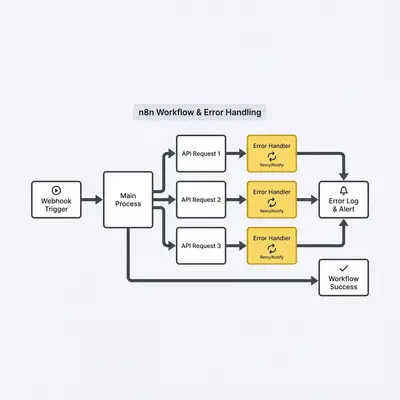
The most common pitfall is creating "infinite loops" where agents pass tasks back and forth without reaching a final output. This happens when instructions are too vague or when agents lack a clear "stop" condition. To prevent this, always implement "max iteration" limits within your agent nodes to force a conclusion.
Another frequent issue is excessive token consumption caused by passing the entire conversation history to every agent. You can solve this by using "summary nodes" that condense the previous steps into a concise context block before passing it to the next agent. This keeps your workflows fast and your API bills predictable.
How Do You Optimize Performance and Cost for Your Agents?
Optimizing performance involves selecting the right LLM for the specific task at hand. You do not need a top-tier model to summarize a simple email or format a phone number. By routing simple tasks to smaller, faster models, you maintain high-speed execution while keeping your monthly operational costs low.
Minimizing the context window is another critical optimization. Only pass the data necessary for the current step rather than the entire history of the workflow. This reduces latency and prevents the model from getting distracted by irrelevant information, which is a common cause of poor performance in complex automations.
Key Insight: We recommend using local models via Ollama for internal data processing to keep sensitive business information off public cloud servers.
How to Get Started with Your Automation Journey
Building your first multi-agent workflow is a process of refinement. Start by automating a single, repetitive task—like lead enrichment—and then add a second agent to handle the follow-up. As you become comfortable with the n8n interface, you can expand these systems to handle more complex business logic.
If you find yourself stuck, focus on the "Human-in-the-loop" approach. Add a node that pauses the workflow and sends a notification to your Slack or email for approval before the final action is taken. This builds trust in your system and ensures that your automated agents are always working within your business standards.