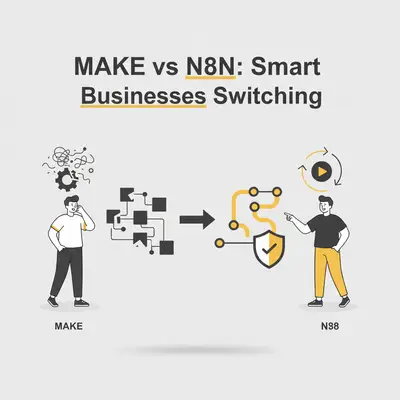
You open your automation invoice and see a number that shocks you. Your business is growing, but your automation costs are growing three times faster.
For years, Make.com (formerly Integromat) has been the default choice for small businesses. It’s pretty, colorful, and easy to start. But as we move deeper into 2025, a shift is happening. Agencies, e-commerce stores, and service businesses are migrating their critical infrastructure to n8n.
This isn't just about saving a few dollars. It's about ownership, scalability, and avoiding the "success tax" that traditional SaaS automation platforms charge.
Make is built for quick starts. n8n is built for scaling businesses.
Here is why 2025 is the year you should consider the switch.
The "Operation" vs. "Execution" Pricing Trap
The biggest difference between the two platforms—and the primary reason businesses bleed money on Make—is how they count usage.
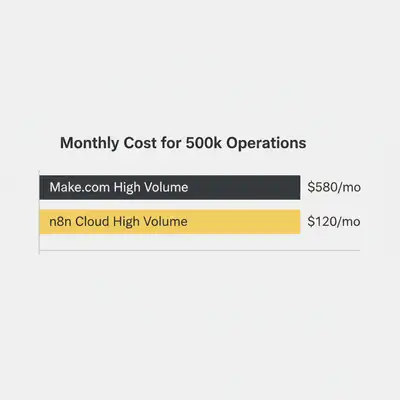
Make charges per "Operation". Every time a bubble in your scenario runs, it costs an operation. If you have a workflow that pulls 100 rows from Google Sheets and updates 100 records in a CRM, that isn't one task. That is 200+ operations. If that runs every hour, your bill explodes.
n8n charges per "Workflow Execution". n8n (specifically their Cloud version) counts the entire run of the workflow as one unit. Whether that workflow processes one row of data or 10,000 rows, it counts as one execution.
Reality Check: If your business processes large datasets—like daily order syncing, lead lists, or inventory updates—Make’s pricing model punishes you for volume. n8n’s model rewards efficiency.
A Real-World Cost Example
Imagine you run an e-commerce store. You need to sync 500 orders a day from Shopify to a Google Sheet and then to an email tool.
- Make: 500 orders × 3 steps = 1,500 operations/day.
- ~45,000 operations/month.
- You are already pushing into the $29/mo tier, and if you add any complexity (error handling, formatting), you jump to the $100+ tiers quickly.
- n8n: 1 execution runs once every 15 minutes to process the batch.
- 96 executions/day.
- ~2,880 executions/month.
- This easily fits into n8n’s Starter tier (~$20/mo), which allows for thousands of executions.
Complexity and The "Spaghetti Monster"
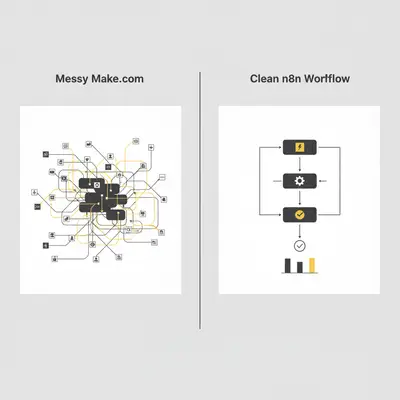
Make’s interface is beautiful. It uses bubbles that orbit each other. It looks friendly. But anyone who has built a complex logic flow in Make knows the "Spaghetti Monster."
As your logic grows, your Make scenario expands horizontally and vertically. It becomes a massive web of connections that is impossible to read on a single screen.
n8n takes a linear, flowchart approach. It looks more like an engineering diagram. While less "fun" visually, it is infinitely more manageable for complex business logic. You can group nodes, write clear notes, and structure data flow linearly.
Pro Tip: n8n allows you to merge data streams much easier than Make. In Make, combining data from two different branches often requires complex "Array Aggregators" and "Iterators." In n8n, data structures are more transparent and easier to manipulate.
The AI Agent Advantage
In 2025, automation isn't just about moving data; it's about AI agents.
n8n has pivoted aggressively toward AI. They have native integration with LangChain, the framework used to build advanced AI applications.
If you want to build a customer support bot that:
- Reads an email.
- Checks your inventory database.
- Decides if it needs to ask a human or reply automatically.
- Drafts the reply using GPT-4.
- Updates the CRM.
Make can do this, but it’s clunky. You have to chain standard API modules together.
n8n has dedicated "AI Chain" nodes. It understands the concept of "memory" in a conversation. It supports vector databases (like Pinecone) natively. For businesses looking to implement genuine AI agents, n8n is currently unmatched in the low-code space.
Data Privacy and Self-Hosting (The Nuclear Option)
This is the ultimate trump card for n8n.
Make is a SaaS (Software as a Service). Your data lives on their servers. If they double their prices, you pay. If they go down, you go down. If they ban your account, you lose your business logic.
n8n is "Source Available". You can sign up for n8n Cloud (SaaS) for ease of use. But you can also take the code and install it on your own server (DigitalOcean, Hetzner, AWS) for $5–10 a month.
Why does this matter for a Small Business Owner (SBO)?
- GDPR & Security: You keep sensitive client data on your infrastructure, not a third party's.
- No Limits: When you self-host, you don't pay per execution. Your only limit is the power of your server. You can run 1,000,000 executions for the cost of a $10 server.
- Insurance: If n8n the company changes direction, you still have your instance running on your server. You own the engine.
Key Insight: Self-hosting isn't for everyone. It requires maintenance. But having the option to export your workflows and move to your own server gives you leverage that Make users simply don't have.
When Should You Stick with Make?
This isn't to say Make is bad. It is a fantastic tool for specific scenarios.
You should stay on Make if:
- You have zero technical skills: Make is slightly easier for a complete novice to grasp initially.
- You use low volume: If you only run 100 tasks a month, Make’s free tier is generous.
- Specific Triggers: Make has some "instant" triggers (webhooks) for specific apps that are easier to set up than n8n.
However, if you are reading this, you are likely hitting the limits of "simple" and moving toward "scalable."
The Verdict for 2025
The era of automating for the sake of novelty is over. Small businesses in 2025 need automation that impacts the bottom line without inflating overhead costs.
Make is the Apple of automation: Polished, user-friendly, expensive, and a walled garden. n8n is the Android (or Linux) of automation: Flexible, powerful, cost-effective, and open.
If you are building a business that relies on automation to function, you want to own the engine. n8n gives you the keys.
Quick Comparison Table
| Feature | Make.com | n8n |
|---|---|---|
| Pricing Model | Per Operation (Expensive at scale) | Per Execution (Cheap at scale) |
| Self-Host Option | No | Yes |
| AI Capabilities | Standard API integration | Native LangChain & Vector Support |
| Complex Logic | Can get messy visually | Structured & Linear |
| Best For | Simple tasks, Beginners | Scaling businesses, Complex Data |
Official Sources
- n8n Official Pricing Page
- Make.com Pricing & Tiers
- LangChain Integration Docs for n8n
Conclusion
Switching platforms feels like a headache, but the math doesn't lie. Moving from Make to n8n often reduces monthly spend by 70-80% while unlocking advanced AI capabilities. Start by migrating one high-volume workflow. Your budget will thank you immediately.
Ready to migrate your expensive Make workflows to n8n? Book a workflow audit with Evalics and let's stop the billing bleed.
By Kevin Michael Schindler, AI Automation Expert at Evalics.