Marketing automation is the process of using software to execute repetitive marketing tasks—like email sequences, social media posting, and lead nurturing—without manual intervention. For small business owners, it acts as a force multiplier. It allows you to engage leads 24/7, improve conversion rates, and reclaim hours of your work week.
Marketing automation moves the repetitive parts of follow-up off your desk. By removing the need for manual data entry and follow-up emails, you shift your focus from administrative busywork to high-level strategy.
Why Should Small Businesses Use Marketing Automation?
Marketing automation bridges the gap between lead generation and closing a sale. When a potential customer visits your site, they expect immediate engagement. If you wait hours to send a manual follow-up, that lead often goes cold. Automation ensures every prospect receives a timely, relevant response the moment they express interest.
Beyond speed, automation provides consistency. A manual process is prone to human error, such as forgetting to send a follow-up email or misplacing a contact’s information. Automated workflows ensure every lead follows the exact same high-quality path, which builds trust and keeps your brand top-of-mind.
Key Insight: Automation is not about replacing your voice; it is about scaling your ability to be present for every customer at the right time.
What Are the Prerequisites Before You Start?
Before building your first workflow, you must have a clear understanding of your customer journey and a centralized database. You cannot automate a process that you have not yet defined. Start by mapping out how a stranger becomes a lead and eventually a paying client.
Ensure you have a CRM or email marketing platform integrated with your website. You also need a defined lead magnet, such as a discount code, a whitepaper, or a free consultation offer. Finally, define a clear goal for the automation. Are you trying to book more discovery calls, or are you aiming to increase e-commerce sales?
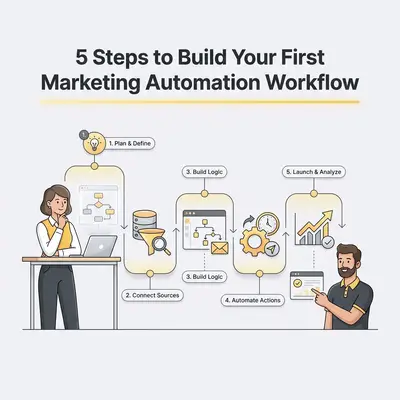
How Do You Build Your First Marketing Automation Workflow in 5 Steps?
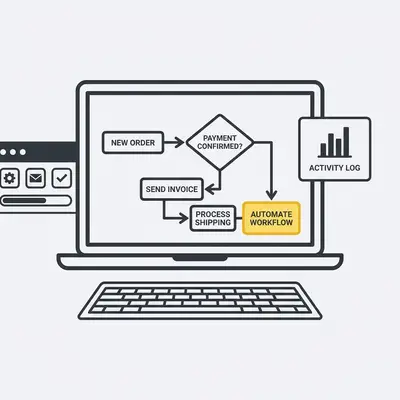
Building a workflow is a systematic process of defining a trigger and the subsequent actions that follow. By mapping out the logic before you touch the software, you ensure a seamless experience for your prospects.
- Define Your Trigger: Identify the specific action a user takes to start the process. This could be filling out a contact form, downloading a PDF, or abandoning a shopping cart.
- Set Your Entry Criteria: Filter who enters the workflow. You might only want to target leads from a specific geographic region or those who signed up for a specific service.
- Map the Action Sequence: Determine the series of emails or notifications that follow. Include time delays between each step to avoid overwhelming the prospect.
- Configure the Logic: Add "if/then" branches to personalize the experience. For example, if they clicked a link in your first email, send them a case study. If they did not, send them a helpful tip instead.
- Test and Activate: Run a test version of the workflow using your own email address. Check every link, button, and delay to ensure the experience is flawless before going live.
Pro Tip: Always include a "human-sounding" sign-off in your automated emails to maintain a personal connection with your leads.
What Are the Common Pitfalls to Avoid?
The most common mistake is over-automating and losing the human touch that small businesses are known for. Avoid sending generic, high-frequency emails that feel like spam. If your messages do not provide value, your audience will unsubscribe quickly.
Another pitfall is failing to segment your audience. Sending the same message to a long-time client and a brand-new lead creates confusion. Finally, neglecting to monitor your workflow once it is live is a recipe for disaster. Automated systems can break or become outdated, so review your performance metrics at least once a month.
![_ [GRAPH] Column chart. Before Automation - 12 Hours/Week. After Automation - 2 Hours/Week. Chart title: Weekly Time Spent on Lead Follow-up at top. Alt text: Column chart showing time savings from automation: 12 hours before vs 2 hours after](/blogs/simple_marketing_automation/-graph-column-chart-before-automation-12-hoursweek-400w.webp)
How Do You Measure the Success of Your Automation?
Success is measured by tracking key performance indicators (KPIs) such as open rates, click-through rates, and final conversion rates. By analyzing these metrics, you identify which parts of your workflow perform well and which steps cause prospects to drop off.
If your open rates are low, test different subject lines. If your click-through rates are low, refine your call-to-action or the value proposition of your content. Continuous optimization is the secret to turning a basic workflow into a high-converting engine.
How Can You Scale Your Automation Strategy?
Once your first workflow is successful, scale by creating more complex "nurture tracks" for different customer personas. You can also integrate your automation platform with other tools like your calendar or payment processor. This creates a fully automated sales cycle that handles everything from lead capture to booking and payment.
Reality Check: You do not need to automate everything at once. Start with one high-impact workflow, perfect it, and then move on to the next.
Evalics specializes in helping SMBs build custom, high-converting automation workflows. If you are ready to stop chasing leads and start closing them, contact us today for a free audit of your current processes.