
As a solo founder, your time is your most valuable asset. Juggling product development, marketing, sales, and customer support can feel like a constant uphill battle. What if you could deploy powerful, industry-standard software without the steep learning curve or hefty price tags? Open-source software (OSS) offers this very advantage, and with the right tools, you can harness its full potential.
Why Should Solo Founders Care About Open Source Software?
Open source software (OSS) offers powerful, flexible, and often free solutions for small businesses. For solo founders, leveraging OSS can significantly reduce costs, accelerate development, and provide access to cutting-edge technology without hefty licensing fees. This allows you to build robust applications and services efficiently, even with limited resources.
The Cost-Effectiveness of OSS
The most immediate benefit of OSS for a solo founder is its cost. Many OSS projects are free to use, eliminating the recurring subscription fees associated with proprietary software. This can save a small business thousands of dollars annually, freeing up capital for other critical areas like marketing or hiring. For instance, instead of paying hundreds of dollars a month for a project management tool, you could self-host an OSS alternative like Taiga or OpenProject for a fraction of the cost, primarily just for server expenses. This financial freedom is crucial for early-stage businesses where every dollar counts.
The Innovation Edge of OSS
OSS communities are often at the forefront of technological innovation. Developers worldwide contribute to these projects, leading to rapid development cycles and the integration of cutting-edge features. By using OSS, solo founders gain access to this innovation without needing to invest heavily in R&D. You can leverage advanced functionalities and stay competitive by adopting tools that are constantly being improved by a global network of experts. This access to bleeding-edge technology can give your small business a significant advantage over competitors relying on older, proprietary systems.
What is Coolify and How Can It Help Solo Founders?
Coolify is an open-source, self-hostable deployment tool designed to simplify the process of running and managing applications. For solo founders, it acts as a powerful command center, enabling you to easily deploy and manage multiple instances of various OSS projects from a single interface, drastically reducing the complexity of infrastructure management.
Understanding Coolify's Core Functionality
At its heart, Coolify automates the deployment and management of applications on your own servers. It abstracts away much of the complexity involved in setting up web servers, databases, and other necessary infrastructure. You can connect your server to Coolify, and then, through a user-friendly interface, select the OSS projects you want to deploy. Coolify handles the Docker setup, configuration, and ongoing maintenance, making it incredibly efficient for a single person to manage a diverse set of applications. It's like having a dedicated DevOps team, but without the overhead.
Benefits of Coolify for a Single-Person Operation
For a solo founder, Coolify is a game-changer. It dramatically reduces the technical barrier to entry for self-hosting OSS. Instead of spending days or weeks learning Docker, server administration, and complex deployment scripts, you can get applications up and running in minutes. This means you can:
- Deploy multiple services: Run your website, a project management tool, a CRM, and a database all from one place.
- Save time: Automate repetitive setup and maintenance tasks.
- Reduce costs: Avoid expensive managed hosting or SaaS subscriptions for many tools.
- Gain control: Keep your data and applications on your own infrastructure.
- Learn faster: Focus on using the tools rather than fighting with their setup.
This efficiency allows you to focus on growing your business, not managing your infrastructure.
How Can I Set Up Coolify to Deploy Multiple OSS Projects?
Setting up Coolify involves a few key steps, starting with its installation on a server. Once installed, you'll connect your server, then begin adding your desired OSS projects. Coolify simplifies this by offering pre-configured templates and straightforward deployment workflows, allowing you to manage diverse applications with minimal manual intervention.
Step 1: Installing Coolify on Your Server
The first step is to get Coolify running on a server. This is typically done using Docker. You'll need a server (a Virtual Private Server or VPS is a good starting point) with Docker and Docker Compose installed. The Coolify documentation provides clear, concise instructions for this. You'll usually run a single command to pull the Coolify Docker image and start its services. This process is designed to be straightforward, even for those with limited server administration experience.
Step 2: Connecting Your Server and Adding Projects
Once Coolify is installed and running, you'll access its web interface through your browser. The initial setup involves connecting your server to Coolify. You'll provide details about your server's IP address or domain name, and Coolify will guide you through setting up the necessary configurations. After your server is connected, you can start adding applications. Coolify offers a curated list of popular OSS projects that can be deployed with just a few clicks. You select the application, provide any necessary configuration details (like database credentials or domain names), and Coolify handles the rest.
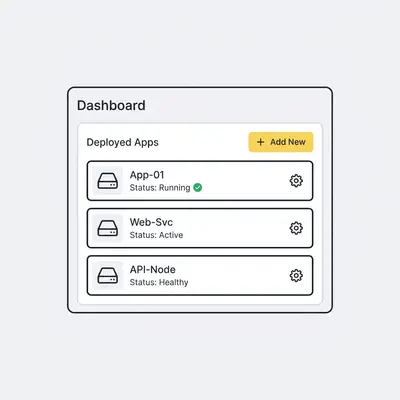
Step 3: Configuring and Deploying Your First OSS Instance
Let's say you want to deploy a self-hosted project management tool like Taiga. You'd navigate to the "Applications" section in Coolify, click "Add Application," and select "Taiga" from the list. Coolify will present you with fields to configure essential settings. This might include:
- Domain Name: The URL you want to use to access Taiga (e.g.,
taiga.yourdomain.com). - Database Type: Coolify can often set up a database for you (like PostgreSQL) or connect to an existing one.
- Email Settings: For notifications and user management.
- Environment Variables: Specific settings required by Taiga.
You fill in these details, click "Deploy," and Coolify will pull the necessary Docker images, create the containers, set up the database, and configure the web server. Within minutes, your instance of Taiga will be live and accessible via the domain you specified. You can repeat this process for other OSS projects, building a comprehensive suite of tools for your business.
What Are the Best OSS Projects to Deploy with Coolify as a Solo Founder?
Several OSS projects are ideal for solo founders looking to leverage Coolify. These range from project management tools and communication platforms to databases and web servers. Choosing the right OSS depends on your specific business needs, but popular options often include self-hosted alternatives to popular SaaS products, offering greater control and cost savings.
Project Management & Collaboration Tools
For solo founders, staying organized is paramount. Coolify makes it easy to deploy powerful OSS alternatives to expensive SaaS project management tools:
- Taiga: A feature-rich, open-source project management platform that supports Agile methodologies like Scrum and Kanban. It's excellent for managing tasks, sprints, and team collaboration.
- OpenProject: Another robust project management solution offering features like issue tracking, Gantt charts, team collaboration, and time tracking.
- Gitea: A lightweight, self-hosted Git service. If you're developing software or managing code for your projects, Gitea provides a private, secure place to host your repositories, similar to GitHub but under your control.
Web Servers & Databases
Underpinning many applications are web servers and databases. Coolify simplifies the deployment of these foundational components:
- Nginx/Apache: These are the workhorses of the web. You can deploy them to serve your static websites or act as reverse proxies for other applications. Coolify makes configuring them straightforward.
- PostgreSQL/MySQL: Essential for storing structured data. If your OSS applications require a database, Coolify can easily set up and manage instances of these industry-standard relational databases.
- MinIO: A high-performance, S3-compatible object storage solution. If you need to store large files, backups, or media assets, MinIO is a fantastic OSS option that Coolify can deploy.
Pro Tip: Start with projects that have active communities and good documentation. This will make troubleshooting and finding support much easier as a solo founder.
What Are Common Pitfalls When Deploying OSS with Coolify?
As a solo founder, you might encounter challenges like underestimating resource requirements, neglecting security updates, or struggling with complex configurations. Being aware of these potential issues beforehand allows you to proactively plan and implement solutions, ensuring a smoother and more secure deployment of your chosen OSS projects.
Underestimating Resource Needs
One common pitfall is not accurately estimating the server resources (CPU, RAM, storage) required for your deployed applications. While OSS is often free, the server it runs on is not. A single-founder business might start with a small VPS, but as more applications are added or as existing ones gain users, resource demands can quickly outstrip capacity. This can lead to slow performance, application crashes, and a frustrating user experience. Always monitor your server's resource usage and be prepared to scale up your hosting plan as needed. For example, a busy database or a high-traffic web server will require more RAM and CPU than a simple static site.
Security and Maintenance Oversights
Self-hosting OSS means you are responsible for its security and maintenance. This includes applying security patches, updating software regularly, and configuring firewalls. Coolify simplifies deployment, but it doesn't eliminate the need for ongoing vigilance. Neglecting security updates can leave your applications vulnerable to attacks. Similarly, failing to update software can lead to compatibility issues or the inability to use new features. Regularly check for updates for both Coolify itself and the applications you deploy through it. Many applications offer simple update mechanisms within Coolify, but it's crucial to actively use them.
![_ [GRAPH] Column chart. Weekly Time Spent on Reporting - 12 Hours/Week. Weekly Time Spent on Reporting - 2 Hours/Week. Chart title: Weekly Time Savings from Automation at top. Alt text: Column chart showing weekly time savings from automation: 12 hours before automation, reduced to 2 hours after automation](/blogs/solo_founder_coolify/-graph-column-chart-weekly-time-spent-on-reporting-400w.webp)
Frequently Asked Questions
Can Coolify handle databases like PostgreSQL or MySQL?
Yes, Coolify is designed to deploy and manage various database instances, including popular options like PostgreSQL and MySQL. It simplifies the setup and ongoing management of these critical data storage solutions for your applications.
How does Coolify help with updates for deployed OSS projects?
Coolify streamlines the update process for your deployed OSS projects. It often provides simple one-click update mechanisms or clear instructions for updating applications, saving you significant manual effort and ensuring your software remains current and secure.
Is Coolify suitable for beginners with limited technical experience?
While Coolify simplifies deployment, a basic understanding of server management and command-line interfaces is beneficial. However, its user-friendly interface and guided workflows make it more accessible than manual deployment methods for those willing to learn.
Next Steps for Solo Founders
Ready to take control of your software stack and unlock the power of OSS?
- Choose your first OSS project: Identify a business need that an OSS tool can solve.
- Set up a server: Get a VPS from a reputable provider.
- Install Coolify: Follow the official documentation to get it up and running.
- Deploy your first application: Use Coolify to deploy your chosen OSS project.
By embracing tools like Coolify, you can build a powerful, cost-effective, and scalable technology foundation for your solo venture.