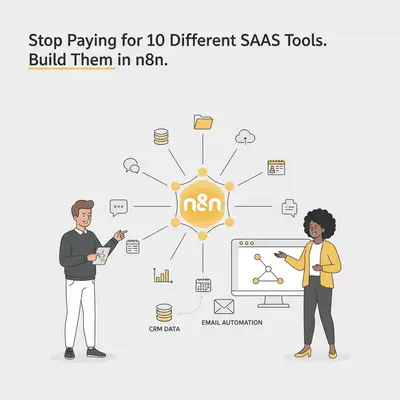
You check your credit card statement and see a familiar list of charges. $49 for social media scheduling. $99 for lead enrichment. $29 for an email parser. $150 for a connector tool to make them all talk to each other.
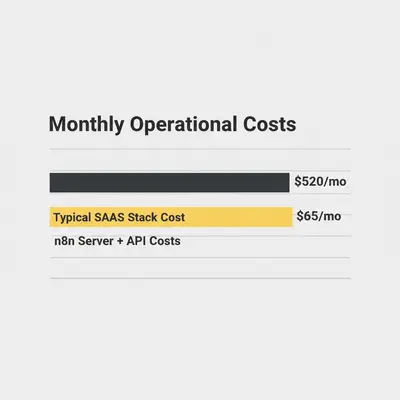
You are paying over $500 a month for a stack of tools, yet you utilize perhaps 10% of their features.
This is the "SaaS Trap." In the rush to automate, businesses often solve every small problem with a new monthly subscription. The result is a fragmented tech stack, data silos, and a burn rate that grows faster than your revenue.
In 2025, the most efficient businesses are taking a different approach. Instead of renting ten different single-purpose tools, they are using n8n to build custom internal tools that do exactly what they need—and nothing they don't.
Here is how you can stop renting your operations and start owning them.
The Problem: Paying for Features You Don't Use
Most SaaS products are built to serve thousands of customers. To justify their pricing, they pack in hundreds of features. But as a small business or agency, you likely only need one specific function:
- You buy Buffer or Hootsuite just to post to LinkedIn once a day.
- You buy Clay or Apollo just to find email addresses for a list of names.
- You buy Zapier just to move leads from Facebook to Google Sheets.
You are paying for the "Enterprise Suite" but using the "Hello World" features.
Reality Check: SaaS pricing is often based on "per seat" or "tier limits." A custom n8n workflow has no seat limits. The only limit is your server capacity and your creativity.
Why n8n is the "Operating System" for Your Business
Unlike simpler tools, n8n is a workflow automation platform that gives you granular control over data. Because it can run custom JavaScript and connect to virtually any API, it acts less like a simple connector and more like a backend operating system.
When you use n8n, you stop paying for the interface (the pretty dashboard) and start paying only for the compute (the actual work being done).
1. The Social Media Scheduler Replacement
The SaaS Way: You pay $50–$100/mo for a tool that queues posts for LinkedIn, X (Twitter), and Instagram.
The n8n Way: You can build a "content engine" in n8n that is infinitely more powerful than a basic scheduler.
- Input: You drop a raw idea into a dedicated Slack channel or Notion database.
- Creation: An AI Agent (GPT-4 or Claude) formats the post, adds hashtags, and generates an image using DALL-E 3.
- Approval: The draft is sent to your phone via Telegram or Slack for a "Yes/No" button click.
- Posting: Upon approval, n8n posts it to the APIs of LinkedIn and X at your scheduled time.
Cost: $0/mo (included in your server) + pennies for API calls. Effort: Moderate setup, zero maintenance once running.
2. The Lead Enrichment Replacement
The SaaS Way: You pay $99–$300/mo for tools like Clearbit, ZoomInfo, or specialized scrapers to get data on 500 leads.
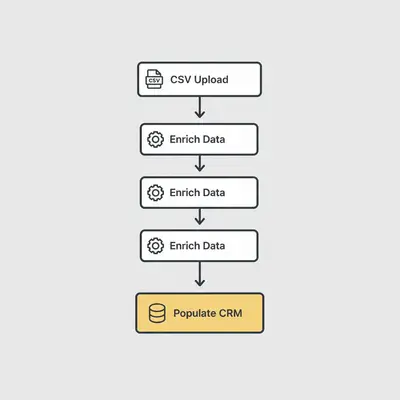
The n8n Way: You build a waterfall enrichment workflow.
- Trigger: A new lead arrives (form fill or CSV upload).
- Search: n8n uses a custom Google Search (via SerpApi or similar) to find the lead's LinkedIn profile.
- Scrape: An HTTP Request node visits the public profile or company website.
- Analyze: An LLM (Large Language Model) reads the website text and extracts the exact data you need: "Pricing Model," "Tech Stack," or "Key Decision Maker."
Pro Tip: By building this yourself, you control the data quality. If an API fails, you can switch providers instantly without losing your workflow logic.
3. The "Connector" Bill (Replacing Zapier)
The SaaS Way: You pay $50–$100/mo for Zapier simply because you have a high volume of tasks, even if the tasks are simple.
The n8n Way: n8n is often cited as the best alternative for high-volume automation. Since n8n is fair-code, you can self-host it. This means you don't pay per "task" or "run." You can process 10,000 rows of data for the same price as processing 10.
If you are debating between the two, read our deep dive on Make vs n8n: The 2025 AI Automation Comparison.
The Economics of Switching
Let's look at a realistic monthly breakdown for a small agency.
| Tool Category | Typical SaaS Cost | n8n Replacement Cost |
|---|---|---|
| Automation Platform | $129 (Zapier Pro) | $20 (n8n Cloud or Server) |
| Social Scheduler | $60 (Buffer/Hootsuite) | $2 (OpenAI/Claude API) |
| Lead Enrichment | $99 (Data Provider) | $10 (SerpApi + Proxy) |
| PDF/Invoice Parser | $49 (Parser Tool) | $5 (Vision Model API) |
| Internal Dashboard | $29 (Geckoboard/etc) | $0 (n8n + Google Sheets/Airtable) |
| TOTAL | ~$366 / month | ~$37 / month |
Annual Savings: ~$3,900.
That is nearly $4,000 purely from consolidating redundant tools.
The "Build vs. Buy" Decision Framework
Before you cancel all your subscriptions, you need to understand the trade-offs. You are trading money for responsibility.
When you buy SaaS, you are paying for the User Interface (UI) and reliability. When you build in n8n, you are the product manager and the support team.
When to KEEP the SaaS (Buy):
- Heavy UI Needs: Do not try to build a CRM (Salesforce) or Project Management tool (Asana) in n8n. The interface is too complex to replicate.
- Compliance/Security: If you handle medical data (HIPAA) or payments (Stripe), rely on established platforms rather than custom scripts unless you are a security expert.
- Critical Uptime: If the tool goes down at 3 AM, do you want to fix it, or do you want to call support?
When to BUILD in n8n (Build):
- Background Processes: Things that run invisibly (syncing data, parsing emails, enriching leads).
- Unique Logic: If your process is "We do X, but only if Y happens, unless Z," SaaS tools will likely fail you. Custom logic is n8n's playground.
- High Volume/Low Complexity: Moving millions of rows of data between databases.
- AI Integration: Most SaaS tools have "AI features" that are just wrappers around GPT-4 with a markup. In n8n, you connect directly to the model and pay wholesale prices.
For a deeper dive on this specific decision, read Building vs. Buying: When to Build Custom vs. Buy SaaS.
How to Get Started
If you are ready to start consolidating, do not try to rebuild everything at once.
- Audit your stack. Look for tools where you only use one feature.
- Pick a "Low Risk" workflow. Start with something internal, like a Slack notification or a weekly report generator.
- Learn the Basics. You need to understand how APIs authenticate. Check out What is an API Key? A Simple Guide.
- Calculate Costs. Ensure the API costs won't exceed the SaaS subscription. Use our guide on Free vs Paid AI Tools to estimate hidden costs.
Quick Win: Cancel your "PDF to Text" or "Email Parser" subscription today. n8n has built-in nodes or can easily connect to Google Vision/OpenAI Vision to read documents for a fraction of the cost.
Conclusion
You don't need ten different subscriptions to run a modern business. You need a data strategy.
By treating n8n as your central operating system, you can eliminate the "SaaS Tax" and build workflows that fit your business like a tailored suit. It requires an upfront investment of time to learn, but the long-term dividends in cost savings and agility are massive.
Stop renting your process. Start building it.
Ready to consolidate your stack? If you want to replace your expensive SaaS tools but don't have the time to build the workflows yourself, Book a demo with Evalics and let's optimize your operations.
Related Resources
- Make vs n8n: The 2025 AI Automation Comparison
- What is an API Key? A Simple Guide for AI Automation
- Free vs Paid AI Tools: What's Actually Worth Your Money?
Official Sources
About the Author: Kevin Michael Schindler is an AI Automation Expert at Evalics, specializing in helping businesses consolidate tech stacks and build scalable custom workflows.