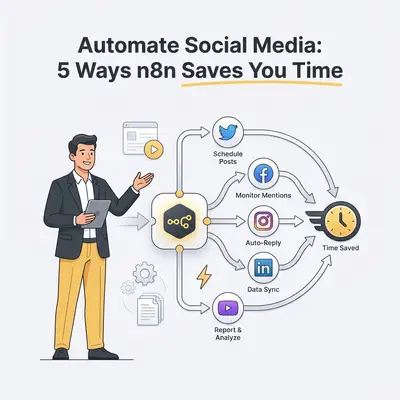
n8n is a workflow automation tool that connects your favorite apps to perform tasks automatically without manual input. For small business owners, it acts as a digital bridge between your content calendar, your AI tools, and your social media profiles. By automating social media scheduling, you can reclaim hours of lost productivity every week.
Manual scheduling drains your time and limits your growth. Consistency is what social platforms reward, and consistency is exactly what a manual posting routine loses first when you get busy. Automating the repetitive part lets you focus on high-level strategy rather than copy-pasting links.
Why is manual social media scheduling holding your small business back?
Manual scheduling forces you to stop your actual work to post content, which kills your focus. This fragmented approach leads to inconsistent brand presence and missed engagement windows. When you rely on manual posting, you risk burnout and human error. Automating your workflow with n8n ensures your brand stays active 24/7 without increasing your headcount.
Key Insight: Automation is not about replacing your voice; it is about removing the friction that prevents you from sharing your expertise consistently.
What are the 5 most effective ways to automate social media with n8n?
Automating your social media involves connecting your content sources directly to your publishing platforms using n8n’s visual workflow builder. By creating automated pipelines, you eliminate the need for manual data entry and repetitive scheduling tasks. Below are the five most impactful ways to leverage n8n for your small business social media strategy.
1. How does the "Content Calendar to Auto-Post" workflow work?
This method syncs your Google Sheets or Airtable content calendar directly to platforms like LinkedIn, Twitter, or Instagram. When a status is marked as "Ready," n8n triggers the post, handles the media upload, and logs the live URL back into your sheet. This creates a single source of truth for your entire team.
- Pros: Centralized control and easy team collaboration.
- Cons: Requires initial setup of API credentials for each platform.
2. How can you use "RSS Feed to Social" syndication?
Automatically share your latest blog posts or industry news by connecting an RSS feed to your social channels. n8n monitors your website’s feed and automatically drafts or publishes a post whenever a new article goes live. This ensures your audience always sees your latest updates without you lifting a finger.
- Pros: Keeps your feed active with minimal effort and drives traffic to your site.
- Cons: Can feel robotic if you do not customize the captions.
3. How does the "AI-Powered Content Repurposing" engine function?
Use n8n to send your long-form content, such as YouTube transcripts or blog posts, to OpenAI’s API to generate platform-specific captions. The workflow then schedules these variations across different channels automatically. This maximizes your content ROI by turning one piece of work into five or more social posts.
- Pros: Maximizes content ROI and maintains a platform-specific tone.
- Cons: Requires careful prompt engineering to ensure your brand voice remains consistent.
![_ [GRAPH] Column chart. Manual Posting - 10 Hours/Week. Automated Posting - 1 Hour/Week. Chart title: Weekly Time Spent on Social Media at top. Alt text: Column chart showing time savings from automation: 10 hours before vs 1 hour after](/blogs/streamline_social_media/-graph-column-chart-manual-posting-10-hoursweek-au-400w.webp)
4. How does "Cross-Platform Sync" automation work?
When you post to one primary channel, such as Instagram, n8n detects the new post and automatically pushes the image and caption to your other channels like Facebook or LinkedIn. This ensures your brand message is consistent across all touchpoints while saving you from repeating the same task on every app.
- Pros: Ensures brand consistency across all touchpoints.
- Cons: May require image resizing logic to fit different platform aspect ratios.
5. How can you set up an "Engagement Notification" loop?
Instead of checking apps constantly, use n8n to monitor mentions or comments and send them to a Slack or Discord channel. You can even trigger automated "thank you" responses for specific keywords. This helps you never miss a customer interaction and significantly improves your response time.
- Pros: Never miss a customer interaction and improves response time.
- Cons: Needs filtering logic to avoid notification fatigue.
Pro Tip: Always test your workflows with a "dummy" account before connecting your primary business social media profiles to avoid accidental public posts.
How does n8n compare to traditional scheduling tools?
| Feature | Traditional Schedulers (Buffer/Hootsuite) | n8n Automation |
|---|---|---|
| Customization | Limited to platform features | Infinite (API-based) |
| Cost | Monthly subscription per user | Self-hosted or cloud (pay for usage) |
| Integration | Pre-built integrations only | Connects to any app with an API |
| Learning Curve | Low | Moderate |
How do you get started with your first n8n workflow?
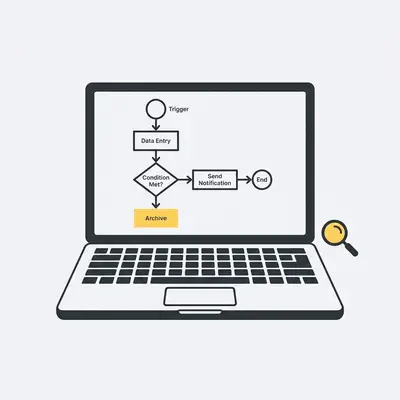
Getting started requires identifying your most repetitive task and mapping out the data flow. First, define your trigger, such as a new row in a spreadsheet. Then, define your action, such as posting to LinkedIn. By starting small with one workflow, you can build confidence before automating your entire social media ecosystem.
Quick Win: Start by automating your blog post sharing via RSS. It is the simplest workflow to build and provides immediate value by keeping your social channels active.
If you find the technical setup overwhelming, Evalics specializes in custom n8n automation for small businesses. We help you build robust, scalable systems that save you 10+ hours a week. Book a discovery call today to see how we can streamline your operations.