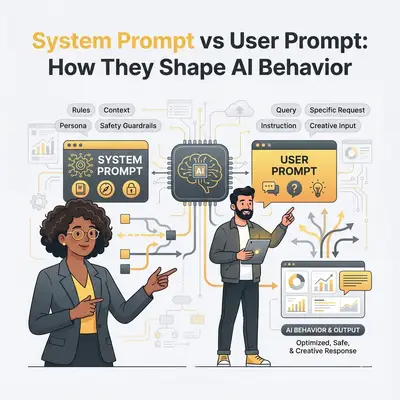
Prompt engineering is how you design instructions so an AI model does useful work instead of drifting, hallucinating, or ignoring constraints. In practice it almost always starts with one split: the durable rules the model should always follow, and the task you ask right now.
That split is system prompt vs user prompt. Master it and most “prompt engineering” advice becomes concrete instead of vague.
If you mainly need copy-paste templates, use the companion guide: System Prompt vs User Prompt: Differences, Examples & Templates. This article focuses on the definition, the behavior model, and how the two layers work together.
What is prompt engineering?
Prompt engineering is the craft of shaping model input so the output matches a goal: correct facts, the right format, the right tone, and safe boundaries. Official docs from vendors describe the same idea with slightly different wording:
- IBM on prompt engineering frames it as writing inputs that steer model behavior.
- OpenAI’s prompt engineering guide focuses on clear instructions, structure, and iteration.
- Anthropic’s prompt engineering overview emphasizes explicit roles, examples, and constraints.
- Google’s Gemini prompting strategies cover clarity, context, and iterative refinement.
You do not need a special title to do it. If you write instructions for an LLM, you are engineering prompts. The skill shows up in chat tools, support agents, sales drafts, coding assistants, and automation workflows.
What prompt engineering is not
- It is not magic keywords that “unlock” a model.
- It is not stuffing every policy into a single long user message.
- It is not inventing metrics or case studies to prove prompts “work.”
- It is not a one-time setup. Models change, tasks change, and prompts need review.
System prompt vs user prompt: the core split
| Aspect | System prompt | User prompt |
|---|---|---|
| Purpose | Persistent role, rules, and guardrails | Immediate task or question |
| Scope | Applies across many turns or sessions | Usually one request |
| Who sets it | Product owners, developers, admins | End user or workflow step |
| Changes | Rarely, when behavior policy changes | Every task |
| Typical content | Persona, tone, compliance rules, output schema | Data, question, format for this job |
System prompts: the standing job description
A system prompt tells the model who it is, what it may do, and what it must refuse. Good system prompts usually include:
- Identity: role and domain (for example, “You are a support agent for a B2B SaaS billing product”).
- Boundaries: what not to invent, what to escalate, what data is off limits.
- Style: tone, length, language, citation habits.
- Output contract: required structure such as Markdown sections, JSON keys, or a short checklist.
Keep system prompts stable. If every ticket rewrites the brand voice, you do not have a system prompt. You have chaos.
User prompts: the task for this moment
A user prompt is the work order. Nielsen Norman Group’s research on prompt structure highlights a practical pattern: clear request, relevant context, defined format, and supporting references (NN/g on AI prompt structure).
Weak user prompt:
Summarize this.
Stronger user prompt:
Summarize the attached churn report in three bullets: top drivers, at-risk segments, and two next actions. Cap at 80 words. Use plain language for a non-technical founder.
The system prompt already owns tone and safety. The user prompt owns the job.
How the two layers shape AI behavior
Think in layers:
- System layer sets the default policy.
- User layer supplies the variable input.
- Model tries to satisfy both. When they conflict, behavior gets weird: ignored rules, broken formats, or overconfident guesses.
That is why prompt engineering for production systems is mostly architecture, not clever one-liners:
- Put reusable rules in the system prompt.
- Put task data and one-off constraints in the user prompt.
- Add a few examples only when the format is hard to describe in words.
- Iterate when failures repeat. Do not “fix” a systemic rule by pasting it into every user message.
Mini example: support triage
System prompt (stable):
You are a first-line support triage assistant for a B2B SaaS product.
Be concise and factual. Never invent policy.
If the answer is not in the provided knowledge snippets, say you are unsure and recommend human follow-up.
Return Markdown with sections: Summary, Likely cause, Suggested reply, Escalate? (yes/no).
User prompt (per ticket):
Ticket subject: Invoice shows duplicate charge
Customer plan: Pro annual
Knowledge snippets:
- Refunds for duplicate charges require billing review within 5 business days.
- Customers should not be told a refund is already processed unless billing confirms it.

Draft the triage output.
Same system prompt can serve hundreds of tickets. Each user prompt stays short and specific.
A practical prompt engineering checklist
Use this when an AI workflow feels unreliable:
- Write the goal in one sentence. If you cannot, the prompt will not either.
- Separate durable vs temporary instructions. Durable goes system. Temporary goes user.
- Name the output format. Bullets, table, JSON, email draft: pick one.
- Add only the context the model needs. Extra paste increases noise and cost.
- State uncertainty behavior. Tell the model what to do when evidence is missing.
- Test with hard cases, not only happy paths: missing data, conflicting notes, hostile input.
- Change one thing at a time when debugging. Otherwise you cannot tell what fixed the failure.
- Version the system prompt like code when it powers automation.
For deeper templates and refusal patterns, see System Prompt vs User Prompt: Differences, Examples & Templates.
Common prompt engineering mistakes
- Everything in the user prompt. Rules get dropped when the message is long.
- Vague verbs. “Make this better” without criteria produces random rewrites.
- Conflicting instructions. “Be brief” and “cover every edge case” in the same layer.
- No output contract. Free-form prose is hard to pipe into n8n, Sheets, or CRM fields.
- Silent failure modes. The model invents policy instead of saying “unknown.”
- Never revisiting the system prompt. Product policy changed; the prompt did not.
Conclusion
Prompt engineering is not a mysterious specialty. It is the discipline of giving AI clear, layered instructions. The highest-leverage layer split is system prompt vs user prompt: standing rules on one side, the current task on the other.
Start with one workflow that already frustrates your team. Write a short system prompt, rewrite one user prompt with request-context-format-constraints, and measure whether outputs need less cleanup. When you want ready-made templates next, open the companion post linked above, or book a short automation strategy call if you want help wiring prompts into a real workflow.