
You spend two hours on a Saturday afternoon trying to automate a spreadsheet task that takes you five minutes to do manually. By the time you finish "saving time," you’ve lost the entire weekend.
This is the "Automation Trap."
Business owners often fall into one of two camps: they either automate nothing (and drown in busy work) or try to automate everything (and drown in maintenance).
The secret to scaling isn't just knowing how to automate—it’s knowing what to automate.
Before you purchase a subscription to Make.com or hire a developer, you need to run your process through a filter. We call this The 5-Minute Automation Test. It separates the high-ROI winners from the time-sucking distractions.
Here is the exact framework to determine if your business process is ready for automation.
The Cost of Automating the Wrong Thing
Automation is an investment of time and money. Like any investment, it needs a return.
If you automate a complex, rare task (like annual tax filing), you will spend 40 hours building a workflow that saves you 10 hours a year. That’s a bad investment. It would take four years just to break even.
Conversely, if you automate a simple, frequent task (like saving email attachments to Google Drive), you might spend 2 hours building it to save 15 minutes a day. That’s 90 hours saved per year. The ROI is almost immediate.
Reality Check: Automation doesn’t just save time; it reduces "context switching." Even a 2-minute task breaks your focus. Removing it saves the 2 minutes plus the 15 minutes it takes to get back into deep work.
The 5-Minute Test Framework
Grab the process you are thinking about automating. Run it through these five criteria. Give yourself one point for every "Yes."
1. Is the Trigger Digital?
Automation needs a clear starting gun. This is called a "trigger."
- Yes: An email arrives, a form is submitted, a payment status changes in Stripe, a calendar event ends.
- No: You "feel like" it’s time to call a client, or you have a conversation in the hallway.
If the trigger isn't digital, you can’t automate it reliably. You need a distinct digital event to wake the robot up.
2. Is the Input Data Structured?
"Structured data" means the information is in a predictable format.
- Yes: A Typeform submission where "First Name" is always in the same field. An invoice where the "Total" is always in the bottom right.
- No: A phone call with a rambling client. A handwritten note on a napkin.
Note: Modern AI has changed this rule slightly. AI can now turn unstructured text (like a messy email body) into structured data. However, for a simple automation, structured data is still king.
3. Is the Logic Stable?
Does the process follow the same rules every time?
- Yes: "If the lead is from the US, send email A. If from Europe, send email B."
- No: "If the client sounds angry, offer a discount, but only if I feel like we can afford it, or if they’ve been with us for a long time, maybe."
If the decision relies on your "gut feeling" or intuition, it will fail as an automation. You must be able to write the rules down on a piece of paper.
4. Is the Frequency High?
How often does this happen?
- Yes: Daily or multiple times per week.
- No: Once a quarter or once a year.
Low-frequency tasks usually aren't worth the maintenance effort unless the risk of human error is catastrophic.
5. Is the Process "Boring"?
This sounds subjective, but it’s a key indicator.
- Yes: Copy-pasting data, renaming files, sending confirmation emails.
- No: negotiating a contract, calming an upset customer, brainstorming strategy.
Automation thrives on monotony. Humans thrive on creativity and empathy.
Scoring Your Process
- 5/5 (The "Green Light"): Automate this immediately. It’s a low-hanging fruit that will pay for itself in weeks.
- 3/4 (The "Yellow Light"): This likely requires AI Automation rather than simple rules. You might need an LLM (Large Language Model) to parse the unstructured data or handle the logic.
- 0-2 (The "Red Light"): Do not automate. Improve the manual process, document it, or outsource it to a human assistant.
Real-World Examples: Pass or Fail?
Let’s apply the test to three common business scenarios to see how they stack up.
Scenario A: New Lead Qualification
The Process: A potential client fills out a form on your website. You check their budget. If it's high enough, you email them a calendar link. If it's too low, you send a polite rejection.
- Digital Trigger? Yes (Form submission).
- Structured Data? Yes (Form fields).
- Stable Logic? Yes (Budget > $X = Accept).
- High Frequency? Yes (Hopefully!).
- Boring? Yes (Copying emails is tedious).
Result: 5/5 (PASS). This is the perfect first automation.
Scenario B: Handling "Upset Customer" Calls
The Process: A client calls your support line angry about a delay. You listen, empathize, and decide whether to offer a refund or a future credit based on the vibe of the call.
- Digital Trigger? Yes (Phone rings).
- Structured Data? No (Voice audio, emotional nuance).
- Stable Logic? No (Depends on "vibe").
- High Frequency? Maybe.
- Boring? No (Requires high EQ).
Result: 1/5 (FAIL). Do not automate this. You will alienate your customers.
Scenario C: Monthly Expense Categorization
The Process: You download a CSV from your bank, go through 100 transactions, and tag them as "Software," "Travel," or "Meals" for your accountant.
- Digital Trigger? Yes (Calendar date or file download).
- Structured Data? Yes (Bank rows).
- Stable Logic? Mostly (Uber is always Travel, but Amazon could be anything).
- High Frequency? Medium (Once a month, but high volume of rows).
- Boring? Extremely.
Result: 4/5 (AI CANDIDATE). This is a tedious task with mostly stable logic. However, the "Amazon" variable makes it tricky for simple rules. This is where AI shines—it can look at the context and make a smart guess, flagging the uncertain ones for you to review.
Pro Tip: Don't aim for 100% automation. If an AI can categorize 90% of your expenses and leaves you to check the final 10%, you’ve still saved massive amounts of time.
Calculate Your ROI Before You Build
Before you start building, do a quick "napkin math" calculation. It prevents you from spending 10 hours building a robot to save 5 minutes.
The Formula:
(Minutes per task) x (Times performed per year) = Total Time Investment
Let's look at the difference between "Batch Processing" (Automation) vs. Manual work over a year.
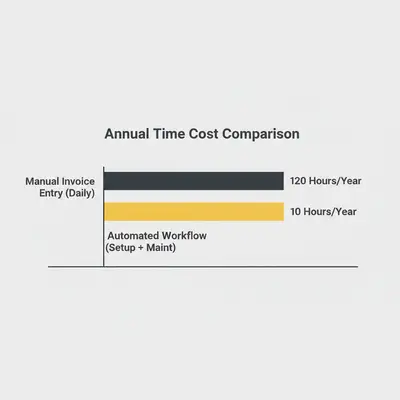
If a task takes 30 minutes a day:
- 30 mins x 5 days x 50 weeks = 125 hours per year.
- Building the automation takes: 5 to 10 hours.
- Verdict: Huge Win.
If a task takes 30 minutes a month:
- 30 mins x 12 months = 6 hours per year.
- Building the automation takes: 5 to 10 hours.
- Verdict: Don't build it. Wait until the volume increases.
The "Hidden" Step: Optimize Before You Automate
Bill Gates famously said: "The first rule of any technology used in a business is that automation applied to an efficient operation will magnify the efficiency. The second is that automation applied to an inefficient operation will magnify the inefficiency."
If your current process is a mess, automating it just creates a faster mess.
Example: If your sales team forgets to ask for the client's budget 50% of the time, automating the proposal generation will fail because the data will be missing. You must fix the human process (mandate the budget field) before you build the robot.
Key Insight: The best way to prepare for automation is to write an SOP (Standard Operating Procedure). If you can't write it down step-by-step for a human, you definitely can't code it for a computer.
Common Pitfalls to Avoid
Even if a process passes the 5-minute test, things can go wrong. Here are the traps to watch out for:
- The "All or Nothing" Mentality: You don't have to automate the entire process. Automate the data entry and keep the final approval manual.
- Ignoring Maintenance: APIs change. Passwords expire. Automations break. Allocate 1-2 hours a month for "workflow gardening."
- Over-Engineering: Don't build a complex 50-step workflow when a simple 3-step Zap will do. Start simple.
Conclusion: Start Small, Start Today
You don't need to revolutionize your entire business overnight. Start with one process that passes the 5-Minute Test with a perfect 5/5 score.
Usually, this is Lead Capture (getting data from a form to a CRM) or Administrative Routing (saving email attachments to folders).
Once you get that first "win" and see hours returning to your week, the automation mindset becomes addictive. You'll stop looking at tasks as "work" and start looking at them as "systems."
Your Next Steps:
- Identify one task that annoys you daily.
- Run it through the 5 criteria above.
- If it passes, map out the steps on paper.
- Build it (or hire someone to build it).
Ready to reclaim your time?
Related Resources
Official Sources
- Zapier: Guide to Business Process Automation
- Harvard Business Review: When to Automate
- McKinsey: The Future of Work and Automation
By Kevin Michael Schindler, AI Automation Expert at Evalics