You spend weeks building the perfect AI agent. It works flawlessly in testing. You launch it on Monday. By Wednesday, it has hallucinated a discount code, misunderstood a customer email, or crashed because an API took two seconds too long to respond.
This isn't just bad luck. It is the norm.
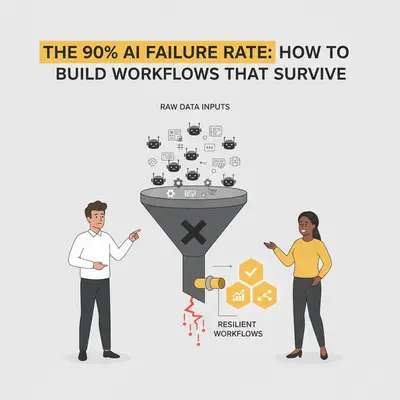
Industry estimates suggest that over 90% of AI experiments never make it to sustained production. They work as demos, but they fail as business infrastructure.
The problem usually isn't the AI model itself. GPT-4 and Claude are smart enough for most tasks. The problem is the workflow. Most businesses build rigid "happy path" automations that assume data will always be clean and the AI will always be perfect.
Real-world data is messy. To survive, your workflows need to be resilient. Here is why automations die and how to build the 10% that survive.
The "Happy Path" Fallacy
When you first build an automation, you usually test it with perfect data.
- Input: "Send an invoice to [email protected]."
- AI Action: Extracts email, generates PDF, sends email.
- Result: Success.
You high-five your team and go live. Then, a real user inputs: "I need an invoice, but can you send it to my assistant instead? Also, is there a discount for non-profits?"
A rigid workflow crashes here. It might try to extract "assistant" as an email address. Or worse, it generates a generic response ignoring the specific request.
Reality Check: If your automation relies on the AI getting it right 100% of the time to function, it is already broken. You need to build systems that expect failure.
The Three Killers of AI Automation
To build a survivor, you need to know what you are fighting. Most failures fall into three categories.
1. Data Drift and Format Changes
Your automation expects a clean row in a spreadsheet. Instead, a user types "N/A" in a price field or pastes a phone number with emojis. Traditional code breaks instantly. AI models might try to interpret it, leading to weird outputs.
If you don't validate data before it hits the AI, you are paying for the model to process garbage. As noted in our guide on data quality, your automation is only as good as the data you feed it.
2. Silent Hallucinations
This is the most dangerous failure mode. The workflow doesn't crash. It runs perfectly—but the output is wrong.
- The AI invents a shipping date.
- The AI promises a feature you don't have.
- The AI summarizes a meeting and adds a participant who wasn't there.
Because the technical workflow (the "pipes") didn't break, you might not notice this for weeks.
3. Structural Fragility
APIs go down. Rate limits get hit. If your workflow is a straight line from A to B to C, a failure at B kills the whole process.
The Survival Framework: How to Build Resilient Flows
You don't need better AI models. You need better engineering around them. Here is the architecture that keeps workflows alive.
Step 1: Sanitize Inputs (The Bouncer)
Never let raw user data go straight to your expensive AI model. Use simple logic or cheaper models to "clean" the request first.
If you are building your AI platform tech stack, include a validation layer. For example, if a user submits a form, use a Regular Expression (RegEx) or a cheap model like GPT-4o-mini to verify that the "Phone Number" field actually contains numbers. If it doesn't, kick it back immediately. Don't waste tokens on it.
Step 2: Implement "LLM-as-a-Judge"
This is the single most effective way to stop hallucinations. Do not let the AI send an email directly.
Instead, split the process:
- Agent A (The Doer): Drafts the email response.
- Agent B (The Judge): Reads the draft and compares it to a policy document.
System Prompt for Agent B: "You are a compliance officer. Review the following email draft. Does it promise a discount? Does it mention dates? If yes, verify these against the provided policy. If the draft is safe, output 'APPROVED'. If not, output 'REJECTED' with a reason."
This adds a small cost but saves your reputation. We discuss this concept further in our guide on understanding AI hallucinations.
Step 3: Build Error Loops, Not Dead Ends
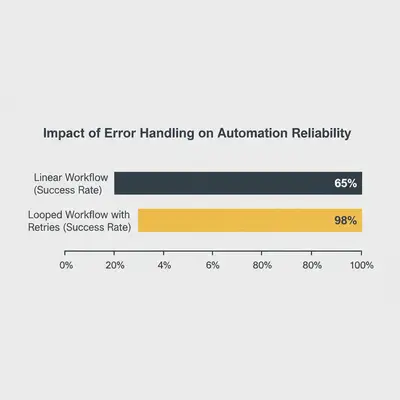
In tools like n8n or Make, most people build linear flows. If a step fails, the automation stops.
A resilient workflow uses Error Paths.
- If the API times out: Wait 60 seconds and retry (up to 3 times).
- If the data is missing: Send a Slack notification to a human to fix it manually, then pause the workflow until they respond.
- If the confidence score is low: Route to a "Human Review" folder.
This approach creates a "Human-in-the-Loop" system. The AI handles the 80% it is sure about, and hands off the messy 20% to you.
Pro Tip: When using n8n, use the "Error Trigger" node. It acts like a safety net, catching any crash in your workflow and alerting you via email or Slack so you can fix it before the data is lost.
The Cost of Fragility vs. Resilience
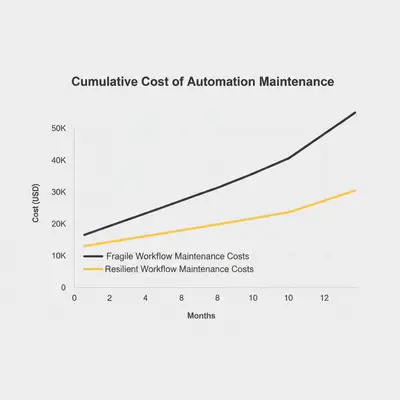
Building a robust workflow takes about 30-50% longer upfront. You have to write tests, create error paths, and write "Judge" prompts.
However, the maintenance cost of a fragile workflow is massive. Every time it breaks, you stop high-value work to debug it.
Here is what the cost looks like over six months:
Testing Before You Trust
You wouldn't buy a car without a test drive. Don't launch an automation without a stress test.
Before you go live, run The 5-Minute Automation Test. Once you pass that, try to break it intentionally:
- Bad Data: Input gibberish, blank fields, or extremely long text.
- Conflicting Instructions: Ask the AI to do two contradictory things.
- Volume: Send 10 requests at once to see if you hit rate limits.
If your workflow survives this, it is ready for the real world.
Conclusion
The 90% failure rate of AI projects isn't a failure of technology—it's a failure of preparation. AI models are probabilistic; they guess the next word. If you treat them like deterministic calculators, you will fail.
To build workflows that survive:
- Validate inputs before they reach the AI.
- Judge outputs before they leave the system.
- Handle errors by routing them to humans, not by crashing.
Automation is not a "set it and forget it" magic trick. It is a system that requires guardrails. Build the guardrails, and you will be part of the 10% that succeeds.
Related Resources
- Building Your AI Platform Tech Stack
- Understanding AI Hallucinations & Prevention
- Data Quality Matters: Why Automation Needs Good Data
- 7 Common AI Automation Mistakes Beginners Make
Official Sources
By Kevin Michael Schindler, AI Automation Expert at Evalics