You started your agency to build great products, design stunning visuals, or run profitable campaigns. You did not start it to spend your Friday afternoons copy-pasting data into spreadsheets or chasing clients for their logos.
Yet, that is exactly where most agency owners find themselves. You hit a ceiling at around 5-10 clients where the administrative burden outweighs your capacity to deliver work. You have two choices: hire expensive account managers to handle the noise, or automate the noise away.
Automation is no longer just for enterprise giants. In 2025, a three-person agency can operate with the efficiency of a thirty-person team by deploying the right "digital workers."
We aren't talking about simple Zapier tasks like "save email attachment to Drive." We are talking about intelligent workflows that make decisions, draft communication, and move projects forward.
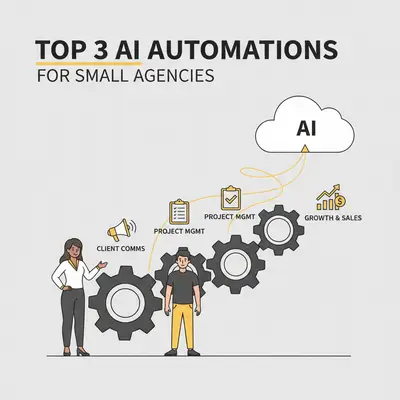
Here are the top three AI automations every small agency needs to implement right now to escape the admin trap.
1. The "24/7" Lead Qualification Agent
The fastest way to lose revenue is responding slowly to leads. The second fastest way is wasting hours talking to leads who have no budget.
Small agencies often treat every inquiry like gold, jumping on calls with anyone who fills out a contact form. This is a mistake. You end up spending hours on discovery calls with prospects who "just wanted a quote" or have a budget of $500 for a $10,000 service.
How It Works
Instead of a static "Thank you" page, your form submission triggers an AI Agent.
- Ingestion: The webhook receives the form data (Name, Company, Message).
- Enrichment: The AI scrapes the prospect's website to understand their industry and size.
- Qualification: The model analyzes their message and website data against your Ideal Customer Profile (ICP).
- Action:
- High Priority: If they match your criteria, the AI drafts a personalized email from you suggesting specific meeting times and syncs it to your CRM as a "Hot Lead."
- Low Priority: If they are too small or irrelevant, the AI sends a polite, helpful rejection email with resources (like your blog or a lower-tier offer).
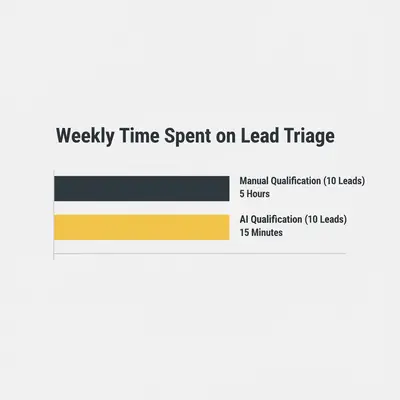
Quick Win: Don't let the AI send the email automatically at first. Have it create a draft in your "Drafts" folder. You review it, click send, and save 15 minutes of writing time per lead.
The Impact
You stop being a secretary. You only see qualified leads on your calendar who already know you understand their business.
For a deeper dive on setting this up, read our guide on AI lead qualification to understand the scoring logic.
2. Automated Client Reporting (That Actually Gets Read)
Client reporting is the bane of agency existence. It usually involves logging into Facebook Ads, Google Analytics, Semrush, or Shopify, taking screenshots, pasting them into a slide deck, and writing a summary that the client might not even read.
It is tedious, prone to human error, and eats up billable hours.
The Intelligent Workflow
We move beyond static dashboards. Dashboards show data; they don't explain why it matters. This automation acts as a junior analyst.
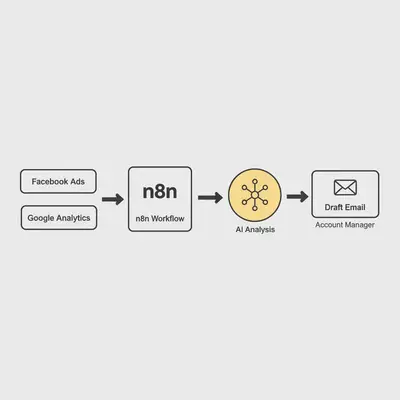
- Data Extraction: A tool like n8n or Make pulls raw metrics from your marketing platforms via API on the 1st of the month.
- Analysis: The data is passed to an LLM (like Claude 3.5 Sonnet or GPT-4o) with a specific system prompt: "Act as a Senior Marketing Strategist. Analyze these trends. Compare this month to last month. Identify one big win and one area of concern."
- Drafting: The AI generates a concise, executive-level summary email or Slack message.
- Delivery: The draft is sent to the Account Manager for a final sanity check before going to the client.
Why This Wins
Clients care about insights, not raw numbers. By automating the data gathering and initial analysis, you deliver high-value strategic commentary without the grunt work.
Pro Tip: Use a large context window model to feed in previous months' reports. This allows the AI to spot long-term trends, like "CPA has decreased by 15% over the last quarter," rather than just looking at a 30-day snapshot.
If you are unsure which tools to use for this, check our comparison of Make vs n8n to see which fits your reporting complexity better.
3. The "Bad Cop" Onboarding Chase
You just signed a new client. Excitement is high. Then, everything stalls.
You need their brand guidelines, logo files, CRM access, and Google Analytics permissions. You send an email. No reply. You send a follow-up. They reply with half the files. The project is now two weeks behind schedule before it even started.
Chasing clients makes you look nagging and desperate. Let a robot do it.
The "Nudge" Workflow
- Trigger: Contract signed in PandaDoc or DocuSign.
- Setup: The automation creates a shared Google Drive folder and a project in your project management tool (Asana/ClickUp).
- Initial Request: It sends a welcoming email with a dynamic form (Typeform or Tally) requesting specific assets based on the service sold.
- The Loop: The automation checks the form status every 48 hours.
- Incomplete? It sends a polite, humorous, or urgent follow-up (escalating tone based on delay). "Hey [Name], still need that logo to get started!"
- Complete? It notifies your team and stops the sequence.
Reality Check: This isn't just about saving time; it's about project velocity. Projects that start fast usually finish successfully. Delays in onboarding kill momentum.
This setup often requires robust file handling. If you are using Google Workspace, you can build powerful logic using Google Workspace Flows to manage these file permissions automatically.
The Tech Stack You Need
You don't need a degree in computer science to build these. You need a "Low-Code" stack.
- ** The Brain:** OpenAI (GPT-4o) or Anthropic (Claude 3.5 Sonnet).
- The Hands: Make.com (easiest to start) or n8n (best for complex data).
- The Database: Airtable or a simple SQL database (don't rely solely on Google Sheets as you scale).
If you are debating whether to build these internal tools yourself or buy off-the-shelf software, consider reading our guide on Building vs. Buying. Usually, for specific agency workflows, building a custom automation in Make/n8n is cheaper and more flexible than buying expensive agency management software.
Implementation Strategy: Don't Do It All At Once
The biggest mistake agency owners make is trying to automate everything overnight. You will break your current processes and frustrate your team.
Follow the 1-1-1 Rule:
- Pick 1 workflow (Start with Lead Qualification—it's the closest to revenue).
- Spend 1 week building and testing it manually.
- Let it run for 1 month before adding the next automation.
Key Insight: Automation is an asset you build once and own forever. An automated onboarding system adds equity to your agency because it proves your business runs without you.
Conclusion
The difference between a stressed freelancer and a scalable agency owner isn't talent; it's systems. By implementing these three automations—Lead Qualification, Reporting, and Onboarding—you reclaim the mental bandwidth needed to grow your business.
You didn't hire your team to do data entry. Give the robot jobs to the robots, and let your humans do the creative, strategic work they were born to do.
Ready to automate your agency operations? Book a demo with Evalics and let's build your custom workflow engine.
Related Resources
- Building Your AI Tech Stack
- What is AI Lead Qualification?
- Make vs n8n: 2025 Comparison
- Google Workspace Flows Implementation Guide