Most marketing agencies bleed profit in the "glue work."
You have a powerful CRM, a smart project management tool, and expensive AI subscriptions. Yet, your team still spends 15 hours a week manually copying leads from Facebook Ads to spreadsheets, formatting client reports, or copy-pasting ChatGPT outputs into Slack for approval.
This isn't just boring; it's expensive.
n8n (nodemation) has emerged as the weapon of choice for technical agencies in 2025. Unlike linear automation tools, n8n handles complex logic, loops, and heavy data loads without breaking the bank.
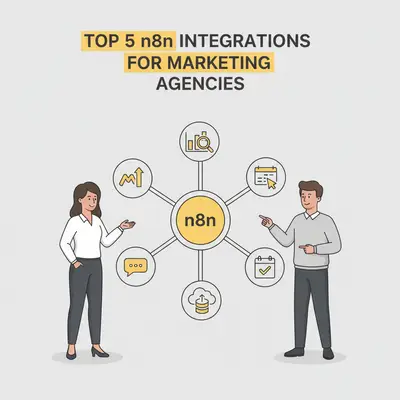
If you are ready to stop being a "copy-paste" shop and start acting like a tech-enabled agency, here are the top 5 integrations you need to set up immediately.
1. OpenAI or Anthropic (The Content Engine)
Integrating an LLM (Large Language Model) is the most obvious step, but most agencies do it wrong. They treat n8n like a simple chatbot interface.
The real power lies in batch processing and chaining.
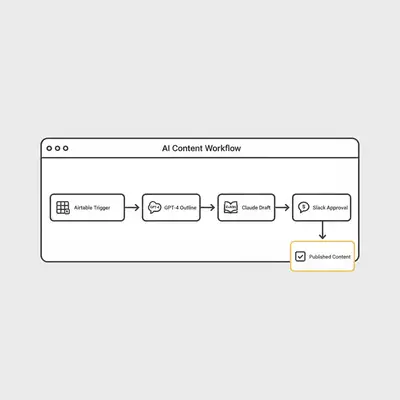
Instead of generating one blog post at a time, your n8n workflow should trigger whenever a new row is added to a content calendar (like Airtable). It should then:
- Read the topic and SEO keywords.
- Send a prompt to OpenAI (GPT-4o) to generate an outline.
- Send a second prompt to Anthropic (Claude 3.5 Sonnet) to write the draft (Claude often has a more natural writing style).
- Send a third prompt to generate metadata and social captions.
Why This Matters
You move from "helping a writer" to "managing a production line." Your team shifts focus from drafting to editing and strategy.
Pro Tip: Don't rely on a single prompt. Use a "chain of thought" approach in n8n where the output of one node becomes the context for the next. This reduces hallucinations and keeps the AI on brand.
For a deep dive on managing these inputs, check our prompt engineering step-by-step checklist.
2. Slack or Microsoft Teams (The "Human-in-the-Loop")
Automation fails when you trust it blindly.
In a marketing agency, sending an unchecked AI-written tweet or a raw client report is a recipe for disaster. This is where the Slack integration becomes critical. It serves as your quality control gate.
The Approval Workflow
Instead of automatically posting content, configure n8n to:
- Generate the asset (image, copy, report).
- Send a message to a specific Slack channel with "Approve" and "Reject" buttons.
- Wait (using the n8n Wait node) for a human click.
- If approved, proceed to publish. If rejected, ping the account manager to fix it.
This setup builds trust. Your team knows nothing goes out the door without a set of eyes on it, but they don't have to log into five different platforms to give the green light.
See how to manage this effectively in our guide on team collaboration on automations.
3. Google Sheets or Airtable (The Command Center)
Your CRM holds customer data, but Google Sheets or Airtable usually holds the process.
Agencies run on spreadsheets. Content calendars, influencer lists, keyword research, and performance trackers all live here. n8n turns these static sheets into active databases.
The Use Case: Automated Enrichment
When a new lead hits your sheet (perhaps from a Typeform or Facebook Ad), n8n can instantly:
- Grab the domain name.
- Ping an enrichment API (like Clearbit or Apollo).
- Search for recent news about the company via Google Search API.
- Update the row with CEO names, revenue data, and recent news hooks.
By the time your sales rep looks at the sheet, the research is already done.
Reality Check: Google Sheets has API limits. If you are processing thousands of rows an hour, you will hit a wall. Know when to move from Google Sheets to a database.
4. HubSpot, Salesforce, or Pipedrive (The ROI Tracker)
Marketing agencies often struggle to prove attribution. You send leads to the client, but you don't know if they closed.
Integrating n8n with the client's CRM (HubSpot is a common favorite) allows you to close the loop.
Bi-Directional Sync
Set up a workflow that runs weekly:
- Pull data from the Client CRM regarding deal stages.
- Match closed deals back to the original lead source (e.g., "LinkedIn Campaign B").
- Push this conversion data back into your ad platforms (Meta/Google Ads) via their Conversion APIs.
This optimizes your ad spend based on revenue, not just clicks. It turns you from a "vendor" into a "revenue partner."
Quick Win: Use n8n to alert your team via Slack whenever a lead you generated marks a deal as "Closed-Won." It’s a great morale booster and a perfect time to ask for a testimonial.
Read more about qualifying these leads automatically in our case study on AI-powered lead qualification.
5. Gmail or Outlook (The Reporting Savior)
Reporting week is universally hated. Account managers spend days pulling screenshots from Google Analytics, Meta Ads, and LinkedIn, pasting them into slides, and emailing them.
You can automate 90% of this with the Gmail integration.
The "Zero-Touch" Report
- Trigger: First Monday of the month.
- Action: n8n pulls key metrics from ad platforms for the last 30 days.
- Action: Passes data to OpenAI to generate a 3-bullet executive summary (e.g., "CPL dropped by 10%, we scaled spend on Campaign A").
- Action: Creates a formatted HTML email or PDF.
- Action: Creates a draft in Gmail for the Account Manager to review.
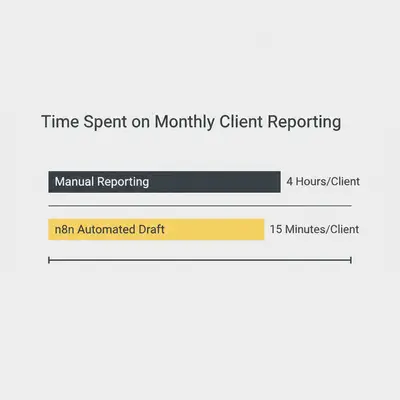
The Account Manager opens their drafts folder, checks the numbers, adds a personal note, and hits send. What took 3 hours now takes 5 minutes.
For more on email automation strategies, check out AI chatbots vs email automation.
Integrating for Impact
The goal isn't to collect integrations like Pokémon cards. It's to build a cohesive ecosystem where data flows freely between your tools.
Start with one of these integrations. The Reporting Workflow (Gmail) often provides the quickest win for agencies because it immediately frees up hours of billable time.
Once you master the basics, you can start building complex "AI Agents" that handle autonomous tasks. Curious about where that leads? Read our guide on AI Agents in 2025.
Ready to build?
If you want to map out your agency's tech stack before you start building, download our architecture guide or book a demo with Evalics to see these workflows in action.
Related Resources
Official Sources
By Kevin Michael Schindler, AI Automation Expert at Evalics