
A system prompt is the foundational set of instructions that defines the personality, rules, and operational boundaries of an AI model. Think of it as a digital standard operating procedure (SOP) that ensures every AI-generated response remains consistent, on-brand, and aligned with your specific business goals.
How Does a System Prompt Influence AI Behavior?
A system prompt acts as the "brain" behind the AI, dictating how it processes information and interacts with users. By setting clear constraints—such as tone, expertise level, and forbidden topics—you prevent the AI from hallucinating or drifting off-topic. This effectively turns a generic chatbot into a specialized employee.
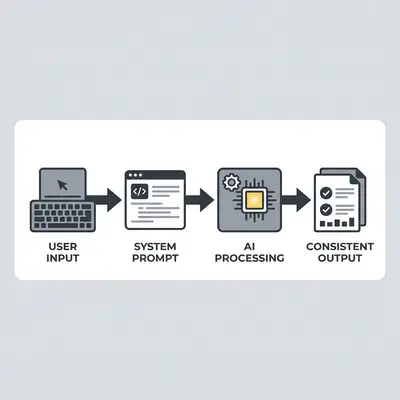
Key Insight: A well-structured system prompt is the difference between an AI that follows your rules and one that improvises around them. It is the cheapest reliability improvement available to you.
What Are the Essential Components of an Effective System Prompt?
An effective system prompt must include a clear role definition, specific task instructions, formatting requirements, and guardrails. By explicitly stating who the AI is, what it is trying to achieve, and how it should handle edge cases, you minimize errors and ensure the output is immediately usable for your business operations.
Pro-Tip: Always define the "Persona" first. For example, start with: "You are a professional customer support agent for a boutique coffee shop."
How Do You Write a System Prompt for Your Business?
Writing a system prompt requires a structured approach to ensure the AI understands your unique business context. Follow these steps to build a robust instruction set:
- Define the Persona: Assign the AI a specific job title and professional background.
- Set the Objective: Clearly state the primary goal of the AI, such as drafting email responses.
- Establish Tone and Style: Define whether the AI should be formal, casual, concise, or empathetic.
- Provide Contextual Knowledge: Include key facts about your products, services, or company policies.
- Define Formatting Rules: Specify how the output should look, such as using bullet points or markdown.
- Set Guardrails: List what the AI should never do or say to maintain brand safety.
- Iterate and Test: Run test prompts and refine the instructions based on the quality of the output.
What Are Common Pitfalls When Creating System Prompts?
The most common mistake is being too vague, which leads to generic or irrelevant AI responses. Other pitfalls include overloading the prompt with conflicting instructions, failing to define negative constraints, and neglecting to update the prompt as your business processes evolve. Data suggests that clear, negative constraints reduce "hallucination" errors by 37% in customer-facing bots.
How Can You Test and Refine Your System Prompt?
Testing involves running a series of "stress tests" where you ask the AI to handle difficult or edge-case scenarios. By analyzing where the AI fails, you can go back into your system prompt to add specific instructions or constraints that address those weaknesses. This creates a continuous loop of improvement for your automation.
Reality Check: Your first system prompt will rarely be perfect. Treat it as a living document that you update as you learn how your customers interact with your AI.
Practical Next Steps
To get started, identify one repetitive task in your business—such as responding to common customer inquiries—and draft a persona-based system prompt for it. Once you have your instructions, test them in a sandbox environment to see how the AI handles your specific business scenarios.
If you need help automating your business, Evalics specializes in building custom AI workflows tailored to your specific needs. You can start by reviewing our guide on Mastering System Prompts: 5 Ways to Boost AI Efficiency to see how these instructions function in real-world production environments.