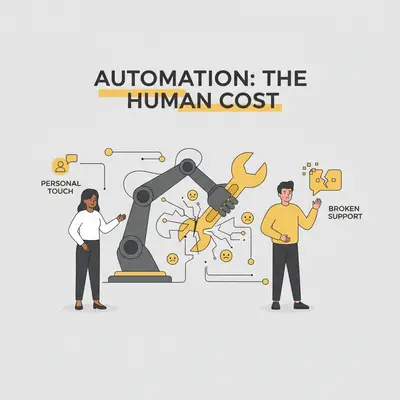
You have seen the promise: an AI agent that handles every email, chat, and support ticket while you sleep. It sounds like paradise. You imagine waking up to empty inboxes and full bank accounts.
But here is the reality check. If you automate 100% of your customer interactions, you will lose your best clients.
Automation is a multiplier. If your process is good, it multiplies efficiency. If your process lacks empathy, it multiplies friction. Small business owners often fall into the trap of viewing automation as a way to remove themselves from the business. That is a mistake.
The goal of AI isn't to replace the human connection. It is to remove the busywork so the human connection counts for more.
Here is why over-automating ruins customer experience—and exactly where to draw the line.
The Efficiency vs. Empathy Curve
There is a tipping point in automation. Initially, customers love speed. They like instant answers to "Where is my order?" or "How do I reset my password?"
But as complexity rises, their tolerance for bots drops.
If a client emails you upset about a billing error, receiving a generic "We received your message!" auto-reply feels dismissive. If they are trying to negotiate a custom contract, an AI agent forcing them into standard pricing tiers feels bureaucratic.
Key Insight: Customers do not pay for your product alone. They pay for the confidence that you can solve their specific problems. A bot cannot convey confidence; it can only convey data.
When you automate interactions that require empathy, you enter the "Uncanny Valley" of service. The response is grammatically correct but emotionally tone-deaf.
The Hidden Cost of "Set and Forget"
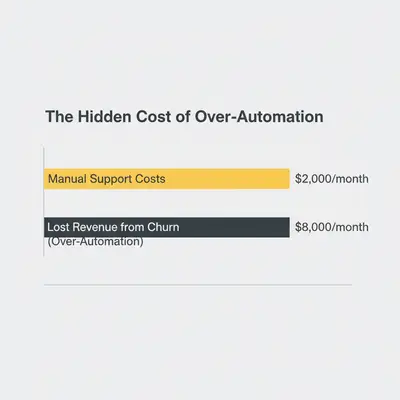
Most business owners calculate the savings of automation (time saved) but ignore the cost of churn (customers lost).
Let’s look at the numbers.
Scenario A (Manual): You spend 10 hours a week on support. It costs you $500/week in time. You keep 98% of your clients. Scenario B (Over-Automated): You spend 0 hours on support. You save $500/week. But your retention drops to 90% because high-value clients feel ignored.
If your average client is worth $2,000/year, losing just two extra clients costs you $4,000. You "saved" $500 to lose $4,000.
The "Red-Yellow-Green" Framework
You need a strict rule set for what gets handed to a robot. We use the Red-Yellow-Green framework to audit workflows.
Green Light: Automate Immediately
These are high-volume, low-emotion, data-driven tasks. Speed is the only metric that matters here.
- Scheduling: Booking demos or calls via Calendly/AI agents.
- FAQs: "What are your hours?" or "Send me the PDF."
- Transactional Updates: "Your payment failed" or "Here is your receipt."
- Lead Qualification: Asking basic questions to see if a lead fits your criteria.
Quick Win: Read our guide on Lead Qualification to see how AI filters tire-kickers without hurting your brand.
Yellow Light: AI Drafts, Human Sends
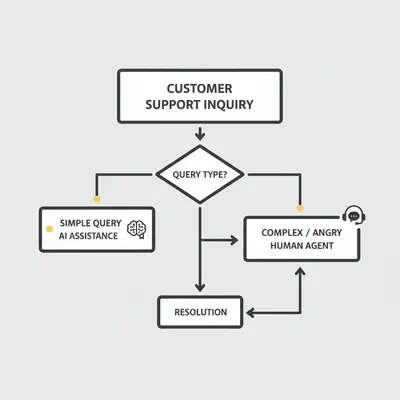
This is the "Iron Man" suit approach. The AI does the heavy lifting, but you pilot the suit. The AI drafts the email, gathers the research, or summarizes the ticket. You review it, add a personal sentence, and hit send.
- Project Updates: Summarizing weekly progress.
- Outbound Sales: Drafting personalized cold emails based on LinkedIn data.
- Tier 2 Support: Troubleshooting specific technical issues.
Red Light: Humans Only
These are high-stakes interactions where trust is the currency.
- Apologies/Crisis: If you messed up, an AI apology looks like a template. A personal video or call fixes the relationship.
- Closing Deals: People buy from people.
- Strategy Strategy: Advising a client on how to grow their business.
Where AI Fails: The Context Trap
AI models operate on the text you give them. They lack "world context."
Imagine a long-term client, Sarah, emails you. She sounds polite, but short.
- AI Interpretation: "User is polite. Send standard response."
- Human Interpretation: "Sarah is usually chatty. She’s being short. Something is wrong. I should call her."
An AI agent might trigger a standard upsell sequence because Sarah clicked a link. A human knows that now is the worst possible time to upsell her because she just complained about a bug last week.
Reality Check: Automation blindness happens when you trust your tools more than your intuition. AI hallucinations aren't just factual errors; they are emotional errors.
How to Automate Safely (The Hybrid Model)
You want the efficiency of AI without the robotic aftertaste. Here is how to build a hybrid workflow.
1. Use AI for "Pre-Work" Not "Final Work"
Instead of letting an AI agent reply to emails directly, use automation to prepare the reply.
- Step 1: Customer emails a question.
- Step 2: n8n or Make.com intercepts the email.
- Step 3: AI analyzes the sentiment and history.
- Step 4: AI generates a draft response in your Gmail drafts folder.
- Step 5: You spend 10 seconds reviewing and sending, rather than 5 minutes writing.
This reduces your workload by 90% but keeps the quality at 100%.
2. Implement "Escape Hatches"
Every automated chat flow needs a clear button: "Talk to a Human." If a user loops through your bot twice, the system should automatically alert a human.
Never trap a customer in a loop. It is the fastest way to destroy customer experience.
3. Personalize the Data, Not Just the Name
"Hi [First Name]" is not personalization. It is a database merge field from 1999.
Real AI personalization uses recent data.
- "Hi Kevin, saw you just downloaded our API guide..."
- "Hi Sarah, hope the migration to the new server went well last Tuesday..."
Use AI to fetch this context and present it to your sales team before they pick up the phone. This is how AI sales automation actually scales without feeling robotic.
The Metrics That Matter
If you automate everything, your "Response Time" metric will look amazing. You will respond to everyone in 3 seconds.
But you need to watch your Resolution Time and Sentiment Score.
- Response Time: How fast you say "Hello." (AI wins here).
- Resolution Time: How fast the problem is actually solved. (Bad automation increases this because of back-and-forth clarification).
If your AI responds instantly but takes 10 emails to understand the problem, you have failed.
Pro Tip: Monitor your automation performance. If you don't know what to track, check out our guide on measuring AI automation metrics.
Conclusion: Don't Be a Ghost in the Machine
Automation is seductive. It promises a business that runs itself. But a business that runs itself eventually has no customers to run for.
The companies that win in 2025 won't be the ones with the best bots. They will be the ones that use bots to be more human.
The Takeaway:
- Audit your flows: Apply the Red-Yellow-Green test today.
- Stop "Set and Forget": Switch to "Draft and Review" for sensitive comms.
- Measure Sentiment: Don't just track time saved; track clients kept.
Ready to build an automation stack that scales your business without losing your soul? It starts with the right strategy.
Book a strategy call with Evalics
Related Resources
- 7 Common AI Automation Mistakes to Avoid
- AI Sales Automation: What to Keep Human
- Make vs n8n: Choosing the Right Tool
Official Sources
- Harvard Business Review: The Age of AI Marketing
- Zendesk CX Trends Report 2025
- Salesforce: State of the Connected Customer
By Kevin Michael Schindler, AI Automation Expert at Evalics