
It works perfectly in the YouTube tutorial. You watch the influencer connect a form to ChatGPT, then to an email sender. In five minutes, they have a fully functioning "business on autopilot." You copy the steps exactly. You run a test. It works. You launch it.
Three days later, you wake up to a disaster.
Maybe the AI hallucinated a discount you don't offer. Maybe it replied to a dissatisfied customer with a cheery "Great to hear!" message. Or maybe the workflow just silently stopped running because a date format changed from DD-MM-YYYY to MM-DD-YYYY.
This is the reality for 90% of first-time automations. They don't fail because the technology is bad; they fail because they are fragile.
Building an automation that works once is easy. Building an automation that works 1,000 times in a row without human supervision is an engineering discipline. If you treat it like a casual experiment, it will cost you customers.
Here is why your first build is likely to crash—and the specific engineering principles you need to use to prevent it.
The "Happy Path" Fallacy
Novice builders design for the "Happy Path." This is the scenario where every input is perfect: the customer types their email correctly, the API responds instantly, and the AI understands the prompt exactly as intended.
In the real world, the Happy Path happens about 60% of the time.
The other 40% consists of edge cases. A customer enters "N/A" in a required field. An API times out. A file attachment is in a format the AI can't read. If your workflow doesn't have logic to handle these deviations, it simply breaks.
Reality Check: A 95% success rate sounds like an A grade. In automation, it means 5 out of every 100 processes fail. If you process 500 leads a month, that's 25 missed opportunities or angry responses every single month.
When you automate a broken or undefined process, you don't get efficiency. You get chaos at scale.
Failure Point 1: Unstructured Data & Dirty Inputs
AI models are incredibly smart, but automation platforms (like Make or n8n) are incredibly literal.
If you build a workflow that expects a phone number to look like 555-0199, and a customer enters (555) 0199 or 555.0199, a rigid automation script might fail to dial or log it to your CRM.
While AI can fix this (using an LLM to "standardize phone number format"), most beginners skip this step to save on API costs. They plug raw user data directly into their CRM or email tools.
The "Garbage In, Garbage Out" Multiplier
When you perform a task manually, you subconsciously clean data. You see "John Doe (CEO)" and you know to write "Dear John," not "Dear John Doe (CEO)."
An automation script doesn't know that unless you explicitly tell it to.
Example: A real estate agency automated their lead follow-up. A lead entered their name as "NO ONE." The automation sent an email starting with "Hi NO ONE, hope you're having a great day!" It immediately flagged the email as spam to the recipient.
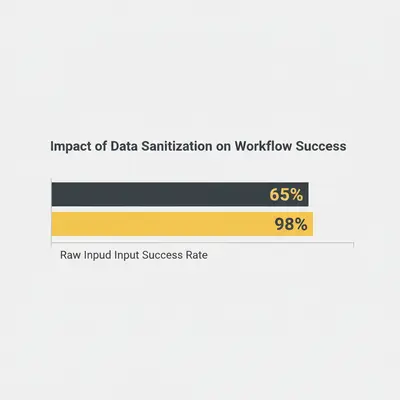
To fix this, you must insert a Sanitization Layer at the start of every workflow.
- Validate: Is the email actually an email?
- Standardize: Convert all dates to ISO format (
YYYY-MM-DD). - Clean: Use a cheap AI model (like GPT-4o-mini) to extract just the first name and capitalize it correctly.
Failure Point 2: The Context Window Trap
You tested your chatbot with a three-sentence conversation. It was brilliant. Then, a customer pasted a 4,000-word error log into the chat. The AI crashed, or worse, it "forgot" the instructions you gave it at the start of the conversation.
Every AI model has a Context Window—a limit on how much information it can hold in its short-term memory. When a conversation exceeds this limit, the model drops the oldest information to make room for the new.
Often, the first thing it drops is your System Prompt—the set of rules that tells it not to offer refunds or not to use profanity.
How to Prevent Memory Loss
You cannot rely on the model to remember everything forever. You must architect your workflow to handle memory efficiently.
- Summarization Steps: If a conversation gets too long, trigger a background workflow to summarize the key points and re-inject them as a fresh prompt.
- Retrieval Augmented Generation (RAG): Instead of stuffing every policy document into the prompt, store them in a vector database. Have the AI "look up" only the relevant paragraph when needed.
If you don't manage context, your AI employee will eventually develop amnesia in the middle of a critical negotiation.
Failure Point 3: Probabilistic vs. Deterministic Logic
This is the most dangerous misunderstanding in AI automation.
Traditional code is deterministic. 2 + 2 will always equal 4.
Generative AI is probabilistic. It predicts the most likely next word. 2 + 2 might equal 4, or it might equal Four, or in a creative mode, it might say The sum is typically 4.
If your next step in the workflow expects the digit 4 to perform a calculation, and the AI outputs "The answer is 4," your automation breaks.
Key Insight: Never use Generative AI for tasks that require 100% mathematical or structural precision, such as calculating invoices or formatting JSON dates, unless you have a code-based validation step immediately after.
The Fix: Structured Outputs
Modern models now support "Structured Outputs" or "Function Calling." This forces the AI to return data in a strict JSON format (e.g., {"sentiment": "positive", "score": 8}) rather than conversational text.
If you are just asking the AI to "give me the score," you are gambling with your workflow's stability every time it runs.

Failure Point 4: Zero Error Handling
What happens when OpenAI's API goes down for 3 minutes?
In a beginner's workflow, the automation attempts the task, fails, and stops. The lead is lost forever. The email is never sent. You might not even know it happened until a customer complains.
Professional automations are designed with the assumption that everything will eventually fail.
The Retry Pattern
Your automation platform (Make, n8n, Zapier) usually has error-handling modules. You need to use them.
- The Break Directive: If an error occurs (e.g., API timeout), wait 5 minutes, then try again.
- The Dead Letter Queue: If it fails 3 times, do not just delete the data. Move the data to a Google Sheet or database labeled "Failed Runs" and send yourself a Slack notification.
This ensures that even when the robots break, the business data is safe.
Pro Tip: Use the 7 Common AI Automation Mistakes guide to audit your current workflows for these missing safety nets.
The Cost of "Set and Forget"
The biggest lie in automation is that it is passive. It is not. It is leverage.
A lever amplifies force. If you push in the right direction, you move mountains. If you push in the wrong direction, you crush your foot.
An automated process that sends the wrong pricing to 1,000 leads costs you infinitely more than sending the right pricing to 10 leads manually.
The Human-in-the-Loop Rule
For your first automation, never grant the AI "write access" to your customers.
Instead of:
Trigger -> AI Write Email -> Send Email
Build this:
Trigger -> AI Write Draft -> Save to Drafts Folder -> Human Review -> Send
This is called Human-in-the-Loop (HITL). It allows you to audit the AI's performance without risk. Once you have reviewed 50 drafts and found them perfect, then you can remove the training wheels.
How to Build Your First Automation Correctly
Don't start by opening your automation software. Start with a piece of paper.
Step 1: The Manual Walkthrough
Do the task manually 10 times. Write down every tiny decision you make.
- "I check if the email is a gmail.com or a business domain."
- "I check if the tone of their message is angry."
- "I look up their company on LinkedIn."
If you don't write these steps down, the AI won't do them.
Step 2: The "5-Minute Test"
Before building a complex system, run a simple test to see if the logic holds up. Use our 5-Minute Automation Test to validate your idea before spending hours building it.
Step 3: Start Small (The MVP)
Don't automate the entire sales process. Automate one step.
- Don't automate "Lead to Closed Deal."
- Do automate "Lead Data Enrichment."
When that works perfectly, add the next step.
When to Build vs. When to Buy
Sometimes, the complexity of a workflow isn't worth the effort to build yourself.
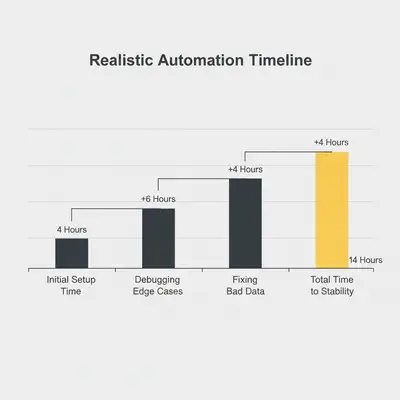
If you are spending 20 hours a week debugging your "time-saving" automation, you have just created a new part-time job for yourself. This is a classic sign of the Build vs. Buy dilemma.
If the process is core to your business (like your proprietary product delivery), build it. If it is a utility (like receipt scanning), use a pre-built tool. Or, if the logic is complex, hire an expert to build the robust infrastructure while you focus on strategy.
Conclusion: Embrace the Friction
Your first automation will fail. That is not a sign to stop; it is a sign that you are discovering the nuances of your own business processes.
Every time the AI fails, it highlights a rule or an edge case you hadn't clearly defined. It forces you to clarify your operations.
Summary of the Prevention Framework:
- Sanitize Inputs: Never trust raw data. Clean it first.
- Handle Errors: Build "Retry" loops and "Dead Letter Queues."
- Use Structured Outputs: Force JSON mode for logic; use text for conversation.
- Keep Humans in the Loop: Review drafts before sending until trust is earned.
Automation isn't magic. It's engineering. Treat it with respect, and it will give you scale. Treat it like a toy, and it will give you headaches.
Ready to build an automation that actually scales? Start by learning how to debug automation when it stops working, or check out our guide on data quality to ensure your inputs are clean from day one.
Related Resources
- 7 Common AI Automation Mistakes Beginners Make
- The 5-Minute Automation Test: Find Your First Win
- Data Quality Matters: Why Your Automation Is Only As Good As Your Data
Official Sources
- Zapier Guide to Automation Strategy
- Make.com Error Handling Documentation
- IBM: What is Data Sanitization?
By Kevin Michael Schindler, AI Automation Expert at Evalics