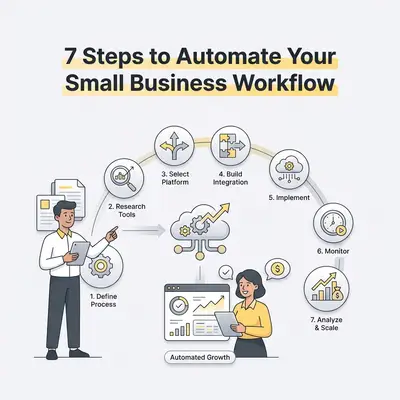
Workflow automation is the practice of using software to execute repetitive, rule-based tasks without human intervention. For small businesses, this means replacing manual data entry, email sorting, and file organization with automated digital triggers. By delegating these tasks to AI-driven tools, teams reclaim hours of labor and remove the transcription errors that come with doing it by hand.
Why Should Small Businesses Prioritize Workflow Automation?
Small businesses prioritize automation to reclaim time spent on manual labor and ensure consistent output. When you delegate repetitive tasks to software, your team stops acting like data processors and starts acting like strategists. Research from McKinsey indicates that 60% of occupations have at least 30% of activities that can be automated, allowing small teams to scale operations without increasing headcount.
![_ [GRAPH] Column chart. Manual Workflow - 15 Hours/Week. Automated Workflow - 3 Hours/Week. Chart title: Weekly Time Spent on Administrative Tasks at top. Alt text: Column chart showing a 12-hour reduction in weekly administrative time after implementing automation](/blogs/workflow_automation_guide/-graph-column-chart-manual-workflow-15-hoursweek-a-400w.webp)
What Are the 7 Steps to Automate Your Small Business Workflow?
To successfully automate, you must audit your current processes, identify bottlenecks, and implement scalable solutions. Follow these seven steps to transition from manual chaos to an automated, efficient operation:
- Audit your current tasks: Track every task performed in a week to identify repetitive patterns.
- Prioritize by impact: Focus on high-volume, low-complexity tasks first.
- Map the workflow: Visualize the trigger, the action, and the desired outcome.
- Select your automation stack: Choose tools that integrate with your existing software.
- Build and test: Create the automation in a sandbox environment to ensure accuracy.
- Deploy and monitor: Roll out the automation to your team and track performance.
- Optimize and scale: Review data to refine the process and automate the next bottleneck.
Pro Tip: Use the "Rule of Three"—if you have performed a task manually three times, it is time to automate it.
How Do You Identify Which Tasks to Automate First?
The best tasks for automation are those that are repetitive, rule-based, and time-consuming. Look for processes that involve data entry, email notifications, or file management. If a task requires a human to copy-paste information between two different apps, it is a prime candidate for immediate automation.
| Task Type | Complexity | Automation Potential |
|---|---|---|
| Data Entry | Low | High |
| Email Sorting | Low | High |
| Strategic Planning | High | Low |
| Creative Writing | High | Medium |
| Customer Support (FAQs) | Medium | High |
Which Tools Are Essential for a Small Business Automation Stack?
A robust automation stack includes a central integration platform, a CRM, and an AI-powered communication tool. These tools act as the "glue" that connects your disparate software, allowing data to flow seamlessly between your marketing, sales, and customer support departments without manual intervention.
For most small teams, a combination of Make or Zapier for integrations, a CRM like HubSpot or Pipedrive, and an AI assistant like Gemini or Claude creates a powerful foundation. These tools allow you to build custom logic that handles complex tasks, such as updating a client record the moment a payment is received.
Key Insight: Automation is not about replacing your team; it is about removing the "busy work" that prevents them from doing their best work.
How Do You Avoid Common Automation Pitfalls?
The most common pitfall is "over-automating" a broken process, which only serves to speed up errors. Always refine and simplify your manual workflow before applying automation. Additionally, ensure you have a human-in-the-loop system for critical customer interactions to maintain a personal touch where it matters most.
If you automate a process that is fundamentally flawed, you will simply generate bad data faster. Start by documenting the "happy path" of your process—the way it should work when everything goes right—and build your automation around that specific sequence.
Reality Check: Automation requires maintenance. Set aside one hour per month to review your active workflows and ensure they are still aligned with your current business goals.
How Can Evalics Help You Scale Your Automation Strategy?
Evalics specializes in building custom AI-driven workflows tailored to the unique needs of small businesses. We bridge the gap between complex technical implementation and business goals, ensuring your automation strategy is not just functional, but optimized for growth, cost-reduction, and long-term scalability.
We help you move beyond simple "if-this-then-that" triggers to build intelligent systems that learn from your data. Whether you need to automate lead qualification or streamline your project management, our team ensures your infrastructure is built to handle your growth.
Quick Win: Book a free workflow audit with the Evalics team today to identify your first high-impact automation opportunity.