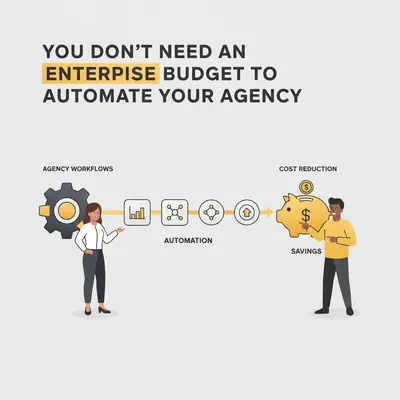
You see the headlines about Fortune 500 companies pouring millions into AI transformation, and you assume the door is closed for you. You look at your agency's P&L, see the tight margins, and decide that "innovation" is a luxury for next year.
This is the single most expensive mistake agency owners are making right now.
The narrative that automation requires an "enterprise budget"—six-figure software contracts, a team of developers, and months of consulting—is outdated. In 2025, the barrier to entry hasn't just been lowered; it has been obliterated. The tools available today allow a 5-person agency to operate with the efficiency of a 50-person firm, often for less than the cost of a single monthly client retainer.
Here is the reality of what it actually costs to automate your agency, and why waiting for "more budget" is costing you more than the automation itself.
The "Enterprise" Myth vs. The Low-Code Reality
Ten years ago, automation meant "Custom Software Development."
If you wanted to connect your CRM to your project management tool and automatically generate invoices, you hired a dev shop. They quoted you $45,000 for a custom build, took six months to deliver it, and charged you $5,000/year for maintenance. That was an enterprise game.
Today, we live in the era of Composable Automation.
Instead of building a monolith from scratch, we use "glue" platforms like Make.com or n8n to connect the tools you already use (Slack, HubSpot, Gmail, Asana). We add intelligence using API-based AI models (OpenAI, Anthropic).
The cost difference is staggering.
Reality Check: You aren't paying for "software development" anymore. You are paying for "workflow configuration." The heavy lifting has already been done by the tool providers. You are just assembling the pieces.
The Cost Breakdown: Enterprise vs. Agile Agency
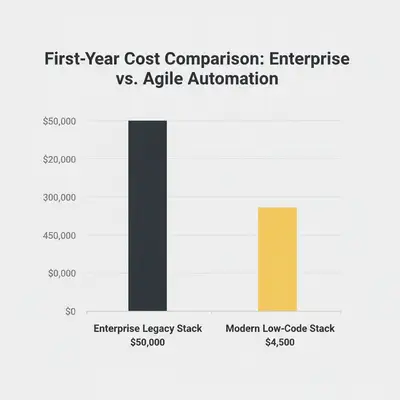
Let's look at the numbers for a standard automation scenario: End-to-End Lead Qualification & Onboarding. This includes capturing a lead, researching them with AI, scoring them, drafting a personalized email, and setting up a project folder if they sign.
The Old "Enterprise" Way:
- Salesforce/Enterprise CRM License: $15,000/yr
- Custom Integration Middleware: $10,000/yr
- Implementation Consultant: $25,000 one-time
- Total First Year: ~$50,000
The Modern "Agile Agency" Way:
- n8n (Self-hosted) or Make (Pro): ~$50 - $100/mo
- OpenAI/Claude API Usage: ~$30/mo (varies by volume)
- Existing Tools (Gmail/Slack/ClickUp): Already paying for them
- Setup (DIY or Specialist): Time investment or small project fee ($2k-$5k)
- Total First Year: ~$1,500 - $6,000
You are looking at a 90% cost reduction. This isn't "cheap" functionality—it's often more flexible and powerful than the enterprise rigid box because you own the logic.
The 80/20 Rule of Automation Strategy
The biggest budget killer isn't the software; it's scope creep.
Agencies often think, "If we automate, we must automate everything." They try to build a robot that handles every unique client edge case. That is where budgets explode.
To stay lean, apply the 80/20 rule:
- Automate the 80% of standard, repetitive tasks (reporting, invoicing, initial outreach, file organization).
- Keep Humans for the 20% of nuance, strategy, and complex client relationship management.
Building an automation that handles 100% of edge cases costs 10x more than building one that handles 80% and flags the rest for human review.
Pro Tip: Don't build "The Perfect Machine." Build "The Helper." If your automation drafts 80% of an email and a human reviews it, you've saved 15 minutes per email. That's pure profit, and the build cost is minimal.
Where to Spend: The 3 Tiers of Investment
You don't need to jump straight to hiring a full-time automation engineer. Automation adoption scales with your budget.
Tier 1: The "Digital Intern" (Budget: $50 - $200/mo)
This is for agencies just starting out. You rely on low-cost SaaS subscriptions and DIY learning.
- Tech Stack: Make.com (Core plan), ChatGPT Plus, Zapier (Starter).
- Strategy: You pick one high-pain task—like "saving email attachments to Google Drive"—and automate it.
- Cost: Monetary cost is low. The real cost is your time learning the tools.
- Best For: Solopreneurs or agencies under $200k revenue.
Tier 2: The "Hybrid System" (Budget: $500 - $2,000 one-time + $100/mo)
You are too busy to learn to code, but you don't need a full-time hire. You pay a specialist for specific "setup" projects.
- Tech Stack: n8n (for data privacy/cost control), OpenAI API (Pay-as-you-go), specialized databases like Supabase.
- Strategy: You hire a freelancer or agency to build a specific "Lead Gen Engine" or "Client Onboarding Flow." Once built, you run it for pennies.
- Cost: A project fee for the build, then minimal maintenance.
- Best For: Agencies with $500k - $2M revenue.
Tier 3: The "Fractional Ops Partner" (Budget: $2k - $5k/mo)
You view automation as a competitive advantage. You want continuous improvement without the $150k salary of a CTO.
- Tech Stack: Enterprise-grade n8n instances, custom vector databases for AI memory, internal dashboards.
- Strategy: Retainer model where an expert constantly optimizes your workflows, monitors for errors, and expands capabilities.
- Cost: Monthly retainer, but still significantly less than a full-time employee.
- Best For: Agencies scaling past $2M revenue.
Hidden Costs You Must Anticipate
While you don't need an enterprise budget, you do need a realistic budget. "Cheap" can become expensive if you ignore the hidden costs of automation.
1. The "Token" Trap
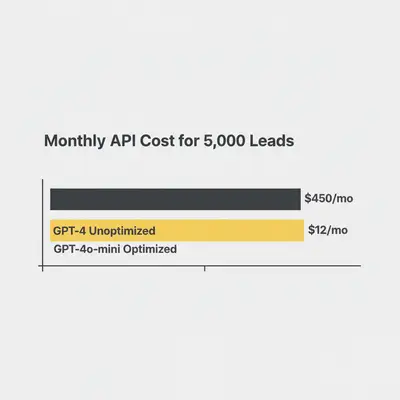
AI isn't free. Every time you ask GPT-4 to "analyze this website," it costs money.
- Mistake: Running a heavy prompt on 10,000 rows of data without calculating the cost first.
- Solution: Use Context Window optimization strategies. Summarize data before processing, or use cheaper models (like GPT-4o-mini) for simple tasks.
- Read More: How to Calculate Token Costs for an AI Project
2. Maintenance & Technical Debt
Workflows break. APIs change. Credentials expire.
- Mistake: Building a complex system in Tier 1 (DIY) and realizing you don't know how to fix it when it crashes on a Friday afternoon.
- Solution: Factor in 1-2 hours of "maintenance time" per week, or ensure your external partner includes support. If you rely on a critical workflow, you need a backup plan.
- Read More: Backup and Recovery for Your Automations
The "Build vs. Buy" Decision for Small Agencies
Should you subscribe to a $300/mo specialized SaaS (like an AI writer tool) or build your own workflow in Make for $20/mo?
Buy (SaaS) when:
- The problem is standard (e.g., payroll, accounting).
- You need a polished UI for your team immediately.
- You have zero technical interest or support.
Build (Automation) when:
- The process is unique to your agency's "secret sauce."
- SaaS tools are too rigid or don't integrate with your specific stack.
- You want to avoid "per-seat" pricing that punishes you for growing.
Building your own assets increases your agency's valuation. A proprietary lead qualification system that runs automatically is an asset you own, not a subscription you rent.
Key Insight: Enterprise tools rent you the capability. Automation allows you to own the capability. Ownership is the ultimate cost-saver over time.
How to Start Without Spending a Dime
You don't need to sign a contract today. You need an audit.
- Track Your Time: For one week, write down every task that takes you longer than 10 minutes and happens more than 3 times a week.
- Apply the "5-Minute Test": Can a smart human do this in 5 minutes with clear instructions? If yes, AI can probably do it.
- Calculate the ROI: If a task takes 5 hours a week, that's 20 hours a month. At your billable rate of $150/hr, that task costs you $3,000/mo. Spending $500 once to automate it is a no-brainer.
You don't need an enterprise budget. You need an "automation mindset." The tools are ready and waiting—the only thing shrinking is the window of opportunity before your competitors figure this out too.
Related Resources
- Free vs. Paid AI Tools: What's Actually Worth Your Money
- Make vs n8n: 2025 Automation Comparison
- The 5-Minute Automation Test
Official Sources
About the Author: By Kevin Michael Schindler, AI Automation Expert at Evalics. Kevin helps agencies and small businesses build scalable, enterprise-grade automation systems without the enterprise price tag.
Key Takeaways
- Low-Code Changed the Math: You no longer need $50k custom software builds. Tools like Make and n8n allow for enterprise-grade logic at a fraction of the cost.
- Beware of Scope Creep: Automate the standard 80% of tasks and leave the complex 20% to humans. This keeps build costs low and reliability high.
- Start Small, Scale Up: Begin with a "Digital Intern" approach (DIY/Low cost) and graduate to "Fractional Partners" as your ROI justifies the investment.
Ready to see exactly how much time and money you could save? Book a free automation audit with Evalics and let's map out your high-ROI opportunities.