Große KI-Flows in Langflow bauen (RAG-Benchmarking)
Walkthrough einer großen Langflow-RAG-Benchmarking-Pipeline für Agenturen und Builder, die messbare Retrieval-Qualität brauchen.
Große KI-Flows in Langflow bauen (RAG-Benchmarking)
Wichtigste Erkenntnisse
- Langflow kann große, visuelle RAG-Pipelines für Benchmarks hosten.
- Retrieval-Qualität sollte gemessen werden, bevor Sie einen Agentur-Workflow skalieren.
- Komplexe Flows brauchen klare Stufen: Ingest, Retrieve, Evaluate, Compare.
Verwandter Leitfaden
Agentic AI in n8n Multi-Agent-WorkflowsVollständiges TranskriptAnzeigen
Aus Auto-Untertiteln bearbeitet und lesbar gemacht. Entspricht dem Gesprochenen im Video.
Das Transkript stammt aus den YouTube-Untertiteln und wurde für die Lesbarkeit in Absätze gegliedert.
This video showcases that there's basically no limit to what you can build in langlow and I will show you how I approach these large flows and some of the tricks I use I won't go into detail on every component because we will be sitting here until tonight now if you want me to
Go into more detail on some of the components just let me know in the comments below now to the video okay so this is a rack flow which includes an evaluation pipeline and everything is inside langlow so usually rag contains two components or two parts one is the retrieval part where you retrieve
The documents or the chunks from your vector database and the other part is where you use those chunks and your prompt to generate responses and we want to evaluate both of them so we want to evaluate the retrieval part and we want to evaluate the responses of the llm and again everything is
Built in Lang flow directly so let's have a look at how this works all right so the first flow is where we ingest our data into the vector database so in my case I'm using vv8 and yeah I'm probably butchering the pronunciation but that's an open source database which you can self host
Or you can also use a cloud version the special thing about this flow is that I'm using a special file loader which loads metad data such as file name and file path which is required for retrieval benchmarking and I will go into this later in the next Flows In general it's also always
Helpful to have the file name and file path if you want your Rea flow to include citations the second special thing is that I'm using a document ID based on the firepath so each document gets assigned to a document ID and this is important such that I can when I update the document
I can delete the previous version otherwise you will get duplicates of the same of the same document which you obviously don't want so you you need to have some labeling of these documents and you can see here I have this Vector clearer which I use to remove this document from my database before
I then ingest the updated version or the updated chunks now each of these chunks will have the same document ID so it will grab all the chunks related to this one document and delete them now this is the retrieval flow that contains a list of file names a query and a vector data
Base index as input I use the query to retrieve my vectors from my Vector database which contain the file path and the file name I can then use those file names and compare them to my input file names to see whether the correct files were retrieved I use a custom component to calculate
All the relevant metrics usually you would calculate things like recall Precision F1 score false positives mrr map and these are usually the normal metrics so this is now how my output would look like and you see there's one row which contains all the different metrics this is then converted into ajon and this
Is then the output of my flow now the next flow iterates over the previous flow so again the previous flow was the retrieval flow which we use to ask a query and retrieve our vectors from this flow but this was just a single query so now we actually have a list of questions
So a list of queries and we for each one of them we want to do the prior flow so for each one of them we want to retrieve the vectors and basically retrieve the context or the chunks and create a output Json so here we can see I'm using a CSV file which
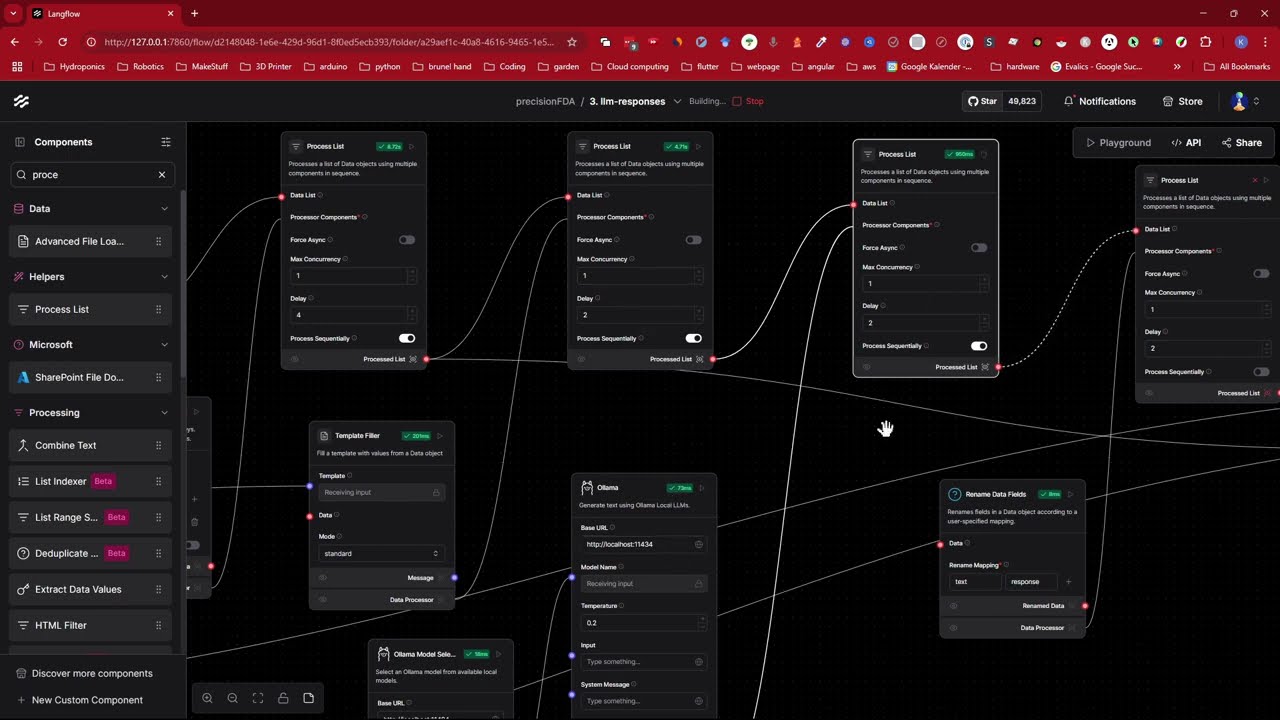
Contains all the questions and it contains the information about the file name which contains the answer to the question question then I Loop over my previous flow as mentioned using this subflow component to evaluate each query and by the way this process list component is a custom looping function since this is an
Older version of L flow but the new llow version already contains a looping functionality so you can already use the existing looping functionality and you don't need a custom component the output of our subflow now are the Matrix of each evaluation so as I said the output in our case is a Json
File which contains the the chunks as well as our Matrix now the last thing we can do is we can actually aggregate The Matrix to get a mean and a sum based on the evaluated questions so each question got evaluated and we're now aggregating the Matrix of each question to get an overall
Benchmark of our retrieval flow this tells us now whether the correct files were retrieved no llm is needed here but this part is actually super crucial for any rag pipeline all right next up we need to generate llm responses in order to later evaluate them and you can see this pipeline is actually
Currently running at the moment because I wanted to run all of them again and this also takes the longest time to run so this pipeline takes in a zsv file which we can have a look at here and this file contains the non-aggregated metrix for each query which we have generated previously and
The file includes the query itself here and it also includes the text chunks so the context which is in the text column another input is the system prompt or I should rather say system prompt template which we have defined here and you have a context part and a query part and because now
You can already see what I'm doing I will iterate over the CSV file and insert each query and context into the system prompt template and then pass the final prompt forward to an llm so we can see this here in my case I'm currently using AMA locally and I'm iterating now over each
Of these rows and generating a response for each of these prompts then the output will look as follows so this is now from a previous run because currently the run is still going so this is just one test run with one example but you will see here the response the query the context
And the system prom template and we are writing all of this again to a zsv file such we can use it in the upcoming flows before diving into the actual evaluation I want to showcase this intermediary flow right now we've only evaluated one system prompt but what if we want to iterate over
Multiple system prompts so this flow allows it and it's obviously it's quite simple we just load in a CSV file containing different system prompts so different system prompt templates and then we iterate over our previous subflow to generate multiple output zsv files which contain the query the context and the llm responses for
Evaluation this part is basically optional and only required if we have multiple system prompts and we want to automate this testing of different system prompts so next is the llm evaluation metrix flow it's quite a long name but this basically now evaluates the different responses we have generated in the previous flow for
This we take in a zsv file and if we look at the zsf file it contains the query it contains the context and it contains the response it also contains the system prompt template but this is just for information we only need the the query the context and the response to be able
To evaluate the response of the llm now for the evaluation I have created a custom component and this custom component evaluates based on common matrics such as exact match F1 score Rogue Bird score blue meteor semantic similarity and these are basically the main ones you want to have in your evaluation pipeline so
This is how the output would look like so we have each question and all the Matrix for each of the questions so the next step is to aggregate them once aggregated this is what we will end up with and this is the final evaluation of our responses this is one system prompt and
All the questions I think it's something like 20 questions evaluated in this Pipeline and of course both the aggregated version and the non-aggregated version are written into a zsv file so we can look at them now we have basically a table or zv file for the retriever part as well as the llm
Response part now let's talk about managing these different flows I like to create this sort of executor I'm not sure whether this is the best name but we will just roll with it since I've structured each part into a separate flow I can use Lang flows subflow functionality to run them one by
One or execute them all in one go I find this method 100 times better than creating one map massive unwisely flow because big flows they obviously they are confusing and also it kind of gets laggy if you have so many components so creating these separate smaller flows is actually not a disadvantage because
As I said you can always just chain these different subflows together so here we have the ingestion flow which you can trigger manually and then for the other flows for example the other flow would be to retrieve the results based on the questions then we will write our Matrix to file and these
Are the path to the metrix will be the output of the flow so we take the output and this is the input for the next flow because in the next flow we want to get the llm responses then once we have generated these responses they are written to a zsv file and the
Path to the zsv file is again the input for the next flow which is doing the actual evaluation and aggregation and basically if I would press this button here it will run all of them together because they're all chained together but at at each point I can just run only one of them
At a time so one last tip when you're creating your rack pipelines make sure you have some kind of dashboard to actually monitor your vector database so in this case for vv8 there's a dashboard you can simply download so it's ready made and you can see here for example it shows me all
The collections I have and the number of vectors I have so I can check this in real time to see whether my vectors were ingested correctly and how many vectors I actually have and all this kind of stuff so this is very handy and I would recommend search for for these dashboards or
Or if needed Implement them yourself so yeah this flow I've actually created this for a competition and I didn't take part in the competition because you know when you're considering entering an online like challenge or hackaton and then you realize actually there's there's not even a price pool there's not even a t-shirt
So I was like all right I actually have other projects to do but this is not the case with our today's sponsor langlow not only have they created this Banger open source AI flow Builder but they also have an awesome community on Discord and they actually host challenges with insane price pools so
For example here you can see 40K price pool Count Me In all right Jokes Aside this video is actually not sponsored by llow but seriously their team is phenomenal and LF flow is probably one of the best if not the best AI Builder out there so yeah definitely check him out low.or but
That's it now finally for today's video If You did leave a like and let me know in the comments what you want to see next I hope you enjoyed it and have a great day and bye-bye
Auf YouTube ansehen: https://www.youtube.com/watch?v=B-3K3EeGsS0