Fix Too Many Redirects with Cloudflare and Hostinger
Fix SSL redirect loops when Cloudflare sits in front of Hostinger: which SSL modes break, and the setting that stops the loop.
Fix Too Many Redirects with Cloudflare and Hostinger
Key takeaways
- Too Many Redirects usually means Cloudflare and the origin disagree on SSL.
- Check Cloudflare SSL/TLS mode against Hostinger HTTPS settings.
- Align both sides on one HTTPS policy to stop the loop.
Related guide
Self-host n8n with CoolifyFull transcriptShow
Edited from auto-captions for readability. Matches what is said in the video.
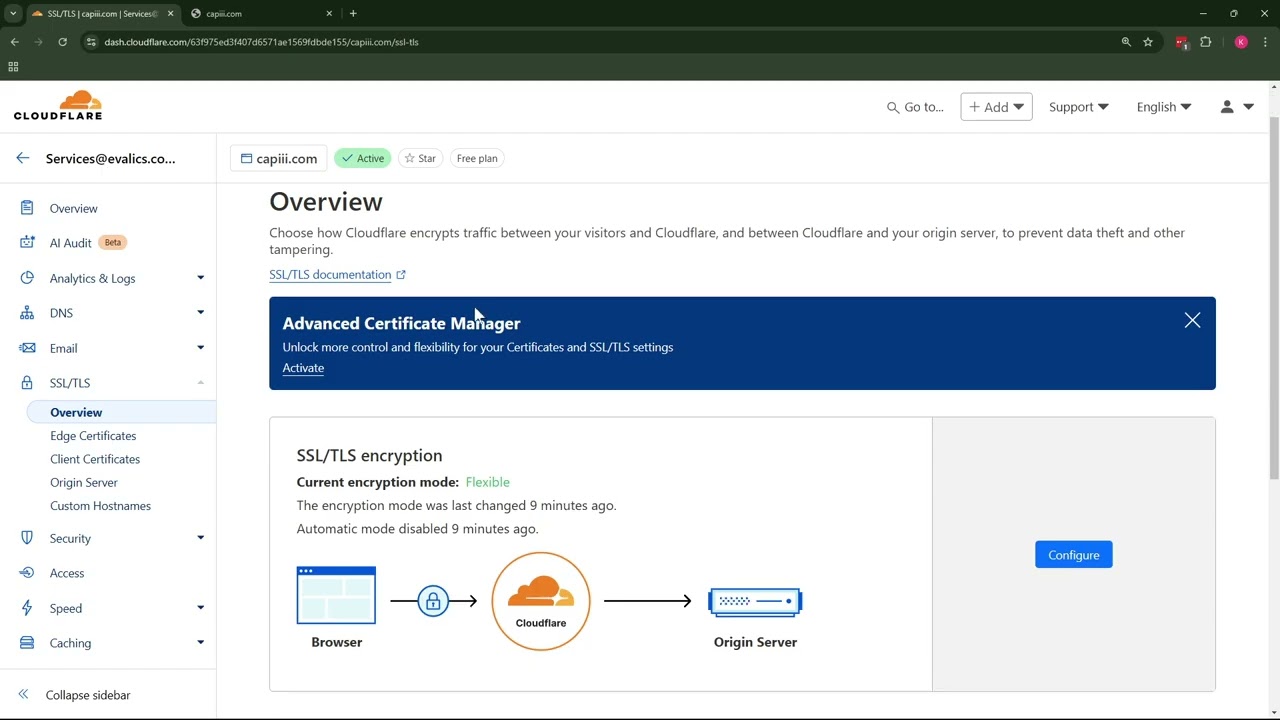
All right so in this video I want to show you how you can resolve this error stating redirected you too many times and this can appear when you use Cloud flare and another hosting provider like hostinger so this is when I got this error so I trans I added the site to Cloud
Flare and set up all the records and to fix this now you need to go to SSL and to overview and then it says encryption mode flexible and you need to change it to full and the reason for this error is that it basically redirects HTTP to https constantly so it's like a
Loop which is going on and yeah so you just need to select it to full and now if I refresh it works again so that's it hope it helped and see you around bye-bye
Watch on YouTube: https://www.youtube.com/watch?v=nSmk9t2zRJ8