Building a Self-Improving AI Agent in Langflow
Step-by-step follow-up on a Langflow agent that rewrites its own instructions. What worked, what got out of hand, and how to constrain loops.
Building a Self-Improving AI Agent in Langflow
Key takeaways
- A Langflow agent can rewrite parts of its own instructions from feedback.
- Self-improvement loops need constraints or they drift.
- Start simple, then add write-back and evaluation steps carefully.
Related guide
Agentic AI in n8n multi-agent workflowsFull transcriptShow
Edited from auto-captions for readability. Matches what is said in the video.
The agent can essentially decide its own instructions wait what's going on I'm not moving the mouse last time I showed you a simple self-improving AI agent at a high level but today we're actually going to build it step by step together so by the end of the video you'll also get the system
Prompt and even the flow file itself so you can simply drag and drop it into your own system so let's get started we'll be using langlow an open source low code AI builder for llm and agentic applications and the best part is you don't even need to sign up to start building you
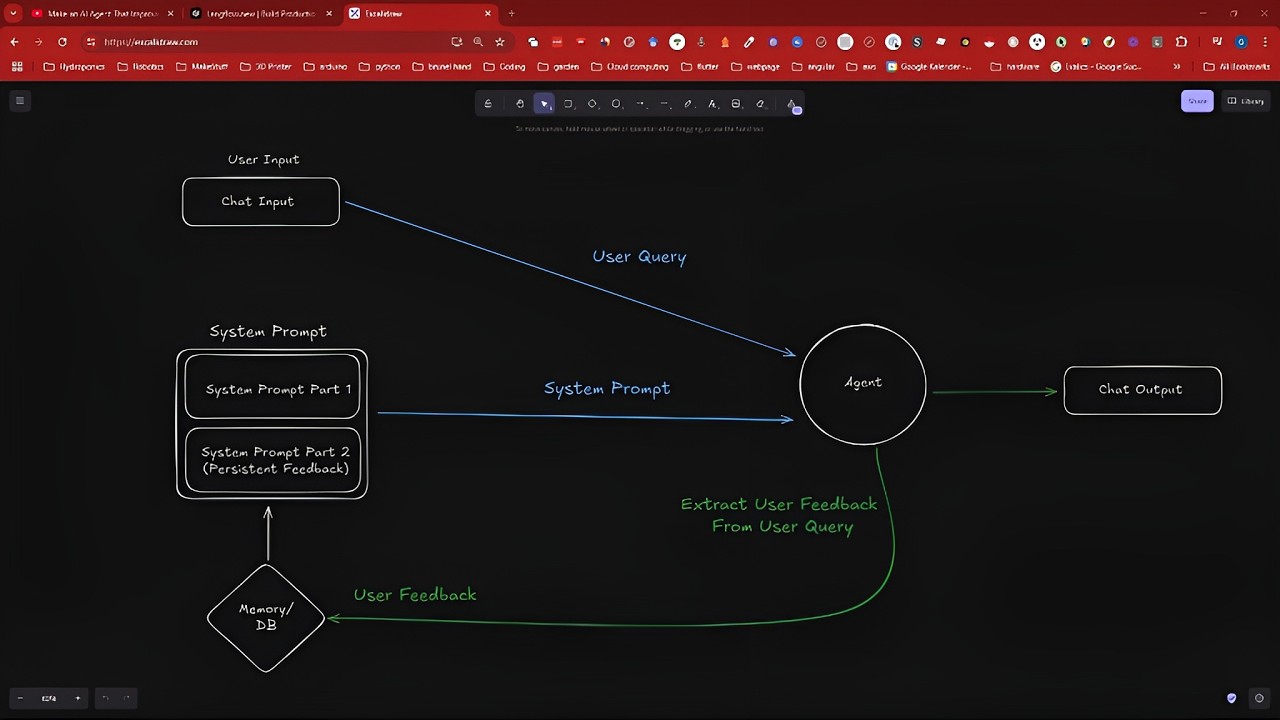
Can simply head over to langl flow. new instead of or and boom you're in and you can get started with building now before we get started I want to Simply outline how the flow works and how the agent works so first we simply make a request from the chat so basically make a
User query to the agent and so far so good usually the agent has a hardcoded system prompt and we would get an output however in our case the system prompt is dynamically created and passed to the agent so each time we make a query this sort of subflow runs so the system system
Prompt has two parts one static system prompt so this is the usual one and one which is retrieved from a database or memory and our agent itself is programmed to detect feedback in the user query and store it so basically we send a request we asked the agent to always answer in Haiku
Style the agent detects that this is user feedback which needs to be stored it uses tool calling to store it in our memory ODB and then the next time we make a query this information is retrieved from the database merged with our static system prompt and then passed forward to the agent so
Each time we make a query this retrieval system will be triggered and that's pretty much it so now let's build it in L flow all right first let's get rid of all this because we won't need it then the first component we will need is the agent so here we can leave it
As open AI I will already switch it to GPT 40 and we need to insert our API key now let's prepare the input an output of the chat next we're going to prepare our system prompt all right so quick update I'm now switching to the logged in version of langlow simply because I
Was getting this Auto safe message all the time so I guess the guys at langlow are still changing something so this is still in sort of preview if you don't use the open source repository so we will continue from here so here you can create a new flow we will create a blank
Flow and now let's just add all the components input boom boom prompt and the API ke all right now to the system prompt so I already prepared a system prompt so notice we have a static part and we have this placeholder variable so if you now press save you can see I now
Have this connection for my placeholder variable and this is the dynamic part part we're going to insert so where does this feedback come from exactly it comes from the storage component this is called message history which is Lang flows inmemory storage obviously if you want persistance you need to save the data to
A database or file which I demonstrated in my last video which I can link in the description there's no direct component for this so you'll need to create a custom component if you'd like a full video on this let me know in the comments below now let's first click on the component and
Go to controls next let's toggle on all the options so we can see them we need a specific setup for this I won't go into detail here so just trust me on this and follow me along next we need to retrieve the stored feedback for this we'll use the message store component as
Before We'll add the controls and fill out the necessary fields we'll also need to enable tool mode here which we can just toggle on and voila now we can connect the tool to the agent such that the agent can use it to store our feedback one very important thing is to change the
Description of your component so this is necessary for the agent to determine which tool to call now we just need to connect our system prompt in this case we connected to agent instructions which is basically the same thing as system prompt and now we're done so let's test our agent by opening the
Playground and we can ask the question we get an answer great now let's give some feedback now you already see we can look up what the agent has done and you see here it called the storage component and wrote this me message to the component now let's add additional feedback now let's open
A new chat to see whether the feedback is truly persistent and voila it works as intended if we close and reopen the playground you'll see that our common session was created here you can see what messages were stored in the past and what the current message is you can also check directly inside
The Flow by clicking on the outputs so here we can inspect the output of the message history and we can see the instructions it currently has in here I'm honestly astonished at how well this works in theory you can build and update the system prompt entirely through the agent meaning the agent can
Essentially decide its own instructions like isn't that amazing I mean like you can wait what's going on on I'm not moving the mouse this is this isn't me like what wait oh my God I need to unplug the [Music]
Watch on YouTube: https://www.youtube.com/watch?v=rWl1HG2PKv0