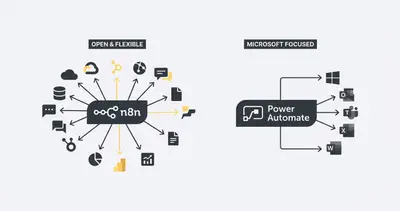
Choosing between n8n and Power Automate for your operations
Power Automate costs $15/user/month for the full plan vs n8n self-hosted at near-zero platform cost
IT managers and operations leads often find themselves at a crossroads when evaluating n8n vs Power Automate for their business process automation. While both platforms aim to streamline workflows, they serve fundamentally different architectural needs. n8n offers a vendor-independent, self-hostable approach that excels in complex, multi-stack environments, whereas Power Automate is built to serve as the native extension of the Microsoft 365 ecosystem. Understanding these core differences is essential for teams looking to balance technical flexibility with enterprise-grade compliance.
The final verdict on n8n vs Power Automate
It depends: choose n8n when you require total control over your data and infrastructure, but stick with Power Automate if your operations are strictly confined to the Microsoft stack. The financial difference is significant, as Power Automate costs $15/user/month for the full plan vs n8n self-hosted at near-zero platform cost. When evaluating n8n vs Power Automate, prioritize your long-term need for vendor independence against the immediate convenience of native Microsoft integration.
Why n8n is the choice for flexible, scalable automation
n8n is a powerful, open-source independent platform that allows IT teams to build complex workflows without being tied to a single vendor. Its primary strength lies in its ability to be self-hosted, which provides full data sovereignty and makes it highly cost-effective at scale. Because it works with any tech stack, it is the ideal choice for operations teams that need to bridge gaps between disparate SaaS tools, legacy databases, and custom APIs. However, it does require more technical oversight and maintenance compared to managed cloud services.
Why Power Automate remains a staple for Microsoft shops
Power Automate is the go-to solution for organizations already deeply invested in the Microsoft 365 ecosystem. Its greatest strength is its deep integration with SharePoint, Teams, and Outlook, combined with a familiar UI that makes it accessible for non-technical office users. It also comes with enterprise compliance and security features built-in, which simplifies governance for IT departments. The trade-off is that it can become expensive as you scale, and you may face significant limitations when trying to integrate with non-Microsoft tools or custom-built applications.
Matching your business needs to the right automation tool
If your team manages a diverse tech stack including AWS, custom SQL databases, and various third-party SaaS tools, n8n is the superior choice for building robust, vendor-agnostic automations. Conversely, if your primary goal is to automate document approvals within SharePoint or trigger notifications in Microsoft Teams, Power Automate provides a seamless, low-friction experience. Operations leads should choose n8n for high-volume, cross-platform data processing, while IT managers should lean toward Power Automate for internal administrative tasks that stay within the Microsoft perimeter.
Partner with Evalics to build your n8n workflows
If you have decided that n8n is the right path for your business, Evalics is here to help you implement it effectively. We specialize in building custom n8n workflows that integrate seamlessly with your existing Microsoft tools, ensuring you get the best of both worlds without the vendor lock-in. Contact Evalics today to schedule a free automation build consultation and see how we can optimize your operations.
Other tool comparisons
- n8n vs Workato: Enterprise Automation Cost and Strategy Guide
- n8n vs Activepieces: Which Open-Source Automation Tool Wins?
- n8n vs Make: A Technical Guide for Ops Teams | Evalics
Comparing other tools? Browse the full Automation Tool Comparisons directory.