You stare at your to-do list and see the same repetitive tasks that ate up your time last week: sorting emails, summarizing meeting notes, and copy-pasting data between spreadsheets. You know you should automate them.
But then the "analysis paralysis" sets in. You think automation requires a computer science degree, expensive software, or weeks of testing. So you push it off and go back to doing it manually.
The reality is different. With modern tools like n8n and AI models like GPT-4o or Claude 3.5 Sonnet, you can build powerful, intelligent workflows in less time than it takes to attend one of those meetings you're dreading.
n8n is particularly strong here because it offers a visual, node-based builder that is intuitive for beginners but flexible enough for pros. Unlike other platforms that might hide complexity behind expensive paywalls, n8n gives you full control.
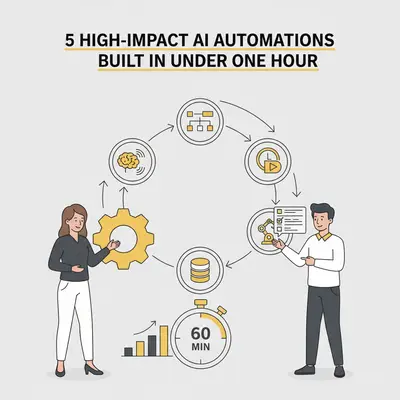
Here are five high-impact AI automations you can build in n8n right now. Each one takes under an hour to set up and solves a real business problem.
1. The "Zero-Effort" Meeting Actionizer
We spend hours in meetings, and often just as long trying to remember what was decided. Manual note-taking distracts you from the conversation, and automated transcripts are often too long to read.
This workflow takes a raw transcript (or audio file), summarizes it, extracts action items, and assigns them to the right people.
How It Works
- Trigger: A new file upload (Google Drive/Dropbox) or a Zoom recording completion.
- Processing: If it's audio, send it to an audio-to-text model (like OpenAI Whisper).
- AI Logic: Send the text to an LLM node (OpenAI or Anthropic) with a system prompt to "Summarize key points and extract a checklist of action items with owners."
- Action: Post the summary to a dedicated Slack channel or create tasks in Notion/Asana.
Quick Win: Don't have a Zoom plan that allows recording access via API? Just drag and drop your recording file into a "Watch Folder" on Google Drive to trigger the flow.
Why It Matters
You stop being the "secretary" of your own business. The AI doesn't just transcribe; it thinks about what needs to happen next.
Estimated Build Time: 45 Minutes
Most of your time will be spent tweaking the prompt to get the summary format exactly how you like it.
2. The Inbox Guard Dog (Smart Email Triage)
Your inbox is likely a mix of urgent client fires, newsletters you forgot you subscribed to, and cold outreach spam. Treating every email with equal attention is a productivity killer.
Standard email filters rely on keywords, which are brittle. An AI "Guard Dog" reads the intent of the email to sort it for you.
How It Works
- Trigger: Gmail/Outlook node triggers on "New Email."
- AI Logic: An LLM node analyzes the email body.
- Prompt: "Classify this email as: Urgent Client, Invoice/Admin, Newsletter, or Cold Spam. Return only the category name."
- Switch Node: Routes the workflow based on the category.
- Urgent Client: Send a push notification to your phone via Telegram/Slack.
- Invoice: Save attachment to Drive and label "To Pay."
- Spam: Label "AI-Spam" and archive.
- Newsletter: Label "Read Later" and skip inbox.
Pro Tip: Use a smaller, cheaper model like GPT-4o-mini for this. It's incredibly fast and costs pennies to classify thousands of emails.
Estimated Build Time: 40 Minutes
The setup is simple. The trickiest part is connecting your Gmail account and granting the right permissions.
3. The Content Multiplier Engine
Creating a blog post or YouTube video takes serious effort. Letting that content sit idle after one post is a waste. This automation turns one "pillar" piece of content into a week's worth of social media posts.
This is a classic example of where AI shines—reformatting existing ideas into new channels.
How It Works
- Trigger: A new row in Google Sheets (where you paste your blog URL) or an RSS feed update.
- Scraping (Optional): Use an "HTTP Request" node to fetch the text from the URL.
- AI Logic: The LLM node runs three parallel branches:
- Branch A: "Write a compelling LinkedIn post about this article using a professional tone."
- Branch B: "Write a thread of 5 tweets summarizing the key takeaways."
- Branch C: "Write a short, engaging email newsletter blurb linking to this."
- Action: Save these drafts back to your Google Sheet or draft them directly in your social media scheduling tool (like Buffer or Typefully).
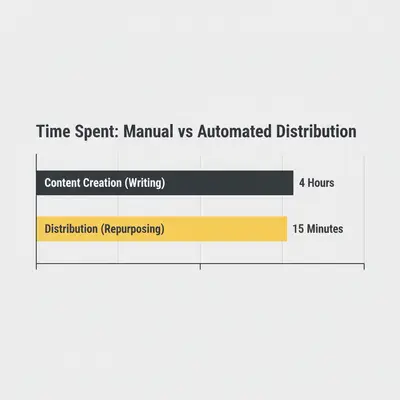
The Impact of Repurposing
Most businesses create content but fail to distribute it. By automating the "remixing" phase, you ensure every piece of content works 5x harder for you.
Estimated Build Time: 50 Minutes
You'll want to spend time testing different prompts to ensure the AI captures your brand voice correctly.
4. The 24/7 Lead Qualifier
Not all leads are created equal. If you treat a student looking for free advice the same as a Fortune 500 buyer, you're burning money. Speed to lead is critical, but only for the right leads.
This workflow qualifies leads instantly, 24/7, without you lifting a finger.
How It Works
- Trigger: A Typeform, JotForm, or website webhook submission.
- AI Logic: The AI analyzes the form answers (e.g., Company Size, Budget, Project Description).
- Prompt: "Analyze this lead. Score them from 1-10 based on [Your Criteria]. If score > 7, output 'High Priority'. If < 4, output 'Low Priority'. Explain why."
- Action:
- High Priority: Add to CRM (HubSpot/Pipedrive) and alert the Sales channel in Slack with an @channel tag.
- Low Priority: Add to a "Nurture" email sequence in your marketing tool.
Key Insight: This prevents your sales team (or you) from wasting energy on bad fits while ensuring hot leads get an immediate reaction.
Estimated Build Time: 55 Minutes
Connecting your CRM usually takes the most time here. The logic itself is straightforward.
5. The Receipt & Invoice Parser
Data entry is the lowest-leverage work a business owner can do. It's boring, prone to errors, and adds zero value to your product.
With the new "Vision" capabilities of AI models, you don't need expensive OCR software anymore.
How It Works
- Trigger: Email with attachment received (filter for subject "Receipt" or "Invoice").
- Processing: Download the attachment.
- AI Logic: Pass the image to a Vision-enabled model (like GPT-4o).
- Prompt: "Extract the Vendor Name, Date, Total Amount, and Tax Amount from this image. Return as JSON."
- Action: Add a new row to your "Expenses" Google Sheet or AirTable base.
Reality Check: Traditional OCR tools were clunky and expensive. AI Vision models are surprisingly accurate, even with crinkled receipts or weirdly formatted invoices.
Estimated Build Time: 30 Minutes
This is often the fastest build because the output (JSON) maps perfectly to a database or spreadsheet row.
Why n8n Instead of Zapier or Make?
You might be wondering why we're focusing on n8n for these specific tasks. While tools like Zapier and Make are fantastic, n8n offers a "fair-code" model that is particularly powerful for AI.
- Cost Control: AI workflows often involve many steps (loops, retries, branching logic). n8n's self-hosted version doesn't charge per execution step, meaning you don't get penalized for building complex, robust AI agents.
- Data Privacy: For sensitive workflows like the Lead Qualifier or Invoice Parser, running n8n on your own server means your data doesn't pass through a third-party automation cloud—only between you and the AI provider.
- Developer-Friendly: If you ever need to write a tiny snippet of Javascript to clean up data, n8n makes it incredibly easy.
Getting Started: The 60-Minute Challenge
Don't try to build all five of these at once. Pick the one that addresses your biggest pain point right now.
- Drowning in email? Build the Inbox Guard Dog.
- Hating data entry? Build the Receipt Parser.
- Dropping balls with clients? Build the Meeting Actionizer.
Block out one hour on your calendar this Friday. No distractions. Open n8n, connect your nodes, and ship it. The feeling of seeing that first automated task run successfully is addictive—and it's the first step toward reclaiming your time.
If you're unsure how to handle the prompting part of these workflows, check out our guide on Prompt Engineering Step-by-Step to ensure your AI nodes deliver reliable results every time.
Summary
Automation doesn't have to be a massive project. Quick wins build momentum.
- Meeting Actionizer: Turns talk into tasks.
- Inbox Guard Dog: Keeps your focus on what matters.
- Content Multiplier: squeezes more value from every creative hour.
- Lead Qualifier: Sorts the buyers from the browsers.
- Receipt Parser: Kills manual data entry forever.
Start with one. Build it today. Your future self will thank you.