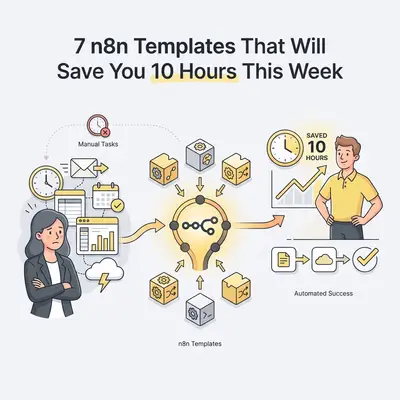
You spend two hours every Monday copying lead data from your inbox into your CRM. By Friday, another three hours vanish into formatting weekly performance reports.
Manual tasks drain your energy and steal time from actual growth. But you don't need to spend weeks building complex software to fix this. You just need the right workflow templates.
n8n is a powerful automation platform that lets you visually connect your apps. Because it allows you to copy and paste entire workflows using simple JSON text, setting up a new automation takes minutes instead of days.
Here are seven practical n8n templates you can implement this week to reclaim at least 10 hours of your time.
1. The AI-Powered Inbox Triager
Email management is a massive time sink. Most business owners manually read every message to decide if it is a support request, a sales lead, or spam.
This template uses AI to read incoming emails, categorize them, and route them to the correct department automatically.
The Workflow Nodes:
- Trigger: IMAP / Gmail Node (Listens for new emails)
- AI Agent: OpenAI / Anthropic Node (Reads the body and assigns a category)
- Switch Node: Routes the workflow based on the AI's category
- Action: Slack Node (Alerts the team) or Draft Reply Node
Quick Win: Set the AI to look for specific intent, like "billing issue" or "demo request." Have it automatically draft a response in your inbox so you only have to click send.
2. Automated Lead Routing to CRM
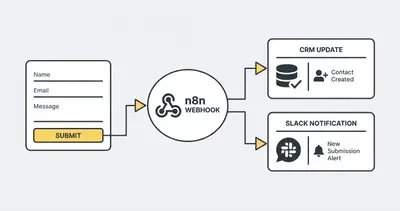
Speed to lead is critical. If a prospect fills out a form on your website, you need that data in your CRM and your sales team notified instantly.
Relying on daily manual exports means lost deals. This template captures form submissions in real time. For a deeper dive into optimizing this process, check out our guide on AI for lead generation workflows.
The Workflow Nodes:
- Trigger: Webhook Node (Catches data from your website form)
- Action: HubSpot / Pipedrive Node (Creates a new contact and deal)
- Action: Slack / Microsoft Teams Node (Sends a notification channel)
3. Failed Payment Follow-Up Sequence
Chasing down expired credit cards is frustrating and awkward. When a customer's payment fails, they need immediate notification to update their billing details before their service is interrupted.
This template eliminates the need for your finance team to manually email clients about declined charges.
The Workflow Nodes:
- Trigger: Stripe Node (Listens for 'invoice.payment_failed' events)
- Action: Customer Data lookup (Finds the customer's email)
- Action: Gmail / SendGrid Node (Sends a personalized recovery email with a payment link)
Reality Check: Do not send generic failed payment emails. Use n8n to pull the exact invoice amount and a direct Stripe payment link into the email body to reduce friction.
4. Daily Performance Report Aggregator
Pulling data from multiple platforms to create a daily or weekly report is tedious. You log into Google Analytics, your CRM, and your ads manager, then paste the numbers into a spreadsheet.
This template fetches your key metrics every morning and delivers a clean summary directly to your team's chat.
The Workflow Nodes:
- Trigger: Schedule Trigger (Runs every weekday at 8:00 AM)
- Action: Multiple API / App Nodes (Fetches data from Google Ads, CRM, Analytics)
- Action: Code Node / AI Node (Calculates totals or summarizes trends)
- Action: Slack Node (Posts the formatted report)
If your reports require complex math, read up on when to move from Google Sheets to a database to keep your reporting workflows stable.
5. New Client Onboarding Flow
Onboarding a new client requires multiple repetitive steps. You have to create a Google Drive folder, generate an invoice, send a welcome packet, and set up a project board.
Automating this sequence guarantees every client gets a premium, error-free experience immediately after signing.
The Workflow Nodes:
- Trigger: DocuSign / PandaDoc Node (Listens for a signed contract)
- Action: Google Drive Node (Creates a dedicated client folder)
- Action: ClickUp / Asana Node (Generates a project template)
- Action: Gmail Node (Sends the welcome email with folder links)
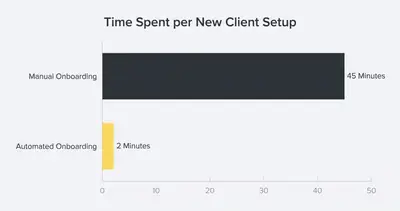
The time savings here are massive. For a complete breakdown, explore our automating client onboarding walkthrough.
6. Competitor Social Media Tracker
Keeping an eye on your competitors manually takes hours of scrolling. You can automate this intelligence gathering.
This template watches your competitors' social feeds or blogs, summarizes their new posts, and drops the insights into a database for your marketing team to review. Learn more about the mechanics in our guide on how AI tracks competitors in real time.
The Workflow Nodes:
- Trigger: RSS Feed Node / Twitter Node (Monitors specific accounts)
- Action: AI Agent Node (Summarizes the key points of the content)
- Action: Notion / Airtable Node (Logs the summary and URL)
Pro Tip: Set the workflow to run only once a day and compile the updates into a single digest. This prevents your database from getting cluttered with dozens of separate entries.
7. Cross-Platform Content Repurposing
Creating content takes time. Distributing it takes even more. When you publish a new blog post, you shouldn't have to manually format it for LinkedIn, Twitter, and your newsletter.
This template takes your long-form content and automatically drafts social media posts tailored to different platforms.
The Workflow Nodes:
- Trigger: RSS Feed Node (Triggers when a new blog is published)
- Action: OpenAI Node (Generates a Twitter thread and a LinkedIn post from the blog text)
- Action: Google Sheets / Airtable Node (Saves the drafts for your review)
Do not auto-publish AI-generated social posts directly. Always save them to a spreadsheet or draft folder so a human can review and approve them before they go live.
Ready to implement these workflows? Download your free n8n workflow starter pack or book a demo with Evalics to map out a custom automation strategy for your business.
Summary
Stop letting repetitive manual work dictate your schedule. By implementing these seven n8n templates, you can fundamentally change how your business operates.
- Triage and Route Data: Automate your inbox and lead routing to ensure no opportunity falls through the cracks.
- Eliminate Copy-Pasting: Use workflows to handle reporting and competitor tracking automatically.
- Standardize the Experience: Deploy automated onboarding and payment recovery to provide a flawless customer experience.
Start with just one template this week. Pick the process that causes you the most friction, copy the workflow, and watch your time come back.
Related Resources
- 5 High Impact AI Automations n8n Under One Hour
- The 10 Minute n8n Setup That Replaces a Full Time VA
- 7 Hidden n8n Features Save Time
- How to Improve n8n Workflow Performance Tips Faster Stable Flows
Official Sources
By Kevin Michael Schindler, AI Automation Expert at Evalics