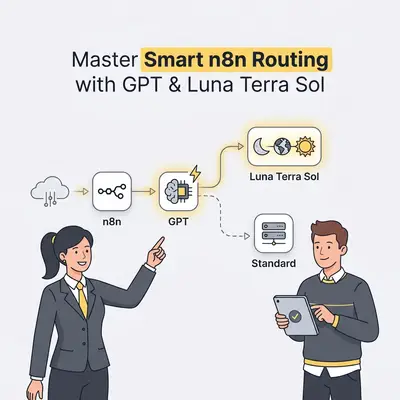
n8n model routing automatically sends incoming tasks to different AI models based on query complexity, domain requirements, or cost constraints. Instead of processing every request through a single expensive LLM, an n8n routing workflow uses a lightweight model or classifier node to evaluate the incoming prompt. The system then forwards the task to the most cost-effective tier—such as GPT-5.6 Luna for routine classification, Terra for everyday business tasks, or Sol for complex reasoning and advanced coding.
Understanding the GPT-5.6 Model Family
- GPT-5.6 Luna: OpenAI's most cost-efficient model, engineered for high-volume, simple tasks like document classification, text extraction, and basic customer support triage.
- GPT-5.6 Terra: A balanced model designed for everyday business operations, administrative workflows, content draft generation, and intermediate reasoning.
- GPT-5.6 Sol: OpenAI's flagship frontier model built for high-stakes tasks, including advanced software engineering, complex data analysis, and multi-step multi-agent orchestration. OpenAI reports that GPT-5.6 Sol scored 53.6 on Agents' Last Exam, a benchmark of long-running professional workflows across 55 fields. That figure comes from OpenAI's own launch post and has not been independently verified.
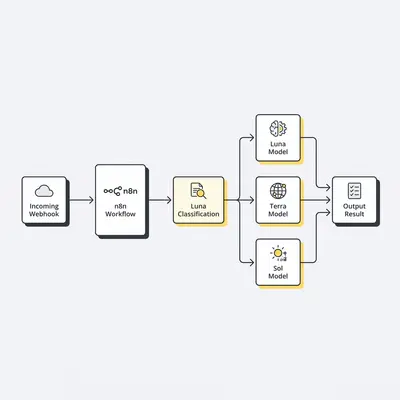
Step 1: How Do You Set Up the Initial Webhook Trigger in n8n?
To initiate dynamic routing, start by configuring a Webhook trigger node in n8n to accept incoming data requests from your business apps, web forms, or chat interfaces. This node provides a stable endpoint for your callers while capturing raw payload data.
- Add a Webhook node to your canvas and set the HTTP Method to
POST. - Set the Respond parameter to
Using Respond to Webhook Nodeso your workflow can send structured AI outputs back to the caller upon completion. - Copy the Test URL and trigger a sample payload containing a
user_promptfield to establish your baseline data structure.
Step 2: How Do You Build the Classification Prompt using GPT-5.6 Luna?
Use a low-cost model like GPT-5.6 Luna to evaluate the incoming prompt and assign it a category without incurring high token fees. The primary classifier evaluates intent rather than generating full responses.
- Add an OpenAI Chat Model node connected to a basic chain or HTTP Request node.
- Set the model to
gpt-5.6-luna. - Configure the system prompt to return JSON classifying the input into one of three predefined categories:
simple,standard, orcomplex.
Pro Tip: Keep your classifier system prompt tightly scoped. Force the classification step to analyze only the structure and intent of the prompt rather than solving the underlying task.
Step 3: How Do You Standardize Outputs with a Structured Parser?
To ensure your workflow routes accurately, enforce a strict JSON schema on your classification step using n8n's Structured Output Parser. This guarantees the model output matches your exact key names and expected strings.
- Attach a Structured Output Parser node to your classifier node.
- Define an output schema requiring a key named
task_categorywith values constrained strictly tosimple,standard, orcomplex. - Enable auto-fixing options to automatically re-prompt the classifier if invalid JSON is produced.
Step 4: How Do You Configure the n8n Switch Node for Model Selection?
The Switch node acts as the traffic controller, directing execution down specific branches based on the classifier's output. Mapping these values explicitly prevents execution failures down the line.
- Add a Switch node in Rules Mode directly after your parser.
- Add Rule 1: Output branch
0if{{ $json.task_category }}equalssimple. - Add Rule 2: Output branch
1if{{ $json.task_category }}equalsstandard. - Add Rule 3: Output branch
2if{{ $json.task_category }}equalscomplex.
Step 5: How Do You Connect Each Routing Branch to Luna, Terra, and Sol?
Connect each output pin of the Switch node to an OpenAI Chat node tailored for that specific complexity level. Matching task requirements to model tiers keeps processing fast and token spend predictable.
- Connect Output 0 (simple) to an OpenAI node configured with
gpt-5.6-lunafor fast, budget-friendly handling. - Connect Output 1 (standard) to an OpenAI node set to
gpt-5.6-terrafor balanced everyday task processing. - Connect Output 2 (complex) to an OpenAI node set to
gpt-5.6-sol(with reasoning set to high or max) to tackle intensive analysis or coding tasks.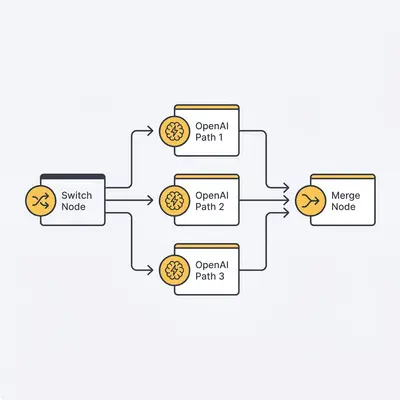
Step 6: How Do You Consolidate Responses with a Merge Node?
After the selected model processes the request, unify the execution pathways into a single pipeline to streamline post-processing. A single downstream path simplifies data formatting and error handling.
- Add a Merge node to the canvas.
- Set the Merge Mode to Choose Branch or Pass Through.
- Connect the output of the Luna, Terra, and Sol execution nodes into the incoming input pins of the Merge node.
Step 7: How Do You Deliver the Final Response Back to Your Application?
Finish the workflow by returning the generated response to the original caller via a webhook response node. This closes the asynchronous HTTP connection cleanly.
- Add a Respond to Webhook node following the Merge node.
- Set the Response Body to JSON and map the result field:
{{ $json.message.content }}. - Save and activate your n8n workflow to begin handling live dynamic model routing.
Quick Win: Set your Webhook node to include execution IDs in the return payload during initial deployment. This lets you correlate downstream client logs directly with n8n execution histories.
Below is a production-ready JSON schema snippet for your n8n Structured Output Parser node. You can paste this directly into your workflow configuration to guarantee standard routing outputs:
{
  "$schema": "http://json-schema.org/draft-07/schema#",
  "title": "ModelRoutingSchema",
  "type": "object",
  "properties": {
    "task_category": {
      "type": "string",
      "enum": ["simple", "standard", "complex"],
      "description": "The category of task based on reasoning overhead. Simple: simple lookups, formatting, basic classification. Standard: summarizing text, writing emails, standard logic. Complex: multi-step math, code generation, detailed research."
    },
    "reasoning_summary": {
      "type": "string",
      "description": "A brief, single-sentence justification for the chosen classification category."
    }
  },
  "required": ["task_category", "reasoning_summary"],
  "additionalProperties": false
}
What Are Common Pitfalls in n8n AI Model Routing?
- Classification Overhead: Using a model that is too large to classify simple tasks can negate the cost savings of dynamic routing. Keep the classifier prompt concise and leverage GPT-5.6 Luna.
- Unstructured Classifier Responses: If the classifier output isn't strictly validated, string mismatches (e.g., "Simple" vs "simple") will cause the Switch node to fail or fall through.
- Missing Fallback Branches: Failing to define a default route in your Switch node can lock up executions if a query falls outside expected categories. Always send unrecognized inputs to a balanced tier like GPT-5.6 Terra.
Reality Check: Routing every prompt through an evaluation node adds a few hundred milliseconds of latency to every request. Ensure your business use case values cost control and performance over minimal latency before adding complex classification steps.
Implementation Checklist for Dynamic n8n Routing
- Webhook trigger configured with POST method and raw payload capture.
- Classification system prompt optimized for concise JSON output.
- Structured Output Parser attached and schema validated.
- Switch node configured with explicit routing rules for simple, standard, and complex paths.
- API keys and model parameters assigned for GPT-5.6 Luna, Terra, and Sol nodes.
- Fallback path defined on the Switch node for unclassified edge cases.
- Merge node integrated to combine model outputs before payload delivery.
- Respond to Webhook node configured to close the asynchronous HTTP loop.
To expand your routing setup, review our breakdown of the n8n Switch node or learn how to handle scale with our n8n queue mode guide. The same pattern works with any provider's model tiers, so you can swap in newer models without rebuilding the workflow. Test your workflow with edge-case prompts to ensure all fallback branches route predictably under load.
Sources
- GPT-5.6 - OpenAI
- GPT-5.6 Benchmark Review: Sol, Terra, and Luna Across 12 Benchmarks - LayerLens