Your development team probably uses a mix of AI tools. They have GitHub Copilot for autocomplete. They use ChatGPT Plus for brainstorming. They hit various APIs for internal automation tools.
You pay for all of it. But your team still spends hours fixing broken AI-generated code.
Most LLMs suffer from a fatal flaw in software development: they get lazy. They write half a function, leave comments like // implement logic here, and forget your system architecture three prompts later.
Claude 4.6 Sonnet fixes this.
Anthropic built this specific model tier to handle deep reasoning and heavy coding tasks. It blends high speed with low cost, completely outperforming heavier models. If you want to simplify your tech stack and cut software costs, Claude 4.6 Sonnet is the only LLM your developers actually need.
Here is exactly why this model dominates the development workflow.
The End of "Lazy Code"
If you use AI to write code, you know the frustration of lazy outputs. You ask a model to update a complex React component. It gives you the first ten lines, skips the middle, and writes the last five lines.
You have to manually stitch the file together. One mistake breaks the entire application.
Claude 4.6 Sonnet does not do this. It writes complete, syntactically correct files. It provides the exact code you need to copy, paste, and run.
Reality Check: You don't save time if your developers spend 45 minutes debugging the code an AI wrote in 10 seconds. You need a model that writes production-ready code on the first try.
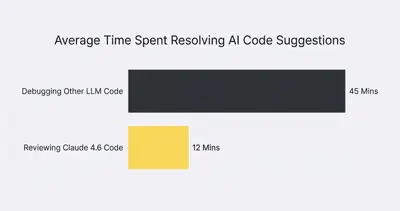
When AI gives you complete code blocks, your workflow changes. Developers transition from "AI debuggers" back to "software engineers." They review the logic, approve the structure, and push to production faster.
The Massive 1M+ Context Window
Code does not exist in a vacuum. A single function change might impact five different files across your database, frontend, and backend APIs.
Traditional LLMs fail here. Their context windows (their active memory) are too small. If you paste your entire database schema and three routing files into ChatGPT, it often forgets the first file by the time it reaches the third. You can read more about this in our guide on how token limits and context size affect AI automation costs.
Claude 4.6 Sonnet boasts a massive context window with near-perfect recall.
You can drop your entire codebase documentation, your API schemas, and your styling guidelines into a single prompt. Claude will read it all, understand how the pieces connect, and write code that respects your global architecture.
Why Perfect Recall Matters
- Fewer Hallucinations: Claude relies on your actual code, not its training data. It will not invent libraries or reference outdated syntax.
- Contextual Debugging: Paste an error log alongside your repository files. Claude cross-references the error with your code to find the exact line causing the crash.
- Faster Onboarding: Feed your entire codebase to Claude and ask it to explain the architecture to a new junior developer. It acts as an instant, interactive wiki.
For a deeper dive into how this specific feature changes the game, check out our breakdown of what Claude Sonnet's 1M context window means for AI automation.
Agentic Capabilities and MCP
You don't want your developers constantly switching tabs between their code editor and a web browser. Context switching destroys focus.
Claude 4.6 Sonnet shines through its agentic integrations. Specifically, Anthropic champions the Model Context Protocol (MCP).
MCP is an open standard that allows AI models to securely connect to your local environment. Instead of developers copying and pasting files into a chat window, Claude can read your active workspace directly.
Key Insight: MCP turns Claude from a passive chatbot into an active team member. It can read your GitHub issues, check your local database schema, and propose code changes directly in your terminal.
With tools like the Claude Code CLI agent, developers stay in their terminal. They type a command, and Claude analyzes the local files, runs tests, and fixes bugs autonomously.
This level of integration makes standard autocomplete tools look prehistoric. If you want to understand this protocol better, read our plain English guide to MCP for business.
Cost vs. Performance Trade-offs
More intelligence usually costs more money. Anthropic flipped this script with the Sonnet tier.
In the AI world, you typically have three tiers:
- Fast/Cheap: Great for simple text, bad at logic.
- Balanced (Sonnet): Fast, affordable, highly capable.
- Heavy (Opus): Slow, expensive, designed for massive academic problems.
Claude 4.6 Sonnet operates in the balanced tier, but its coding capabilities match or exceed the heaviest models on the market.
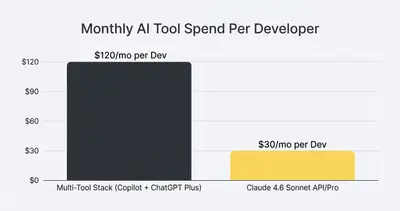
You do not need to pay the premium for Claude Opus or the most expensive OpenAI models for daily development. Sonnet handles 99% of coding tasks at a fraction of the cost and twice the speed. You can see how this compares in our Claude Opus vs GPT-5.2 reasoning cost and automation tradeoffs analysis.
Real-World Developer Workflows
How does Claude 4.6 Sonnet actually change a developer's day? Let's look at three practical scenarios.
Scenario 1: Legacy Code Refactoring
You have a five-year-old Python script that no one on your current team wrote. It's slow, poorly documented, and needs to be updated to a modern framework.
The Old Way: A developer spends three days reading the code, tracing variables, and rewriting the logic line by line. They break things multiple times. The Claude Way: You feed the entire script into Claude. You prompt: "Analyze this script. Rewrite it using modern Python 3.12 standards, add error handling, and output the full complete file." Claude finishes the job in two minutes. The developer reviews and tests it in one hour.
Scenario 2: Building API Integrations
Your team needs to connect your CRM to a custom internal dashboard. They need to read the API documentation, authenticate, and map the data fields.
The Old Way: Developers hunt through outdated API docs. They write custom scripts to handle authentication tokens. They manually map 50 different JSON fields. The Claude Way: You provide the API documentation link and your database schema to Claude. Claude writes the exact integration script, handles the authentication logic, and maps the fields perfectly.
Quick Win: If your team builds a lot of integrations, you might not even need custom code. Pair Claude with a visual workflow builder. Learn how n8n webhooks save time over custom API integrations.
Scenario 3: Automated QA and Testing
Developers hate writing unit tests. It is repetitive and tedious.
The Old Way: Developers skip writing tests to save time, leading to bugs in production. The Claude Way: Developers use Claude to generate comprehensive test suites. Because Claude can read the entire application context, it writes tests that check edge cases your team didn't even consider.
Superior System Prompt Adherence
When building AI automations or coding assistants, you give the AI a "System Prompt." This is a set of hard rules the AI must follow.
Many models suffer from "jailbreaks" or prompt drift. A user asks the AI to ignore its instructions, and the AI complies. This breaks your automated workflows.
Claude 4.6 Sonnet is remarkably disciplined. It adheres to system prompts strictly. If you tell Claude it is a secure coding assistant that must never output raw database credentials, it will refuse user requests that violate that rule.
This makes Claude incredibly reliable for production environments. When you build tools for your team, you need them to behave predictably. We tested this exact behavior extensively. Read the results in our guide on why AI models enforce system prompts differently.
When to Still Use Other Models
Is Claude 4.6 Sonnet perfect for everything? No. Here is when you should look elsewhere:
- Google Workspace Deep Hooks: If your entire business runs on Google Docs, Sheets, and Drive, Gemini integrates natively without complex API setups. It has home-field advantage there.
- Voice and Real-time Audio: If you are building a voice-to-voice application, OpenAI's models currently offer better native audio capabilities.
- Simple, High-Volume Text Scraping: If you just need to extract names from millions of emails, Sonnet is overkill. Use a cheaper, faster model like GPT-4o-mini to save money.
But for writing code, debugging software, and understanding complex system architecture? Claude wins.
Consolidate Your Tech Stack
Software subscriptions add up quickly. Paying for GitHub Copilot, ChatGPT Plus, and various other AI coding assistants wastes money. It also scatters your team's workflows across different interfaces.
By standardizing on Claude 4.6 Sonnet—whether through the Claude web interface, the API, or the Claude Code CLI—you streamline your development process. Your team gets a model that remembers their code, writes complete functions, and connects directly to their local environments.
Stop paying developers to debug lazy AI code. Give them the tool that does it right the first time.
Related Resources
- Claude Sonnet 4.6 1M Context Window: What It Means for AI Automation
- Introduction to Claude Code Agentic CLI Tool
- What is MCP (Model Context Protocol)? A Plain English Guide
- ChatGPT vs Claude for Automation: When Prompts Break