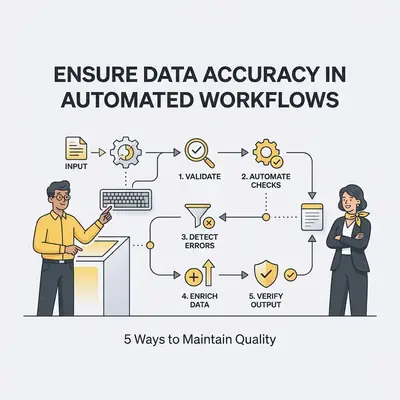
Data accuracy in automated workflows is the practice of ensuring that information flowing between your business applications remains consistent, correct, and reliable. When your systems share high-quality data, your automations function as intended. When they share "dirty" data, your workflows propagate errors at scale, leading to lost revenue and poor customer experiences.
Bad data does not stay in one place. A wrong email address, a duplicate record, or an inconsistent phone format propagates through every automation downstream of it, and someone has to unpick each consequence by hand. For a small business, that is the difference between scaling smoothly and drowning in manual fixes.
Why is Data Accuracy Critical for Small Business Automation?
Data accuracy is the foundation of reliable automation. Without it, your systems will propagate errors at scale, leading to lost revenue, poor customer experiences, and wasted time. When automated workflows ingest incorrect data, they trigger faulty actions, turning a time-saving tool into a source of operational chaos for your business. (small business support)
Key Insight: Automation does not fix bad data; it only accelerates the speed at which bad data impacts your business.
How Should You Implement Strict Input Validation?
Input validation acts as a digital gatekeeper, ensuring that only correctly formatted data enters your automated workflows. By setting rules for fields like email addresses, phone numbers, and dates at the point of entry, you prevent downstream errors that would otherwise require manual intervention to fix later in the process. (AI efficiency)
- Pros: Eliminates "garbage in, garbage out" scenarios and reduces workflow crashes.
- Cons: Can create friction for users if validation rules are too rigid or poorly explained.
How Do You Standardize Data Formats Across Platforms?
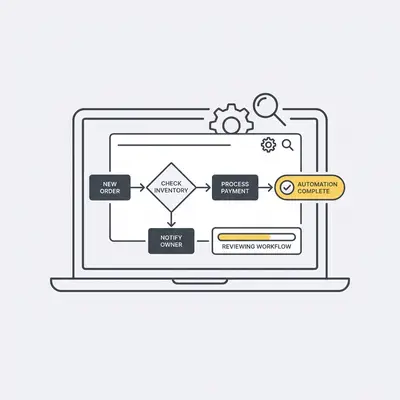
Standardization involves mapping data from different sources into a uniform format before it reaches your automation engine. Whether you are syncing a CRM with an accounting tool or an email platform, normalizing fields like currency, date formats, and naming conventions ensures that your systems "speak the same language" consistently. (Automate Client Onboarding)
- Pros: Enables seamless integration between disparate software and improves reporting accuracy.
- Cons: Requires initial setup time to map fields correctly across all integrated apps.
![_ [GRAPH] Flowchart. Source A (CRM) -> Normalization Layer -> Source B (Accounting). Chart title: The Normalization Layer at top. Alt text: Diagram showing data flowing from multiple sources into a normalization layer before reaching the automation engine](/blogs/ensure_data_accuracy/-graph-flowchart-source-a-crm-normalization-layer-400w.webp)
What Role Do Automated Data Cleansing Tools Play?
Automated cleansing tools periodically scan your databases to identify and resolve duplicates, outdated entries, or incomplete records. By running these scripts on a schedule, you maintain a "single source of truth," ensuring that your automated marketing or billing workflows are always acting on the most current and accurate information available.
- Pros: Keeps databases lean and efficient while preventing duplicate customer communications.
- Cons: Requires choosing the right tool that integrates well with your existing tech stack.
Pro Tip: Schedule your data cleansing runs during off-peak hours to ensure your system performance remains optimal during business hours.
How Can You Use Error-Handling Workflows to Catch Discrepancies?
Error-handling workflows are secondary automations designed to trigger alerts when a primary workflow fails or encounters unexpected data. Instead of letting a process fail silently, these workflows notify you immediately, allowing you to intervene, correct the data, and resume the process without losing critical business momentum.
- Pros: Provides peace of mind and minimizes the impact of inevitable data anomalies.
- Cons: Requires building additional "safety net" workflows for every critical process.
Reality Check: No automation is 100% error-proof. Building a "failure path" is just as important as building the "success path."
Why Is Regular Audit and Maintenance Essential?
Regular audits involve reviewing your automated workflows and the data they process to ensure they are still performing as intended. As your business grows and your software updates, workflows can drift. Periodic check-ins allow you to recalibrate your automation logic and verify that your data integrity standards are still being met.
- Pros: Identifies hidden inefficiencies and ensures long-term scalability of your automation strategy.
- Cons: Demands a recurring time commitment from your team or an external partner.
Quick Win: Need help auditing your current workflows? Contact the Evalics team today for a comprehensive automation health check.
Practical Next Steps
To start improving your data accuracy today, follow these three steps:
- Audit your entry points: Identify where data enters your system (web forms, manual entry, imports) and add validation rules to those specific fields.
- Map your data flow: Create a simple document listing every field that moves between your apps (e.g., "First Name" in CRM must match "First Name" in Email Tool).
- Set a recurring audit: Add a calendar reminder for the first Monday of every quarter to review your top three most critical automated workflows for errors.